

Unlock my PDF: PDF Password
Giulio Palumbo Schiavone Utilities iPhoneiPadiPod touch
Unlock my PDF: PDF Password is a free Utilities app for iPhone and iPad by Giulio Palumbo Schiavone. Rated 5.0/5 from 1 ratings. Requires iOS 16.0.
- Rating
- 5.0
- 1 ratings
- Price
- Free
- on the App Store
- Size
- 17 MB
- Age 4+
- Updated
- Oct 16
- 2026 · v2.0.3
Screenshots


About Unlock my PDF: PDF Password
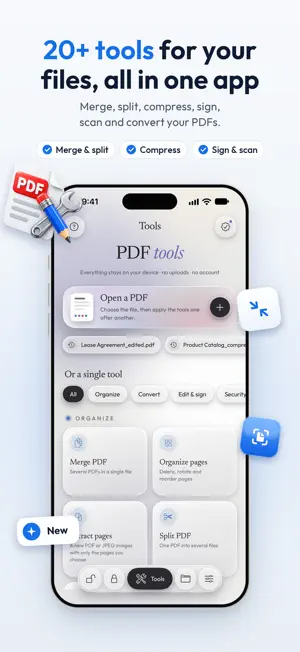
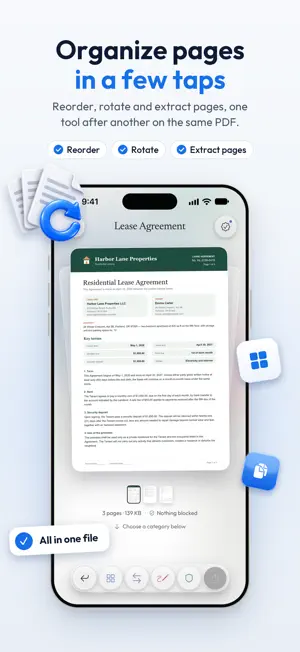
Unlock your PDFs with the password you know, protect them with a new one, and get 20+ PDF tools to merge, compress, sign and scan. Everything runs on your iPhone or iPad: no uploads, no account. UNLOCK AND PROTECT • Unlock: enter the password you know and save a copy without it • Protect: add a password with AES encryption before you share a file • Save your passwords with Face ID and try all saved passwords in one tap (Premium) • Unlock or protect several PDFs at once (Premium) 20+ PDF TOOLS • Merge PDFs, split them, extract pages • Organize pages: reorder, rotate, delete; crop margins • Compress PDFs for email and uploads, even under an exact size (Premium) • Photos to PDF; scan paper documents to PDF • PDF to images (JPG or PNG) and PDF to text • Sign with your finger, fill in forms, add text or images • Watermark, page numbers, redact, permissions, remove metadata, flatten and OCR (Premium) • Open a PDF and apply several tools one after another to the same file (Premium) OPEN YOUR PDF FROM ANYWHERE • Files: iCloud Drive, Dropbox, OneDrive and other apps connected to Files • A document you scan with the camera, your Photos, or the Library (Premium) • From Mail or another app: tap Share, then Unlock my PDF PRIVATE BY DESIGN Your PDFs are processed on your device with Apple technologies. Nothing is uploaded, there's no account, and results never get a watermark. ONLY PASSWORDS YOU KNOW To unlock a PDF you need to know its password: the app removes it only when you type it or pick one you saved yourself. It is not a password recovery tool, and PDFs whose password you don't know stay closed. FREE AND PREMIUM • Free: 3 unlocks and 3 protections every day, plus one base tool a day after a short video • Premium: unlimited unlocks, protections and tools, the Library, saved passwords, Shortcuts actions, no ads • The yearly plan starts with a 3-day free trial for new subscribers. Manage or cancel anytime in your App Store settings. Terms of Use (EULA): https://www.apple.com/legal/internet-services/itunes/dev/stdeula/ Privacy Policy: https://unlockmypdf.app/privacy/
What’s new
Version 2.0.3 · Updated October 16, 2026
In "Organize pages" you can now save the PDF even when you only remove the last pages. A smoother app, improvements and small fixes. Guides and support are on the new site, unlockmypdf.app.
App privacy
The developer, Giulio Palumbo Schiavone, reported these privacy practices to Apple.
Data Used to Track You
The following data may be used to track you across apps and websites owned by other companies:
- Location: Coarse Location
- Identifiers: Device ID
- Usage Data: Product Interaction, Advertising Data
- Diagnostics: Crash Data, Performance Data
Data Linked to You
The following data, which may be collected and linked to your identity, may be used for the following purposes:
- Location: Coarse Location
- Identifiers: Device ID
- Usage Data: Product Interaction, Advertising Data
- Diagnostics: Crash Data, Performance Data
Used for: Third-Party Advertising, Analytics, App Functionality
Alternatives to Unlock my PDF: PDF Password
Looking for apps like Unlock my PDF: PDF Password? Here are 6 similar apps on the App Store. The highest rated is PDF Password Tool (5.0/5), and all 6 are free to download.
-
 PDF Password Tool
5.0
PDF Password Tool
5.0
-
 Unlock PDF – Password Remover
-
 PDFUnlock: Add/Remove password
-
 PDF Unlocker Pro
-
 Lock Pdf & Unlock PDF Offline
-
 PDF Secure
4.8
PDF Secure
4.8
| App | Rating | Price | Last updated | Compare |
|---|---|---|---|---|
| Unlock my PDF: PDF Password | 5.0 / 5 (1 rating) | Free | October 16, 2026 | |
| PDF Password Tool | 5.0 / 5 (1) | Free | Oct 19, 2026 | Compare |
| Unlock PDF – Password Remover | – | Free | Oct 16, 2026 | Compare |
| PDFUnlock: Add/Remove password | – | Free | Jun 10, 2026 | Compare |
| PDF Unlocker Pro | – | Free | Sep 26, 2025 | Compare |
| Lock Pdf & Unlock PDF Offline | – | Free | Apr 19, 2025 | Compare |
| PDF Secure | 4.8 / 5 (383) | Free | Oct 2, 2024 | Compare |