

Tempi - Metronome and Tuner
Rue Music iPhoneiPadiPod touch
Tempi - Metronome and Tuner is a free Music app for iPhone and iPad by Rue. Requires iOS 15.1. Updated September 11, 2026.
- Price
- Free
- on the App Store
- Size
- 38 MB
- Age 4+
- Updated
- Sep 11
- 2026 · v1.1.0
Screenshots
About Tempi - Metronome and Tuner
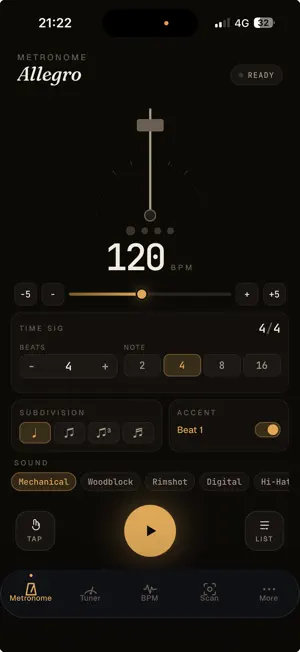
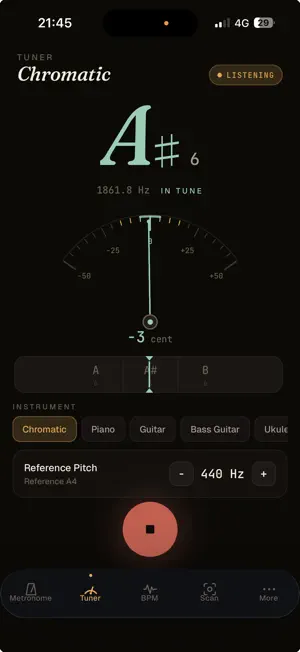
Practice in time. Always in tune. Tempi combines a pro-grade metronome and a chromatic tuner in a single, elegant dark app — built for daily practice sessions on piano, guitar, strings, woodwinds and brass. METRONOME • Drift-corrected scheduling for rock-solid timing (40–220 BPM) • Time signatures from 2/4 to 12/8, including 3/8, 5/8, 7/8 • Tap tempo to find the BPM of any song • Distinct accent on the downbeat • Visual pendulum + beat indicators — read the tempo without looking at numbers • Haptic feedback on supported devices • Presets and Setlist mode to switch quickly between pieces TUNER • Chromatic — every note from any instrument • Accurate to ±1 cent • Live frequency in Hz, note name, octave • Color feedback: mint when you're in tune, amber when you're close, red when you're off • Customizable reference pitch (A4 = 420–460 Hz) • Instrument modes: Guitar, Bass, Ukulele, Strings, Brass & Woodwinds DESIGNED FOR FOCUS • Studio-dark interface that disappears in low-light practice rooms • Large, glanceable hero visuals • Zero ads. No tracking. No upsells in the way of practicing. For pianists, guitarists, string players, and anyone who takes practice seriously.
What’s new
Version 1.1.0 · Updated September 11, 2026
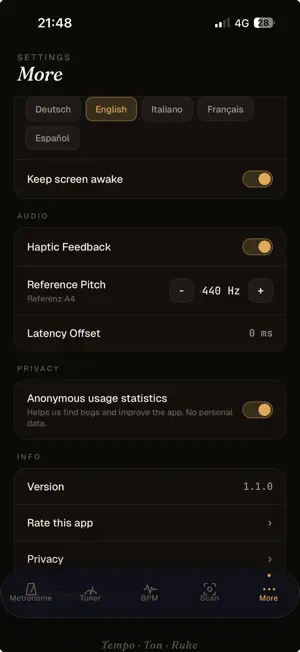
An important bug is fixed The metronome could keep ticking after you pressed stop — especially if you had locked the screen or received a notification while it was running. On restarting, you would sometimes hear a doubled click. Both are fixed: stop now stops instantly, and every restart sounds clean. Your settings are remembered Language, reference pitch, haptic feedback and the keep-screen-awake option are now saved. If you tune to 442 Hz, you only need to set it once. New: privacy settings Tempi now collects anonymous usage statistics so we can find bugs faster and see which features are genuinely used. No personal data is collected, and your audio still never leaves your device. You can switch this off at any time under "More → Privacy". You will also find direct links to the privacy policy and to support there.
App privacy
The developer, Rue, reported these privacy practices to Apple.
Data Not Linked to You
The following data, which may be collected but is not linked to your identity, may be used for the following purposes:
- Location: Coarse Location
- Identifiers: Device ID
- Usage Data: Product Interaction
- Diagnostics: Other Diagnostic Data, Crash Data, Performance Data
Used for: Analytics, App Functionality
Alternatives to Tempi - Metronome and Tuner
Looking for apps like Tempi - Metronome and Tuner? Here are 6 similar apps on the App Store. The highest rated is ARPJAM Player (5.0/5), and 5 of the 6 are free to download.




| App | Rating | Price | Last updated | Compare |
|---|---|---|---|---|
| Tempi - Metronome and Tuner | – | Free | September 11, 2026 | |
| Familiar Player | – | Free | Oct 26, 2026 | Compare |
| Sonic Player | – | Free | Aug 12, 2026 | Compare |
| Longwave Ambience | – | Free | Jun 4, 2026 | Compare |
| ARPJAM Player | 5.0 / 5 (1) | Free | Oct 27, 2026 | Compare |
| Nyquist Player | 4.0 / 5 (1) | Free | Sep 21, 2026 | Compare |
| GPS Tunes | – | 2.99 USD | Sep 8, 2026 | Compare |