

LiDARVisionPro
Sui Fai Law Utilities iPhoneiPadiPod touch
LiDARVisionPro is a free Utilities app for iPhone and iPad by Sui Fai Law. Requires iOS 17.0. Updated September 15, 2026.
- Price
- Free
- on the App Store
- Size
- 6 MB
- Age 4+
- Updated
- Sep 15
- 2026 · v1.7
Screenshots
About LiDARVisionPro
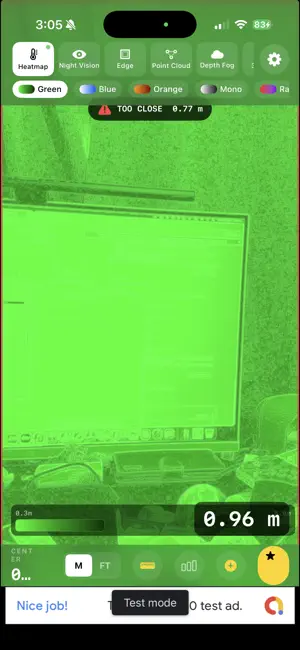
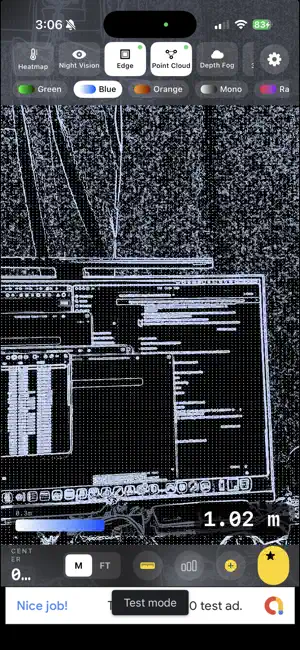
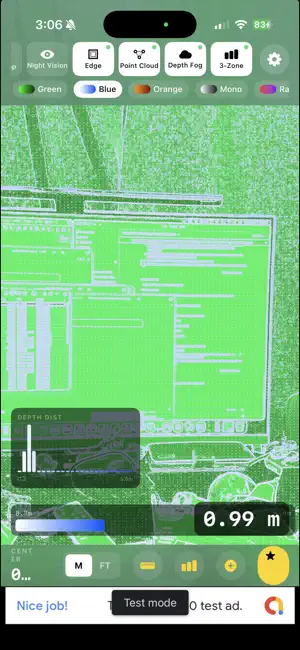
LiDARVisionPro transforms your iPhone's LiDAR sensor into a powerful real-time depth visualization tool. See the three-dimensional structure of the world around you through six stunning rendering modes -- all running live at full frame rate. VISUALIZATION MODES - Heatmap: Classic thermal-style depth coloring from near to far - Night Vision: Low-light phosphor look that reveals depth in darkness - Edge Detection: Highlights surface boundaries and object outlines - Point Cloud: Interactive 3D point cloud rendered in real time - Depth Fog: Atmospheric fog effect that fades with distance - 3-Zone Tricolor: Divides the scene into near, mid, and far depth bands MULTI-MODE OVERLAY Activate multiple visualization modes at the same time. Layer edge detection over a heatmap, combine point cloud with night vision, or create your own custom blend. Modes composite in a carefully tuned order for clean, readable results. CAMERA-GUIDED ENHANCEMENT LiDARVisionPro uses a technique called joint bilateral upsampling that combines camera image data with the LiDAR depth map. The result is sharper depth boundaries that follow real object edges and added surface texture detail -- far beyond what raw LiDAR data provides on its own. COLOR THEMES Choose from six color themes to change the look of every visualization mode: - Green (classic phosphor) - Blue - Orange - Mono (grayscale) - Rainbow - Purple Each theme applies a custom near-to-far color gradient across all 2D modes. MEASUREMENT TOOLS A live depth readout displays the distance to the center of the scene in real time. Switch between metres and feet in settings. A color scale bar shows the mapping from color to depth so you always know what you are looking at. Adjust the minimum and maximum depth range from 0.1 m out to 15 m to focus on exactly the distances that matter. AR DISTANCE MARKERS (Premium) Tap anywhere on the scene to place a persistent AR marker that displays the distance to that point. Markers stay anchored in 3D space as you move the device, giving you a quick and accurate way to measure objects and rooms. CAPTURE AND EXPORT (Premium) - Screenshot: Save any visualization as a high-resolution image - Video Recording: Record your depth visualizations as video with a live timer - Point Cloud Export: Export the current LiDAR depth frame as a .PLY file for use in 3D modeling, CAD, or further analysis ADVANCED FILTERS (Premium) - Adjustable depth range (min and max sliders) - Spatial smoothing for cleaner depth maps - Camera enhancement toggle for edge-guided upsampling - Reset to defaults with one tap FREE AND PREMIUM LiDARVisionPro is free to download and use. All six visualization modes, multi-mode overlay, color themes, and live measurement work without any purchase. A small banner ad is shown at the bottom of the screen. A one-time in-app purchase unlocks Premium and removes all ads permanently. Premium also enables AR markers, screenshot and video capture, point cloud export, and advanced depth filters. REQUIREMENTS LiDARVisionPro requires an iPhone equipped with a LiDAR sensor (iPhone 12 Pro and later Pro models). iOS 17.0 or later is required.
What’s new
Version 1.7 · Updated September 15, 2026
A scan sweep now runs across the view whenever you switch visualisation mode or colour theme, and screenshots get a shutter flash with haptic feedback. Fixed the bottom bar squeezing the centre-distance reading and the Premium button on smaller screens. Ads no longer interrupt a live measurement.
App privacy
The developer, Sui Fai Law, reported these privacy practices to Apple.
Data Used to Track You
The following data may be used to track you across apps and websites owned by other companies:
- Identifiers: Device ID
- Usage Data: Advertising Data
Data Not Linked to You
The following data, which may be collected but is not linked to your identity, may be used for the following purposes:
- Identifiers: Device ID
- Usage Data: Product Interaction, Advertising Data
- Purchases: Purchase History
- Diagnostics: Crash Data, Performance Data
Used for: Third-Party Advertising, Analytics, App Functionality
Alternatives to LiDARVisionPro
Looking for apps like LiDARVisionPro? Here are 6 similar apps on the App Store.
-
 DepthCapture|LiDAR Point Cloud
-
 DropAlarm
-
 WallMark: AR Wall Planner
-
 Latt.
Latt.
-
 Object3D: LiDAR Scanner
-
 CameraTestSlate
| App | Rating | Price | Last updated | Compare |
|---|---|---|---|---|
| LiDARVisionPro | – | Free | September 15, 2026 | |
| DepthCapture|LiDAR Point Cloud | – | Free | Sep 10, 2026 | Compare |
| DropAlarm | – | Free | Aug 26, 2026 | Compare |
| WallMark: AR Wall Planner | – | Free | Sep 24, 2026 | Compare |
| Latt. | – | Free | Jul 23, 2026 | Compare |
| Object3D: LiDAR Scanner | – | Free | Aug 18, 2026 | Compare |
| CameraTestSlate | – | Free | Nov 30, 2025 | Compare |
Compare LiDARVisionPro with the top alternatives: ratings, updates, ASO score and keyword gaps →