

Audio & Video Converter
said oujakane Utilities iPhoneiPadiPod touch
Audio & Video Converter is a free Utilities app for iPhone and iPad by said oujakane. Rated 4.6/5 from 9 ratings. Requires iOS 15.6. Updated April 6, 2026.
- Rating
- 4.6
- 9 ratings
- Price
- Free
- on the App Store
- Size
- 31 MB
- Age 4+
- Updated
- Apr 6
- 2026 · v1.3
Screenshots


About Audio & Video Converter
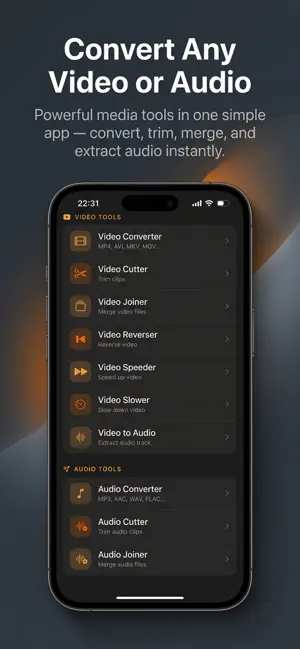
Transform your media with a professional yet simple media converter on your device. Video & Audio Converter gives you full control to convert, trim, merge and edit both video and audio — powered by a robust conversion engine. Convert - Convert video to mp3 or convert mp4 to mp3 and other audio formats: mp3, wav, ogg, m4a, aac, flac and more. - Video converter supports mp4, mkv, flv, avi, wmv, mov, webm, 3gp and common containers. - Change resolution, custom resolution presets (480p, 720p, 1080p, 4K), change frame rate (fps), and adjust bitrate for optimal output. - Choose video codecs (H.264, H.265/HEVC, VP8/VP9, AV1) and audio codecs (AAC, MP3, Opus, AC3, FLAC) for high quality or smaller files. Edit & Trim - Video cutter and mp4 cutter: trim video with a precise range slider and preview before export. - Cut audio, mp3 cutter and audio cutter: trim songs, podcasts or recordings with frame-accurate editing. - Fade in / fade out, volume boost and sound boost controls to polish your clips. - Cut trim video or trim audio without re-encoding when possible to save time and preserve quality. Join & Merge - Video merger and join videos: combine clips into one seamless file with automatic scaling and normalization. - Audio joiner / audio merger: merge multiple audio files into a single continuous track for songs or podcasts. - Merge music or audio tracks and export in your preferred format. Extract & Ringtones - Extract audio from video or music extractor: save audio tracks as standalone files. - Create ringtone and ringtone maker: cut a segment, add fade effects and export as a ringtone file. Export options include set as alarm, set as notification or save for manual import. - Extract mp3 or song extractor for quick audio pulls. Advanced Settings - Bitrate options and sample rate selection from 8000 Hz to 48000 Hz, mono or stereo channels, CBR/VBR encoding. - Preset profiles, custom format settings and estimated output size preview before conversion. - Edit tag and edit metadata: add or modify title, artist, album, genre and add cover image. - Add cover art and manage file renaming and sharing. Batch & Background - Batch conversion and batch processing to convert multiple files at once. - Background conversion keeps jobs running while you use other apps; persistent progress notifications with cancel option. - Offline converter with no account required and fast conversion performance. Creative Tools & Utilities - Speed controls: video speed up (time-lapse), slow motion and change playback speed. - Reverse video for creative effects, rotate video, flip video and crop or resize clips. - Compress video and video compressor to reduce file size with minimal quality loss; mp4 compressor and size reducer presets. - Remux and container conversion for quick format swaps without re-encoding. File Management - Smart file browser with folder view, thumbnail previews and multi-select for easy batching. - Manage converted files, search, share and export to other apps or cloud services you use. - In-app player for previewing audio and video before exporting. Why choose Video & Audio Converter? - Fast converter with high quality mp3 and lossless options. - All-in-one media converter: media converter, format converter, audio extractor, audio editor and video editor in one app. - Designed for both casual users and power users who need control over codecs, bitrate and metadata. Get started: import a file, choose the output format, tweak the settings and tap Convert. Video & Audio Converter handles the rest — fast, reliable and packed with professional options that are easy to use.
Ratings & reviews
4.6
9 ratings
What’s new
Version 1.3 · Updated April 6, 2026
Added review prompt
App privacy
The developer, said oujakane, reported these privacy practices to Apple.
Data Used to Track You
The following data may be used to track you across apps and websites owned by other companies:
- Identifiers: Device ID
Data Linked to You
The following data, which may be collected and linked to your identity, may be used for the following purposes:
- Identifiers: Device ID
Used for: Third-Party Advertising, Developer’s Advertising or Marketing
Alternatives to Audio & Video Converter
Looking for apps like Audio & Video Converter? Here are 6 similar apps on the App Store. The highest rated is Video to MP3: Extract Audio (5.0/5), and all 6 are free to download.
-
 Convoy - Media Converter
-
 Video Converter -MOV, MP4, M4V
-
 Video to MP3: Extract Audio
5.0
Video to MP3: Extract Audio
5.0
-
 Video Converter − MP4 to Mp3
1.0
Video Converter − MP4 to Mp3
1.0
-
 Video to MP3: Audio Extract
-
 ffmpeg
4.9
ffmpeg
4.9
| App | Rating | Price | Last updated | Compare |
|---|---|---|---|---|
| Audio & Video Converter | 4.6 / 5 (9 ratings) | Free | April 6, 2026 | |
| Convoy - Media Converter | – | Free | Oct 15, 2026 | Compare |
| Video Converter -MOV, MP4, M4V | – | Free | Jul 22, 2025 | Compare |
| Video to MP3: Extract Audio | 5.0 / 5 (2) | Free | Oct 14, 2026 | Compare |
| Video Converter − MP4 to Mp3 | 1.0 / 5 (2) | Free | Sep 21, 2026 | Compare |
| Video to MP3: Audio Extract | – | Free | May 12, 2026 | Compare |
| ffmpeg | 4.9 / 5 (14) | Free | Sep 8, 2026 | Compare |