

Video to MP3: Extract Audio
一文 陈 Utilities iPhoneiPadiPod touch
Video to MP3: Extract Audio is a free Utilities app for iPhone and iPad by 一文 陈. Rated 5.0/5 from 2 ratings. Requires iOS 15.6. Updated October 14, 2026.
- Rating
- 5.0
- 2 ratings
- Price
- Free
- on the App Store
- Size
- 45 MB
- Age 4+
- Updated
- Oct 14
- 2026 · v1.1.2
Screenshots


About Video to MP3: Extract Audio
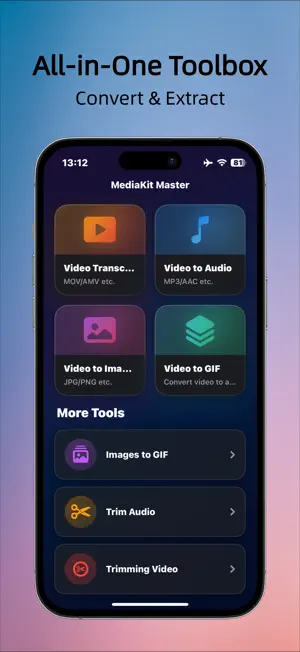
A professional, full-featured video conversion tool built with SwiftUI. Convert, extract, cut, and transform videos, audio, and images with fast, high-quality processing powered by FFmpeg. 【Key Features】 • Video to Image Extract frames from any part of a video or convert the entire video into a sequence of images. Perfect for visual analysis, content creation, and frame-by-frame inspection. • Video to Audio Convert any video into MP3, WAV, M4A, AAC, OGG, and more. MP3 extraction is powered by AVFoundation for speed, while other formats use FFmpeg for high-quality output. • Video to GIF Select a custom video segment and turn it into a smooth, high-quality GIF. Adjust start/end time, frame rate, size, and more. • Images to GIF Pick multiple images and instantly create a GIF. Customize playback speed, order, and dimensions. • Video Format Conversion Convert videos to MP4, AVI, WMV, MPG, TS, and many other formats. Ideal for compatibility, uploading, editing, or sharing across different platforms. • Audio Cutting Precisely cut any segment from an audio file and export it in seconds. • Video Cutting Trim videos with accuracy and keep only the parts you want. 【Why Choose This App?】 • All-in-one solution for video, audio, and GIF tools • High-quality output using FFmpeg’s professional-grade conversion engine • Modern and intuitive interface designed with SwiftUI • Fully offline processing — all conversions happen on your device for privacy and security 【Perfect For】 • Extracting background music or voice tracks • Making GIFs, memes, and animated content • Preparing clips before video editing • Converting formats for upload, sharing, or archiving • Generating frame sequences from videos Terms of Use: https://www.apple.com/legal/internet-services/itunes/dev/stdeula/ Privacy Policy: https://x64sai.github.io/privacy-policy/QualVideoConverter-Privacy.html
What’s new
Version 1.1.2 · Updated October 14, 2026
Improved video-to-audio conversion speed
App privacy
The developer, 一文 陈, reported these privacy practices to Apple.
Data Used to Track You
The following data may be used to track you across apps and websites owned by other companies:
- Identifiers: Device ID
- Usage Data: Advertising Data
Data Linked to You
The following data, which may be collected and linked to your identity, may be used for the following purposes:
- Identifiers: Device ID
- Usage Data: Advertising Data
Used for: Third-Party Advertising, Analytics, Product Personalization, App Functionality
Alternatives to Video to MP3: Extract Audio
Looking for apps like Video to MP3: Extract Audio? Here are 6 similar apps on the App Store. The highest rated is AI Media Converter: MP4 to MP3 (5.0/5), and all 6 are free to download.
-
 Military Counter
-
 Emoji PRO New AI
4.8
-
 Freight Book
3.0
-
 Format Conversion
1.0
-
 AI Media Converter: MP4 to MP3
5.0
-
 M3U8-MP4
| App | Rating | Price | Last updated | Compare |
|---|---|---|---|---|
| Video to MP3: Extract Audio | 5.0 / 5 (2 ratings) | Free | October 14, 2026 | |
| Military Counter | – | Free | Oct 3, 2026 | Compare |
| Emoji PRO New AI | 4.8 / 5 (24) | Free | Jun 30, 2026 | Compare |
| Freight Book | 3.0 / 5 (2) | Free | Dec 4, 2025 | Compare |
| Format Conversion | 1.0 / 5 (1) | Free | Oct 22, 2026 | Compare |
| AI Media Converter: MP4 to MP3 | 5.0 / 5 (2) | Free | Oct 15, 2026 | Compare |
| M3U8-MP4 | – | Free | Apr 2, 2026 | Compare |