

ShifRoll
Chi Leung To Productivity iPhoneiPadiPod touch
ShifRoll is a free Productivity app for iPhone and iPad by Chi Leung To. Requires iOS 17.0. Updated October 20, 2026.
- Price
- Free
- on the App Store
- Size
- 57 MB
- Age 4+
- Updated
- Oct 20
- 2026 · vv4.16.0
Screenshots



About ShifRoll
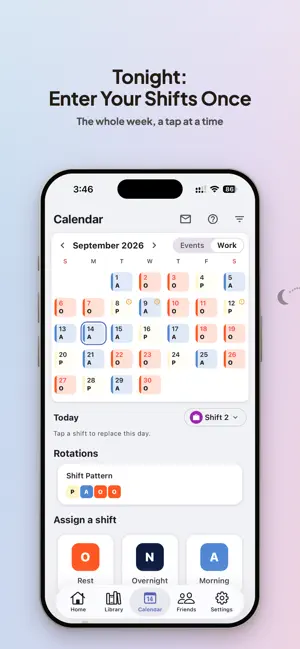
The worst part of shift work isn't the shift — it's every single night before: what shift is tomorrow, what time do I need to wake up, did I set the alarm? ShifRoll ends that loop. Enter your schedule once, and every shift's alarm arranges itself automatically. Your schedule IS the alarm. And not just shifts — classes, exams, events: anything you need to show up for on time. REAL SYSTEM ALARMS ShifRoll uses the iPhone's true system alarm — not a notification. It rings on silent and Do Not Disturb, with a built-in backup tone behind it. ROUTINES — COMBINE YOUR SHIFTS ONCE Combine your existing shifts and rest days into a repeating routine — any pattern, any length — and ShifRoll fills your whole calendar with the cycle. When the roster changes, edit the routine once: every day it scheduled — and every alarm — updates with it. Rest days stay silent automatically. CHAINED REMINDERS & BACKUP ALARMS Stack multiple alarms and reminders on any event — a shift, an exam, a big day — "30 min before, 5 min before, at start," each with its own sound. Heavy sleeper? Add a follow-up alarm after the first ring, so dismissing and drifting back to sleep isn't the end of the story. A DIFFERENT SOUND FOR EVERY SHIFT Set a gentle tone for day shifts and a louder one for 3am call-outs. Sounds inherit from category down to every event, and you can override at any level. SEE IT AT A GLANCE - Home-screen and lock-screen widgets show your next event without opening the app. - Daily Digest: one morning notification summing up your whole day — or a night-before preview of tomorrow. SHARE EVENTS, SEE YOUR TEAM - Connect with friends by QR code or link — one tap, no codes to type. Rotate your code anytime to cut off old links. - Teams: one shared space for your ward, store, or crew. Share one link and everyone who joins sees each other's schedules, side by side in a team table. You approve every member. Joining a Team is always free; creating one requires Premium. - Share any event as a link or QR — anyone can add it to their own calendar and gets notified if it changes. YOUR SCHEDULE, NEVER LOST - Your full schedule — past and future — backs up and restores when you switch phones. Free, automatic. - A recycle bin holds deleted events for 30 days. - Privacy option: keep your past schedule on this device only. PREMIUM (OPTIONAL) Core functions are free, forever. Premium adds the extras — multi-device sync, creating Teams, more reminders per event — and supports a solo developer building for shift workers. Built for nurses, healthcare staff, hospitality, flight crews, and anyone whose week never looks the same twice. Terms of Use (EULA): https://www.apple.com/legal/internet-services/itunes/dev/stdeula/ Privacy Policy: https://shifroll.com/privacy
What’s new
Version v4.16.0 · Updated October 20, 2026
Alarm sets, quicker shift setup, and monthly pay. Alarm sets - Your alarms now come in sets, like the Clock app: a first alarm and up to 3 more in each set, or 9 more with Premium. Find them in Library → Alarm sets. - Repeat a set on the days you choose, or let it ring once. One switch turns the whole set on or off. - Put a set on any day from the calendar, for a day it doesn't usually ring. - Skip routines and Holiday quiet a repeating set. A set you put on a day rings that day anyway. - Stopping one alarm leaves the rest of the set ringing at their times. The Home card says which alarm of the set is next. - Your alarm groups became sets, one for each alarm, and they still ring. Set up your shifts - Making a group now goes on to its shifts: a name, a code, the times and the alarm for each. One tap fills in three 8-hour shifts, two 12-hour shifts or office hours for you to change. - Pay and repeat days come next, for groups that use them. - Add more at once with Add several shifts on a group's page. - In a work group, a shift with the same times as another is flagged before it's added. - No work group yet? Tap Work on the calendar to make one. Pay - A group can have a monthly pay, counted once a month beside your shifts' pay. Set it on the group's page. - A rest-day template can carry pay, for paid leave. Holidays and rest days - A Holiday now also skips your routines that day. To keep them ringing, turn Skip routines off on that day. - Holidays from a calendar on your phone can skip routines too: turn on Treat as holidays for that calendar, and Calendar holidays skip routines in General. - A rest day no longer quiets your other routines. Use Skip or Holiday for that. - Tell Voice input (Beta) "I'm off tomorrow": it puts your rest day on, or marks a Holiday. Two phones - Once both phones are updated, your changes to shifts, events, templates and groups merge: an edit on one phone no longer undoes an edit on the other, and any of them you delete stays deleted. - Signing in to an account with a backup always brings in the account's data. The sign-in screen says so first. - Using two devices? Update both. Calendar - Drag the bar under the month for three sizes: the full month with each day's items by name, the month with the day's list, or one week. - + adds an event straight away. It goes in No group unless you choose a group. An event in No group rings only on the phone you add it on. - Each day's row starts with Template, then Holiday, Memo and Skip routines. Tap Template to put one of your templates on that day. - Any all-day event can be a day off, in any group. Around the app - Settings is in five sections. Settings → Widgets shows every widget, the Lock Screen ones too, and how to add them. - The Daily summary has its own page, where you choose the groups it covers. - Leaving an editor with unsaved changes asks first. - When a group becomes Work mode, you're asked before its shifts are shared with friends. Nothing is shared without a yes.
App privacy
The developer, Chi Leung To, reported these privacy practices to Apple.
Data Linked to You
The following data, which may be collected and linked to your identity, may be used for the following purposes:
- Diagnostics: Other Diagnostic Data
- Contact Info: Email Address
- User Content: Other User Content
- Identifiers: User ID
Used for: Analytics, App Functionality
Alternatives to ShifRoll
Looking for apps like ShifRoll? Here are 6 similar apps on the App Store.


| App | Rating | Price | Last updated | Compare |
|---|---|---|---|---|
| ShifRoll | – | Free | October 20, 2026 | |
| Shift Calendar Alarm | – | Free | Oct 11, 2026 | Compare |
| ShiftAlarm: Work Schedule | – | Free | Oct 19, 2026 | Compare |
| SalaryBuddy | – | Free | Jun 17, 2026 | Compare |
| J Plan - Daily Planner | – | 1.99 USD | Oct 19, 2026 | Compare |
| 簡單排班 | – | Free | Mar 20, 2026 | Compare |
| Worker Tools | – | Free | Oct 2, 2026 | Compare |
Compare ShifRoll with the top alternatives: ratings, updates, ASO score and keyword gaps →