

AI Text Expander - SmartType
Oleksandr Momotiuk Productivity iPhoneiPadiPod touch
AI Text Expander - SmartType is a free Productivity app for iPhone and iPad by Oleksandr Momotiuk. Rated 5.0/5 from 1 ratings. Requires iOS 18.0.
- Rating
- 5.0
- 1 ratings
- Price
- Free
- on the App Store
- Size
- 74 MB
- Age 4+
- Updated
- Sep 3
- 2026 · v1.2.1
Screenshots


About AI Text Expander - SmartType
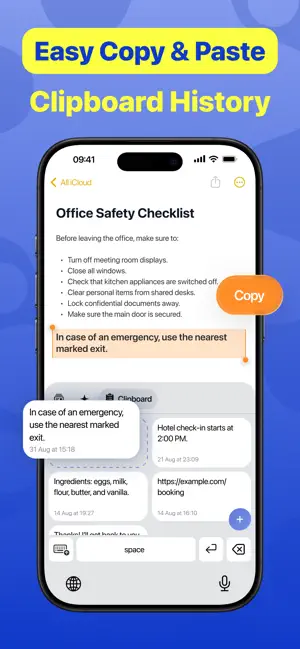
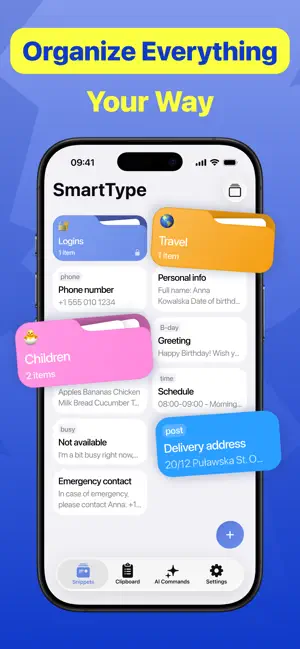
Type a few letters. Insert the full message. SmartType is an intelligent iOS keyboard built around powerful text expansion. Turn short abbreviations into complete messages, email replies, links, addresses, contact details, and any other text you type often. Save your text once, then reuse it wherever you type. SmartType shows relevant inline suggestions as you enter an abbreviation, so the text you need is always ready without switching apps or searching through notes. TEXT EXPANSION Create reusable text templates for everyday conversations and workflows. Add short abbreviations, organize your templates into folders, and find any saved item with instant search. Use SmartType to: • Reply to common questions • Write emails faster • Share links and contact details • Enter addresses and other repeated information • Reuse complete messages with only a few taps Your saved text stays available directly from the keyboard in any app that supports third-party iOS keyboards. CLIPBOARD HISTORY Keep useful copied text close at hand. SmartType helps you find and reuse recent clipboard items without repeatedly switching between apps or copying the same content again. AI COMMANDS Use AI commands when you need more than a saved reply. Rewrite, improve, summarize, translate, or generate text directly from the keyboard. AI features run only when you explicitly select a command. Your ordinary typing and messages are not sent to external AI providers. BUILT FOR EVERYDAY TYPING Whether you are messaging friends, answering customers, working, or studying, SmartType helps you spend less time typing the same text again. Create your shortcuts once. Use them wherever you type. Type less. Say more. The app offers a SmartType Pro auto-renewable subscription that unlocks: • Unlimited AI Writing • Rewrite & Translate with AI • Unlimited Collections & Folders • Unlimited Snippets Privacy Policy: https://luckybeans.app/smarttype/privacy-policy Terms of Use: https://luckybeans.app/smarttype/terms-of-use
What’s new
Version 1.2.1 · Updated September 3, 2026
A smoother, smarter SmartType experience: - redesigned UI for easier, more comfortable use. - clipboard support for quick access to copied text. - improved AI Commands with better results and workflow. - added German, French, Spanish, and Ukrainian localisation. - refined keyboard interactions, animations, and overall polish. Type faster. Work smarter.
App privacy
The developer, Oleksandr Momotiuk, reported these privacy practices to Apple.
Data Not Linked to You
The following data, which may be collected but is not linked to your identity, may be used for the following purposes:
- User Content: Customer Support, Other User Content
- Identifiers: User ID
- Usage Data: Product Interaction
- Diagnostics: Crash Data, Performance Data, Other Diagnostic Data
Used for: Analytics, App Functionality
Alternatives to AI Text Expander - SmartType
Looking for apps like AI Text Expander - SmartType? Here are 6 similar apps on the App Store. The highest rated is Klipra - Clipboard Manager (5.0/5), and all 6 are free to download.
-
 Klipra - Clipboard Manager
5.0
-
 Rockie: ADHD Planner Organiser
-
 ProPrompt Keyboard
-
 Typely: AI Keyboard & Writer
-
 Clipper: Universal Clipboard
-
 AI Keyboard: ClearWrite
| App | Rating | Price | Last updated | Compare |
|---|---|---|---|---|
| AI Text Expander - SmartType | 5.0 / 5 (1 rating) | Free | September 3, 2026 | |
| Klipra - Clipboard Manager | 5.0 / 5 (1) | Free | Oct 17, 2026 | Compare |
| Rockie: ADHD Planner Organiser | – | Free | Aug 25, 2026 | Compare |
| ProPrompt Keyboard | – | Free | Jul 6, 2026 | Compare |
| Typely: AI Keyboard & Writer | – | Free | May 22, 2026 | Compare |
| Clipper: Universal Clipboard | – | Free | Jun 11, 2026 | Compare |
| AI Keyboard: ClearWrite | – | Free | Oct 11, 2026 | Compare |