

Filemorph: File PDF Converter
Bagrat Danielyan Utilities iPhoneiPadiPod touchMac
Filemorph: File PDF Converter is a free Utilities app for iPhone and iPad by Bagrat Danielyan. Rated 5.0/5 from 7 ratings. Requires iOS 17.0.
- Rating
- 5.0
- 7 ratings
- Price
- Free
- on the App Store
- Size
- 37 MB
- Age 4+
- Updated
- Oct 6
- 2026 · v2.7
Screenshots



About Filemorph: File PDF Converter
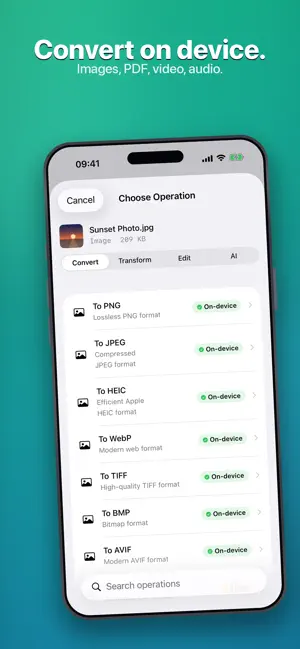
Filemorph converts, edits, and enhances your files — all on your device. Convert and compress PDFs, video, images, and audio with 300+ operations across 80+ file types: PDF to Word, compress PDF, merge & split PDF, HEIC to JPG, MOV to MP4, shrink video, M4A to MP3, make ringtones, and much more. Edit your photos with a full built-in editor, then enhance them with on-device AI — upscale, restore, colorize, and more. PRIVATE BY DESIGN Your files never leave your device. Every conversion and edit runs on-device. The on-device AI models download once from our servers the first time you use an AI tool — after that, AI enhancement runs locally too, and no file data is ever uploaded, before, during, or after processing. CONVERT — 300+ operations, 80+ formats • PDF tools: convert, compress, merge, split, redact, watermark, page numbers • Video: compress, convert, trim, resize, extract audio • Image: convert (HEIC/JPG/PNG/WebP), resize, compress • Audio: convert, trim, normalize, change speed and pitch, export MP3 • Ringtones: trim any song, voice memo, or video on its waveform, preview it, add a fade, and save a ready-to-use ringtone • Bank statements: turn a statement PDF into an OFX file for GnuCash, YNAB, and Xero PROTECT • Encrypt any file with strong on-device encryption • Password-protect PDFs — and unlock them EDIT — a full photo editor, built in • 17 adjustments (exposure, color, tone, and more) plus 12 filters • One-tap Auto enhance • Crop and fine-tune before you export or convert AI ENHANCE — powered by on-device Core ML • AI Upscale — 2x to 16x, recover detail without the blur • Face & Old-Photo Restore — repair damaged, faded, or low-resolution portraits • Colorize — bring black-and-white photos to life • Denoise, JPEG Artifact Fix, Low Light enhancement, and HDR • One-tap background removal • AI utilities: OCR text recognition, speech-to-text transcription, smart crop, face detection, document detection, and barcode & QR scanning WORK FASTER Batch processing, one-tap presets, 16 Shortcuts actions, and keyboard shortcuts for the main commands. Filemorph runs natively on Mac, iPhone, and iPad. FREE TO TRY Every basic image conversion is free and unlimited. Plus, get 3 free Pro conversions every week — including AI tools — before you subscribe. TERMS & PRIVACY Terms of Use (EULA): https://www.apple.com/legal/internet-services/itunes/dev/stdeula/ Privacy Policy: https://filemorph.app/privacy/
Ratings & reviews
5.0
7 ratings
What’s new
Version 2.7 · Updated October 6, 2026
Filemorph 2.7 — a real ringtone maker, better AI photo results, and a long list of fixes. Still 100% on your device. • NEW: Ringtone maker. Pick a song, voice memo or video, drag the clip along its waveform, preview it, add a fade, and save a ringtone of up to 30 seconds — or up to 40 when you sync it to your iPhone from the Finder. Filemorph then shows how to put it on your iPhone. • NEW: a Make Ringtone action for Shortcuts — and you can now re-trim ringtones (.m4r) you already have. • Higher-quality audio: audio you convert, trim, merge or pull from a video now exports at a much higher bit rate. • PDFs you create keep each page's own size instead of turning every page into US Letter. • AI Upscale looks more natural: no crushed shadows or dark outlines, and 2x upscales use a dedicated 2x model. • Old Photo Fix, refined: natural hair texture, faces that stay true to the person, paper borders that stay neutral instead of tinted, and more natural color. • AI Sharpen is far faster on large photos and still returns them at full size. • On Apple silicon, AI Upscale and Old Photo Fix move to the Neural Engine after a one-time preparation in the background, and pace themselves when your Mac gets warm. • The Files buttons in Batch and Presets open again, every file you pick for a batch loads, Save to Files honors Replace, and sharing no longer freezes the window. • Settings: Output Files shows the space your results really take, and Clear All Output frees it (your conversion history is cleared with it). A new Acknowledgements page lists the license of every bundled component. • Fixes: Video Resize works on videos with sound; text in rotated photos is recognized the right way up; Thumbnail Grid and sticker outputs come out upright; Images to PDF skips an unreadable image instead of failing; Save All never overwrites files with the same name; AI model downloads survive quitting the app; Speech to Text can be cancelled. Private by design: your files never leave your device. Nothing is uploaded, ever.
App privacy
The developer, Bagrat Danielyan, reported these privacy practices to Apple.
Data Not Collected
The developer does not collect any data from this app.
Alternatives to Filemorph: File PDF Converter
Looking for apps like Filemorph: File PDF Converter? Here are 6 similar apps on the App Store. The highest rated is Filecraft: Convert Any File (5.0/5), and all 6 are free to download.
-
 Convexy - File Converter
-
 Minimal File Converter
-
 Filecraft: Convert Any File
5.0
Filecraft: Convert Any File
5.0
-
 WAV to MP3 - Audio Converter
-
 WebpMe2 - Webp Video Converter
-
 PACAU
1.0
PACAU
1.0
| App | Rating | Price | Last updated | Compare |
|---|---|---|---|---|
| Filemorph: File PDF Converter | 5.0 / 5 (7 ratings) | Free | October 6, 2026 | |
| Convexy - File Converter | – | Free | Oct 6, 2026 | Compare |
| Minimal File Converter | – | Free | May 28, 2026 | Compare |
| Filecraft: Convert Any File | 5.0 / 5 (1) | Free | Jun 21, 2026 | Compare |
| WAV to MP3 - Audio Converter | – | Free | Aug 11, 2026 | Compare |
| WebpMe2 - Webp Video Converter | – | Free | Mar 23, 2026 | Compare |
| PACAU | 1.0 / 5 (1) | Free | Aug 7, 2026 | Compare |