

Filecraft: Convert Any File
Last Light Labs Utilities iPhoneiPadiPod touch
Filecraft: Convert Any File is a free Utilities app for iPhone and iPad by Last Light Labs. Rated 5.0/5 from 1 ratings. Requires iOS 17.0.
- Rating
- 5.0
- 1 ratings
- Price
- Free
- on the App Store
- Size
- 14 MB
- Age 4+
- Updated
- Jun 21
- 2026 · v1.02
Screenshots

About Filecraft: Convert Any File
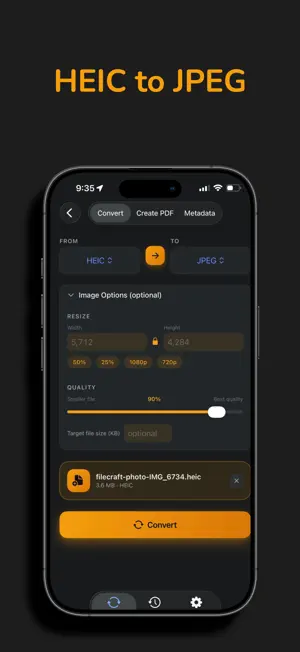
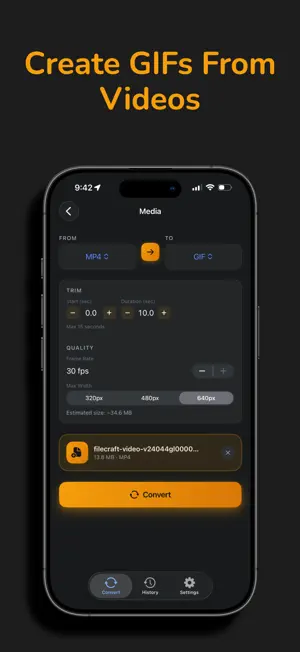
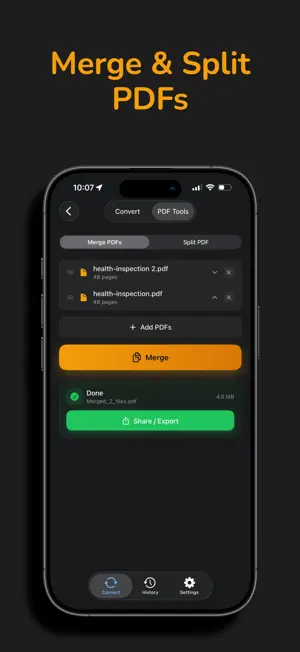
No subscriptions. No uploads. No tricks. Filecraft converts 50+ file formats entirely on your iPhone — your files never leave your device. One fair price unlocks everything forever. CONVERT ANYTHING Documents: PDF, TXT, RTF, HTML, DOCX, EPUB Images: JPEG, PNG, HEIC, WebP, TIFF, SVG Video: MP4, MOV, MKV, AVI, WebM → GIF Audio: MP3, M4A, AAC, WAV, FLAC, OGG Data: CSV, JSON, XML, YAML, PLIST, XLSX Archives: ZIP, RAR, 7Z POWERFUL TOOLS PDF Merge & Split — Combine multiple PDFs or extract pages Video to GIF — Create animated GIFs with custom timing, duration, and frame rate Image to PDF — Compile multiple photos into a single document OCR Text Recognition — Extract text from images and scanned PDFs Batch Convert — Process multiple files at once, export as ZIP PRIVACY FIRST Strip GPS location from photos before sharing View and edit EXIF metadata Remove all metadata with one tap FAST & EFFICIENT Compress 900 MB videos in under 2 minutes Fast mode for container conversions (MP4 ↔ MOV) completes in seconds Real-time progress tracking with elapsed timer Conversion history stored locally for 30 days WORKS EVERYWHERE Share Extension — convert files from any app without opening Filecraft Import from Files app or Camera Roll Dark and light themes FREE TO START HEIC → JPEG, JPEG → PNG, PDF → TXT, and more available free. Markdown and Base64/URL encoding fully unlocked. ONE PRICE. FOREVER. Unlock everything, forever, with a single purchase. No subscription. No weekly fees. No "premium pass" nonsense. Just honest software.
What’s new
Version 1.02 · Updated June 21, 2026
What's New Shortcuts, Siri & Spotlight — Run Filecraft conversions hands-free or build them into your own automations Convert files with a Siri voice command, no need to open the app Kick off conversions straight from Spotlight search Bug fixes and refinements to the new Shortcuts integration
App privacy
The developer, Last Light Labs, reported these privacy practices to Apple.
Data Not Linked to You
The following data, which may be collected but is not linked to your identity, may be used for the following purposes:
- Identifiers: Device ID
- Usage Data: Product Interaction
- Diagnostics: Crash Data, Performance Data, Other Diagnostic Data
Used for: Analytics, App Functionality
Alternatives to Filecraft: Convert Any File
Looking for apps like Filecraft: Convert Any File? Here are 6 similar apps on the App Store. The highest rated is Transforma - File Converter (1.0/5), and all 6 are free to download.
-
 Konvertly: File Converter
-
 BMC File Converter
-
 Transforma - File Converter
1.0
Transforma - File Converter
1.0
-
 File Converter - LocalConvert
-
 MediaShrinkr
-
 Gen Converter
| App | Rating | Price | Last updated | Compare |
|---|---|---|---|---|
| Filecraft: Convert Any File | 5.0 / 5 (1 rating) | Free | June 21, 2026 | |
| Konvertly: File Converter | – | Free | Oct 20, 2026 | Compare |
| BMC File Converter | – | Free | Apr 1, 2026 | Compare |
| Transforma - File Converter | 1.0 / 5 (1) | Free | Apr 24, 2026 | Compare |
| File Converter - LocalConvert | – | Free | May 28, 2026 | Compare |
| MediaShrinkr | – | Free | Aug 3, 2026 | Compare |
| Gen Converter | – | Free | Sep 24, 2026 | Compare |