

Befoor
Jiro Feingold Productivity iPhoneiPadiPod touch
Befoor is a free Productivity app for iPhone and iPad by Jiro Feingold. Requires iOS 26.0. Updated October 20, 2026.
- Price
- Free
- on the App Store
- Size
- 13 MB
- Age 4+
- Updated
- Oct 20
- 2026 · v4.4
Screenshots


About Befoor
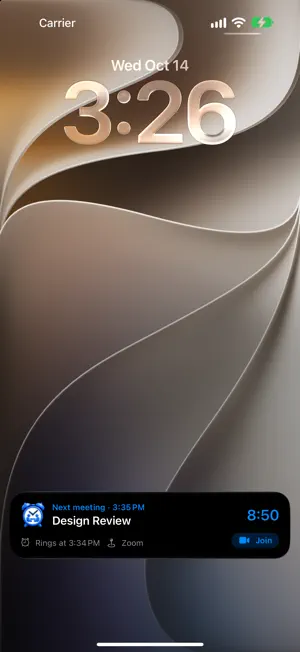
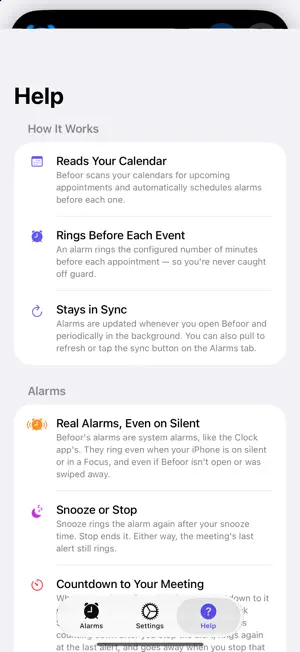
Befoor reads the calendars you choose and rings a real alarm before each meeting, so you're never caught off guard. - Real alarms: Befoor uses the same system alarms as the Clock app, so they ring even when your iPhone is on silent or in a Focus, and even if Befoor isn't open. - Two alerts per meeting: 15 minutes and 1 minute before by default. Change either one. - Meetings that start at the same time share one alarm. - Snooze or stop right from the alarm. - Skip a single meeting with a swipe; it won't ring on any of your devices. - Join Zoom, Google Meet, Teams or Webex calls right from the list or the countdown. - A countdown to your next meeting in the Dynamic Island and on the Lock Screen, in your calendar's color. It appears with the first alarm, keeps counting down to the last one, and goes away when you stop it. Only ever one per meeting. - Choose from a set of pleasant alarm sounds. - Ignore meetings by keyword (like "lunch"), skip weekends, and pick which calendars to watch. - See your meetings for the days ahead, and keep up with your calendar automatically. A Shortcuts action can sync it any time. - Pause for a vacation, get a morning summary, ask Siri or use the widget to join or skip a meeting, and get a warning if a meeting's video link changes. - Works on iPhone and iPad, in English, Chinese, French, German, Italian, Japanese, Korean, Portuguese, Russian and Spanish. Requires iOS 26.
What’s new
Version 4.4 · Updated October 20, 2026
- Pause for a vacation: Settings → Pause turns alarms off until the date you pick, then they come back on their own. - Video link warnings: if a meeting's Zoom, Meet or Teams link is removed or changed, you see it in the list and on the countdown, plus a notification when the meeting is less than two hours away. - Back-to-back meetings: an alert that comes while another meeting is still going vibrates first and only plays its sound after 15 seconds. - Ask Siri "When's my next meeting in Befoor", "Join my next Befoor meeting" or "Skip my next meeting in Befoor". - The Home Screen widget now has Join and Skip buttons. - Morning summary: an optional quiet notification with how many meetings you have and when the first one starts. - Test Alert at the bottom of Settings rings a test alarm in 10 seconds. - More ignored keywords out of the box: OOO, Out of office, Focus time, Do not book, Commute and Travel time. - Fixed: notifications that arrived while Befoor was open didn't stay in Notification Center. Questions or feedback? [email protected]
App privacy
The developer, Jiro Feingold, reported these privacy practices to Apple.
Data Not Collected
The developer does not collect any data from this app.
Alternatives to Befoor
Looking for apps like Befoor? Here are 6 similar apps on the App Store. The highest rated is ScanOnce: PDF Doc Scanner (5.0/5), and 5 of the 6 are free to download.
-
 ScanOnce: PDF Doc Scanner
5.0
ScanOnce: PDF Doc Scanner
5.0
-
 Teleprompter & Prompter Video
-
 Keepwell: Ask About Friends
-
 silentBackup
-
 Deadline Countdown: Stay Sharp
-
 Thought Relay: Fast Notes
| App | Rating | Price | Last updated | Compare |
|---|---|---|---|---|
| Befoor | – | Free | October 20, 2026 | |
| ScanOnce: PDF Doc Scanner | 5.0 / 5 (1) | Free | Oct 3, 2026 | Compare |
| Teleprompter & Prompter Video | – | Free | Sep 3, 2026 | Compare |
| Keepwell: Ask About Friends | – | Free | Oct 22, 2026 | Compare |
| silentBackup | – | 0.99 USD | Apr 17, 2026 | Compare |
| Deadline Countdown: Stay Sharp | – | Free | Jul 10, 2026 | Compare |
| Thought Relay: Fast Notes | – | Free | Aug 11, 2026 | Compare |
Compare Befoor with the top alternatives: ratings, updates, ASO score and keyword gaps →