

Crop Craft: Contour & SVG
Remnant Workshop, Inc. Photo & Video iPhoneiPadiPod touch
Crop Craft: Contour & SVG is a free Photo & Video app for iPhone and iPad by Remnant Workshop, Inc. Rated 5.0/5 from 1 ratings. Requires iOS 16.4.
- Rating
- 5.0
- 1 ratings
- Price
- Free
- on the App Store
- Size
- 132 MB
- Age 4+
- Updated
- Aug 12
- 2026 · v1.1.3
Screenshots

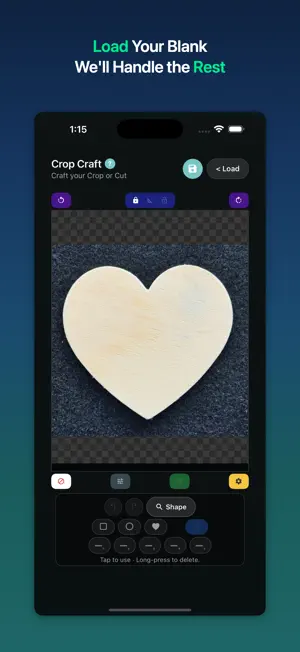


About Crop Craft: Contour & SVG
Clip any photo to a custom shape — then export as a crisp PNG or SVG cutting path for laser engravers, vinyl cutters, and creative crafts. Crop Craft is the fastest way to turn a photo into a precision cutout. Load any image, pick a shape or let the AI trace the edge of your subject, adjust the mask, and export — ready for any cutting platform or design tool. WHAT'S INSIDE - AI Edge Detection — Automatically traces subject outlines for a perfect clip - Shape Library — Circle, square, heart, star, triangle, and more built-in masks - Custom Contours — Save traced edge paths as SVG cutting lines - PNG Export — Transparent-background export for stickers, overlays, and print - URL & Files Support — Load images from your camera roll, Files app, camera, or any URL - Adjustable Padding — Fine-tune the crop boundary with pixel-precise control - Background Color — Set any background color before export HOW IT WORKS Load a photo. Choose a shape or tap "Detect" to let AI trace the edge. Adjust padding and background. Export as PNG or save the contour as an SVG cutting path. That's it. PERFECT FOR - Laser Engraving — Export edge-to-edge images for laser engraving machines - Vinyl Cutting — Save SVG cutting lines for vinyl cutting platforms - Sticker Making — Export transparent-background PNGs for print-and-cut workflows - Photo Art — Clip portraits and objects into creative shapes for social media - Crafters & Makers — Anyone who needs a clean, shaped cutout from a real photo BUILT FOR PRECISION Crop Craft uses on-device AI edge detection to trace subject boundaries with accuracy that free online tools can't match. Every contour can be refined manually, and the SVG export preserves path fidelity at any scale. PRIVACY Crop Craft is ad-supported via Google AdMob (non-personalized ads only). We collect anonymous usage analytics through PostHog — no personal data, no device identifiers, no IP geolocation. Crash reports are collected via Sentry (device model, OS version, and stack traces only — no personal information). No accounts. No subscriptions. No data sold or shared beyond these services. Download Crop Craft and start clipping today.
What’s new
Version 1.1.3 · Updated August 12, 2026
What's new in Crop Craft 1.1.3: • Fixed an issue that prevented images from being saved to your photo library. • The photo permission message now offers a shortcut to Settings.
App privacy
The developer, Remnant Workshop, Inc., reported these privacy practices to Apple.
Data Not Linked to You
The following data, which may be collected but is not linked to your identity, may be used for the following purposes:
- Usage Data: Advertising Data, Product Interaction
- Identifiers: Device ID
- Diagnostics: Crash Data
Used for: Third-Party Advertising, Analytics, App Functionality
Alternatives to Crop Craft: Contour & SVG
Looking for apps like Crop Craft: Contour & SVG? Here are 6 similar apps on the App Store. The highest rated is SimpleCut Video (5.0/5), and all 6 are free to download.
-
 SimpleCut Video
5.0
-
 Lens: Real-Time Camera Effects
-
 LayPic – Photo Collage Maker
1.0
-
 Stellar – Timelapse Camera
5.0
-
 VideoSplitter – Video Cutter
5.0
-
 ReShoot: Before & After Camera
5.0
| App | Rating | Price | Last updated | Compare |
|---|---|---|---|---|
| Crop Craft: Contour & SVG | 5.0 / 5 (1 rating) | Free | August 12, 2026 | |
| SimpleCut Video | 5.0 / 5 (5) | Free | Aug 29, 2026 | Compare |
| Lens: Real-Time Camera Effects | – | Free | Apr 6, 2026 | Compare |
| LayPic – Photo Collage Maker | 1.0 / 5 (1) | Free | Apr 3, 2026 | Compare |
| Stellar – Timelapse Camera | 5.0 / 5 (3) | Free | Apr 7, 2026 | Compare |
| VideoSplitter – Video Cutter | 5.0 / 5 (5) | Free | Sep 3, 2026 | Compare |
| ReShoot: Before & After Camera | 5.0 / 5 (2) | Free | Apr 10, 2026 | Compare |