

Stellar – Timelapse Camera
Gabriel Pires Photo & Video iPhoneiPadiPod touchApple Watch
Stellar – Timelapse Camera is a free Photo & Video app for iPhone and iPad by Gabriel Pires. Rated 5.0/5 from 3 ratings. Requires iOS 17.0.
- Rating
- 5.0
- 3 ratings
- Price
- Free
- on the App Store
- Size
- 14 MB
- Age 4+
- Updated
- Apr 7
- 2026 · v1.0.2
Screenshots
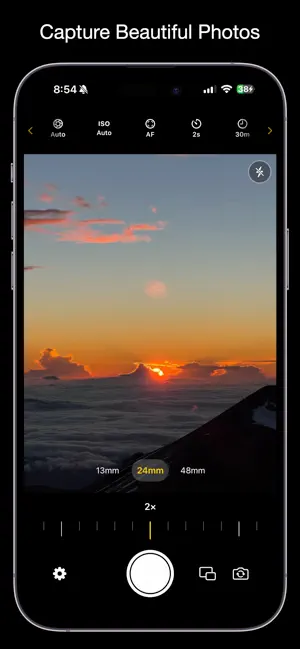


About Stellar – Timelapse Camera
Stellar is a precision interval camera built for photographers who want complete control from a quick self-timer shot to a multi-hour timelapse session. CAPTURE • Interval shooting: every 2, 5, 10, 30, or 60 seconds • Single shot mode with start delay. Use Stellar as a self-timer • Set a shot count (1 to ∞) or a duration limit (30s to 1h) • Schedule a session to fire automatically at a specific time • Visual countdown before the session starts CAMERA CONTROLS • Switch between Ultra Wide, Wide, and Telephoto lenses (If supported) • Manual shutter speed, ISO, and exposure compensation • Manual focus with barrel-style slider and haptic feedback • Barrel-style zoom with haptic tick feedback • Flash: Off / Auto / On • AE/AF lock and tap-to-focus DUAL CAMERA • Multicam: Capture front and back cameras simultaneously • Picture-in-Picture layout: draggable and swappable • Both lenses fire at the exact same time PHOTO OUTPUT • Formats: HEIC, JPEG, RAW, RAW+HEIC, RAW+JPEG • Aspect ratios: Original, 1:1, 4:3, 3:2, 16:9 • Optional geotagging. Embed GPS location in EXIF metadata • Sessions automatically saved to a named album in Photos TIMELAPSE VIDEO • Build a timelapse from any session or photo library • Share photos from the iOS Photos app directly into Stellar to generate a timelapse • Frame rate: 24 or 30 fps • Quality: 1080p, 1440p, or 4K • Speed: 0.5×, 1×, 2×, 3×, or 4× • Reverse playback option • Export and share in seconds REMOTE CONTROL • Control a second iPhone over Wi-Fi or Bluetooth • Start, stop, and preview shots remotely APPLE WATCH • Start and stop capture from your wrist • Live preview on the watch face after each shot • Shot counter displayed during active sessions FRAMING AIDS • Ghost overlay: match composition to the previous shot • 3×3 grid for rule-of-thirds framing • Horizon level indicator • Aspect ratio crop guides GALLERY • Browse, view full-screen, share, or delete photos & videos captured by Stellar FEEDBACK & SETTINGS • Shutter sound and haptic feedback • LED countdown: flashes 3-2-1 before each shot • Battery saver mode: dims screen during long sessions • Sleep mode: pause and resume without losing your session • Presets: save and load named setting combinations • Storage warning before starting a session Download Stellar. Every second counts.
What’s new
Version 1.0.2 · Updated April 7, 2026
Adds ability to toggle shutter sounds for certain countries.
App privacy
The developer, Gabriel Pires, reported these privacy practices to Apple.
Data Not Collected
The developer does not collect any data from this app.
Alternatives to Stellar – Timelapse Camera
Looking for apps like Stellar – Timelapse Camera? Here are 6 similar apps on the App Store. The highest rated is Folio: vid2pix (5.0/5), and all 6 are free to download.
-
 ZOMO: Disposable Camera
-
 Folio: vid2pix
5.0
Folio: vid2pix
5.0
-
 LookYLook: Baby & Pet Camera
-
 VideoSplitter – Video Cutter
5.0
VideoSplitter – Video Cutter
5.0
-
 Lens: Real-Time Camera Effects
-
 LayPic – Photo Collage Maker
1.0
LayPic – Photo Collage Maker
1.0
| App | Rating | Price | Last updated | Compare |
|---|---|---|---|---|
| Stellar – Timelapse Camera | 5.0 / 5 (3 ratings) | Free | April 7, 2026 | |
| ZOMO: Disposable Camera | – | Free | Jun 12, 2026 | Compare |
| Folio: vid2pix | 5.0 / 5 (1) | Free | May 21, 2026 | Compare |
| LookYLook: Baby & Pet Camera | – | Free | Sep 9, 2026 | Compare |
| VideoSplitter – Video Cutter | 5.0 / 5 (5) | Free | Sep 3, 2026 | Compare |
| Lens: Real-Time Camera Effects | – | Free | Apr 6, 2026 | Compare |
| LayPic – Photo Collage Maker | 1.0 / 5 (1) | Free | Apr 3, 2026 | Compare |