

Dimmly: Task & Habit Tracker
Eduardo Pinillos Productivity iPhoneiPadiPod touchMac
Dimmly: Task & Habit Tracker is a free Productivity app for iPhone and iPad by Eduardo Pinillos. Rated 5.0/5 from 4 ratings. Requires iOS 18.6.
- Rating
- 5.0
- 4 ratings
- Price
- Free
- on the App Store
- Size
- 10 MB
- Age 4+
- Updated
- Oct 15
- 2026 · v4.6
Screenshots



About Dimmly: Task & Habit Tracker
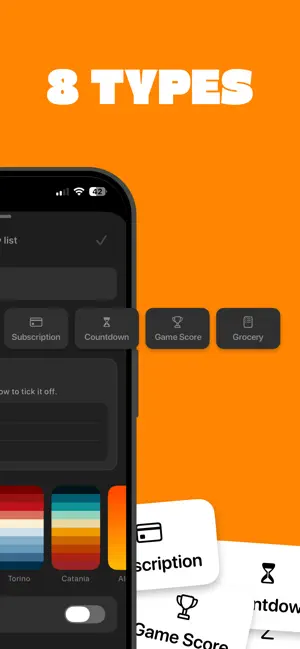
Dimmly is the task and habit tracker you'll actually stick with — now on iPhone and Mac with iCloud sync. Build your lists, set alarms, repeat tasks automatically, and track how many times you complete them each day with Streaks. Track your subscriptions, count down to the days that matter, add up expenses, and keep score on game night. Every feature you need — nothing you don't. 7 list types: • List — a simple checklist. Swipe to complete. • Ranked — your items numbered 1, 2, 3… • Grocery — shopping mode with quantities on every item • Sum — add amounts and watch the running total. Great for expenses. • Subs — track subscriptions: price, renewal date, and your monthly total • Countdown — count the days to trips, birthdays, deadlines • Score — a scoreboard for board and card games: rounds, totals, rankings Features: • iCloud sync — your lists stay in sync across iPhone and Mac • Reminders hub — everything with an alarm, from any list, in one place • Streaks — complete a task multiple times per day and track your progress • Big Notes — add full notes to any task • Checklists — break any task into sub-steps • Alarms with quick options — 1 hour, 3 hours, tomorrow • Repeats — daily, weekly on the days you pick, monthly, yearly • Siri — add items with your voice • Pull down to add tasks instantly • Swipe to complete, swipe to delete • Undo anything within 4 seconds • CSV import & export • 25 handpicked color palettes — or create your own • Home screen widgets • Native Mac app with full keyboard and mouse support • Available in 8 languages • No subscription — unlock unlimited lists once, yours forever
What’s new
Version 4.6 · Updated October 15, 2026
Dimmly, made for iPhone Duo. • Open it and Dimmly becomes two pages: your lists on the left, the list you're working on right beside them. • Closed, every button moves to the column on the right, out of the way of your list. • Big Notes, reminders and settings open on the page they belong to — nothing pops up across the fold. • Fold it like a laptop and type: the list stays above the fold, the keyboard below. • Fold, unfold or rotate whenever you like — you stay exactly where you were. • Dimmly is now on iPad too: two pages in landscape, the iPhone layout, bigger, in portrait. • Dragging a task can now drop it straight into first place.
App privacy
The developer, Eduardo Pinillos, reported these privacy practices to Apple.
Data Not Collected
The developer does not collect any data from this app.
Alternatives to Dimmly: Task & Habit Tracker
Looking for apps like Dimmly: Task & Habit Tracker? Here are 6 similar apps on the App Store. The highest rated is DayPad: Weekly To-Do Planner (5.0/5), and 5 of the 6 are free to download.
-
 DayPad: Weekly To-Do Planner
5.0
-
 What-Else: Life Maintenance
4.5
-
 Natural Calendar - Caliq
-
 Taskful Day: Day Planner
5.0
-
 Wait Menu
5.0
-
 Weekline Weekly Planner & Todo
5.0
| App | Rating | Price | Last updated | Compare |
|---|---|---|---|---|
| Dimmly: Task & Habit Tracker | 5.0 / 5 (4 ratings) | Free | October 15, 2026 | |
| DayPad: Weekly To-Do Planner | 5.0 / 5 (2) | Free | Oct 2, 2026 | Compare |
| What-Else: Life Maintenance | 4.5 / 5 (4) | Free | Jul 7, 2026 | Compare |
| Natural Calendar - Caliq | – | Free | May 19, 2026 | Compare |
| Taskful Day: Day Planner | 5.0 / 5 (1) | Free | Oct 16, 2026 | Compare |
| Wait Menu | 5.0 / 5 (1) | 1.99 USD | Oct 18, 2026 | Compare |
| Weekline Weekly Planner & Todo | 5.0 / 5 (4) | Free | Oct 12, 2026 | Compare |