

Taskful Day: Day Planner
Antti Aittamaa Productivity iPhoneiPadiPod touchMacApple Watch
Taskful Day: Day Planner is a free Productivity app for iPhone and iPad by Antti Aittamaa. Rated 5.0/5 from 1 ratings. Requires iOS 17.6.
- Rating
- 5.0
- 1 ratings
- Price
- Free
- on the App Store
- Size
- 46 MB
- Age 4+
- Updated
- Nov 13
- 2026 · v3.6.8
Screenshots
Save to Pinterest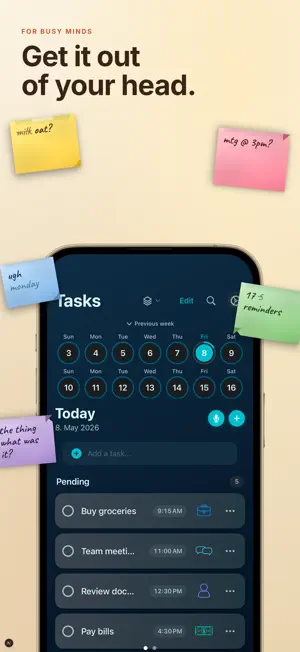


About Taskful Day: Day Planner
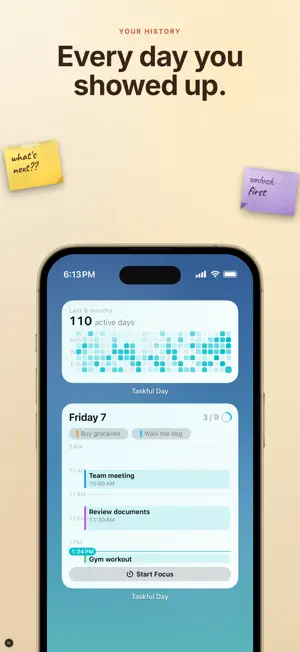
Plan the day you have, and let yesterday go. Taskful Day is a calm day planner for anyone whose to-do list has started to feel like a record of what didn't get done. Unfinished tasks move to today on their own when you open the app, and the Today list has no overdue badge, so mornings start with today's plan and nothing flashing red. Write it the way you'd say it Type "dentist tomorrow at 3pm" and the task lands on the right day at the right time. Natural-language capture understands eight languages. On iPhone and iPad you can also speak a task or capture one from Control Center. Four views of one day Start with the list. Pro adds three more views of the same day: the Day Clock, the Energy River, and the Day Map. Pro also brings a time-block grid for laying out your week. The Energy River takes its shape from the tasks you've scheduled, so it shows how your plans flow through the day. Your day at a glance With Pro, 21 Home Screen widgets keep today in view, and on iOS 27 a widget can give your day a whole page. Lock Screen widgets and Control Center capture are free. Start a Focus timer with Pro and follow it in a Live Activity on iPhone. Taskful Day is on Apple Watch too, and the Watch app works together with the iPhone app. Numbers that don't judge Analytics shows the patterns in how your days go, and its score explains itself in one line: "This score reflects patterns, not performance." Nothing to sign up for There's no account to create, so you can open the app and start planning. Taskful Day shows no ads and doesn't track you, and you can export your tasks whenever you like. iCloud sync comes with Pro for the days you want the same tasks on all your devices. Try everything first Try every Pro feature free for 7 days, with no card. After that, keep using the free version or choose Pro. Pro adds unlimited tasks, the Day Clock, Energy River, and Day Map, the time-block grid, the Focus timer, extended analytics, 10 premium themes (15 themes in all), multiple workspaces, check-ins, iCloud sync, re-importing from Apple Reminders, and all 21 Home Screen widgets. Choose a monthly or yearly subscription, or pay once for lifetime access. One purchase covers iPhone, iPad, and Mac. Taskful Day is available in 33 languages. Pro works with Family Sharing, so your family can use it too. Download Taskful Day and plan tomorrow without the guilt. Subscriptions renew automatically at the price shown until you cancel. Manage them in App Store › Account › Subscriptions. Lifetime is a one-time purchase. Terms of Use: https://www.apple.com/legal/internet-services/itunes/dev/stdeula/
What’s new
Version 3.6.8 · Updated November 13, 2026
Find any task on iPad, and clear your Inbox with a swipe. Search on iPad now finds all your tasks, so the one you need turns up after a few letters. On iPhone, swipe an Inbox item to schedule it. The thoughts you jotted down become plans without opening each one. Pro now works with Family Sharing, so your family can use it too. As always, unfinished tasks move to today on their own when you open the app.
App privacy
The developer, Antti Aittamaa, reported these privacy practices to Apple.
Data Not Collected
The developer does not collect any data from this app.
Alternatives to Taskful Day: Day Planner
Looking for apps like Taskful Day: Day Planner? Here are 6 similar apps on the App Store. The highest rated is Planote - Daily Planner Tasks (5.0/5), and all 6 are free to download.
-
 NimbleDay: Task & Goal Planner
4.3
-
 Natural Calendar - Caliq
-
 Planote - Daily Planner Tasks
5.0
-
 Actium: Self Growth from Books
4.8
-
 What-Else: Life Maintenance
4.5
-
 Pala: ADHD Planner & Calendar
4.8
| App | Rating | Price | Last updated | Compare |
|---|---|---|---|---|
| Taskful Day: Day Planner | 5.0 / 5 (1 rating) | Free | November 13, 2026 | |
| NimbleDay: Task & Goal Planner | 4.3 / 5 (3) | Free | Apr 1, 2026 | Compare |
| Natural Calendar - Caliq | – | Free | Nov 16, 2026 | Compare |
| Planote - Daily Planner Tasks | 5.0 / 5 (25) | Free | Nov 3, 2026 | Compare |
| Actium: Self Growth from Books | 4.8 / 5 (8) | Free | Oct 20, 2026 | Compare |
| What-Else: Life Maintenance | 4.5 / 5 (4) | Free | Jul 7, 2026 | Compare |
| Pala: ADHD Planner & Calendar | 4.8 / 5 (6) | Free | Nov 8, 2026 | Compare |