

Rumskrot Remote
Dansk Rumskrot ApS Utilities iPhoneiPadiPod touch
Rumskrot Remote is a free Utilities app for iPhone and iPad by Dansk Rumskrot ApS. Requires iOS 26.4. Updated September 26, 2026.
- Price
- Free
- on the App Store
- Size
- 17 MB
- Age 4+
- Updated
- Sep 26
- 2026 · v1.0.5
Screenshots


About Rumskrot Remote
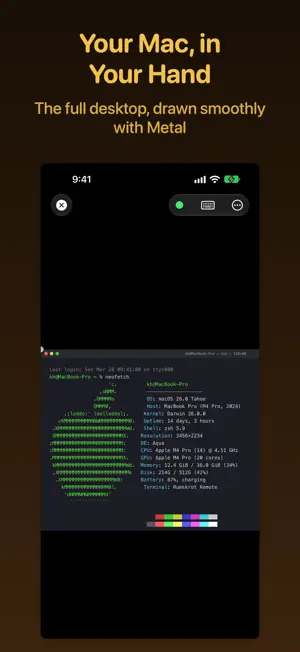
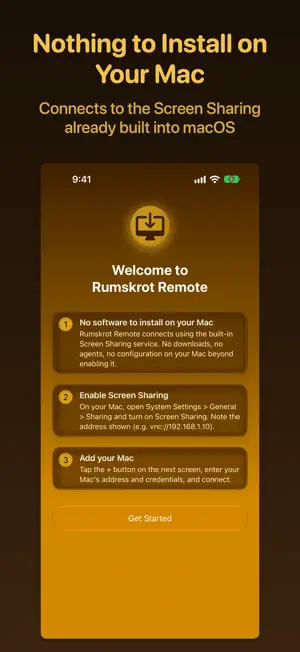
Rumskrot Remote puts your Mac's desktop on your iPhone or iPad, with nothing to install on the Mac. Turn on Screen Sharing in your Mac's System Settings and Rumskrot Remote connects straight to it, using the VNC service macOS already ships with. No helper app, no account, no cloud relay. YOUR MACS, ONE TAP AWAY Macs on your network appear automatically through Bonjour. Save the ones you use, and tap anywhere on a row to connect. THE WHOLE DESKTOP, SMOOTHLY The remote screen is drawn with Metal for a smooth, responsive picture. ZRLE, Hextile and other supported VNC encodings keep bandwidth low, and cursor tracking follows ProMotion on displays that have it. TOUCH THAT FEELS LIKE A TRACKPAD - Drag to move the pointer, tap to click, two-finger tap to right-click - Two-finger drag to scroll, pinch to zoom and pan - Three-finger swipes for Mission Control, App Exposé and jumping between monitors - Haptics confirm clicks, drag lock, modifier keys and monitor jumps EVERY KEY YOUR MAC EXPECTS A bar above the iOS keyboard adds the keys macOS needs and iOS lacks: Esc, Tab, arrow keys, F1–F12, Page Up/Down, Home/End, Forward Delete, Mission Control and App Exposé. Sticky Command, Control, Option and Shift arm with a tap and apply to your next key. Reorder or remove keys to suit you, and let the bar hide itself when a hardware keyboard is connected. Use a hardware keyboard, mouse or trackpad to control your Mac directly. CONNECT YOUR WAY - macOS login, VNC password or Apple Remote Desktop authentication - SSH tunnel for Macs you reach through an SSH server, with host-key verification that refuses to send credentials if the server's identity ever changes - Auto-unlock: opt in per host to type your macOS password after connecting, so you land at the desktop instead of the lock screen - Custom ports, per-host scrolling and a per-host accent colour MORE THAN ONE SCREEN Choose which display to view on a Mac with several monitors, or swipe between them. SNIPPETS Save commands and text you type often and send them to your Mac with a tap. Paste as Keystrokes types text from your device's clipboard into the Mac, including when macOS Screen Sharing does not accept clipboard transfers. SHORTCUTS AND SIRI Connect to a saved Mac and disconnect again from Shortcuts, Siri or Spotlight, so one shortcut can open a session, do its job and close it. PRIVATE BY DESIGN Connections go straight from your device to your Mac. Saved passwords are kept in your device's Keychain without iCloud syncing. No accounts, no analytics, no tracking. ALSO INCLUDED - Receive clipboard text from your Mac; send clipboard text to compatible VNC servers - Performance modes, including 16-bit colour for slower networks - Live diagnostics overlay: frame rate, latency and bandwidth - Adjustable pointer speed, scroll direction and accent colour - Automatic reconnect when the network drops Terms of Use (EULA): https://www.apple.com/legal/internet-services/itunes/dev/stdeula/ Privacy Policy: https://danskrumskrot.com/privacy
What’s new
Version 1.0.5 · Updated September 26, 2026
• Paste as Keystrokes types clipboard text into your Mac, including through macOS Screen Sharing. Snippets use the same reliable typing path, and you can stop typing at any time. • Control your Mac with a hardware keyboard, mouse or trackpad. Touch scrolling is faster and smoother, with inertia and a per-host scroll direction setting. • Three-finger swipes open Mission Control and App Exposé or jump between monitors. Haptics confirm clicks, drag lock, modifier keys and monitor jumps. • Connect to a saved Mac and disconnect from Shortcuts, Siri or Spotlight. • Refreshed screens and a more legible keyboard accessory bar. Choose an app accent colour or a separate colour for each host, with improved layouts at larger text sizes. • Editing a saved host now saves changes automatically. Session toolbar actions respond reliably while the desktop is streaming, and host deletion confirms beside the selected row. • Saved host passwords now use device-local Keychain storage without iCloud syncing. Existing saved passwords are migrated automatically. • Purchasing or restoring a subscription now stops the free-session countdown immediately. • More reliable connections, clearer clipboard diagnostics, and fixes for display corruption, monitor ordering, cursor handling and crashes. Hardened input validation keeps unusual VNC server data from destabilising a session.
App privacy
The developer, Dansk Rumskrot ApS, reported these privacy practices to Apple.
Data Not Collected
The developer does not collect any data from this app.
Alternatives to Rumskrot Remote
Looking for apps like Rumskrot Remote? Here are 6 similar apps on the App Store. The highest rated is Glassy Desk: Remote Desktop (5.0/5), and all 6 are free to download.
-
 LAN Screen Control
-
 Glassy Desk: Remote Desktop
5.0
-
 OffPass - Local Card Codes
-
 Tomaco: Remote Desktop
5.0
-
 CS710S RFID Reader ObjC
-
 FloorLens: Floor Plan Scanner
5.0
| App | Rating | Price | Last updated | Compare |
|---|---|---|---|---|
| Rumskrot Remote | – | Free | September 26, 2026 | |
| LAN Screen Control | – | Free | Aug 25, 2026 | Compare |
| Glassy Desk: Remote Desktop | 5.0 / 5 (1) | Free | Oct 24, 2026 | Compare |
| OffPass - Local Card Codes | – | Free | Jul 29, 2025 | Compare |
| Tomaco: Remote Desktop | 5.0 / 5 (4) | Free | Oct 19, 2026 | Compare |
| CS710S RFID Reader ObjC | – | Free | Sep 14, 2026 | Compare |
| FloorLens: Floor Plan Scanner | 5.0 / 5 (2) | Free | Oct 17, 2026 | Compare |
Compare Rumskrot Remote with the top alternatives: ratings, updates, ASO score and keyword gaps →