

Rumskrot Terminal
Dansk Rumskrot ApS Utilities iPhoneiPadiPod touchApple Watch
Rumskrot Terminal is a free Utilities app for iPhone and iPad by Dansk Rumskrot ApS. Requires iOS 26.4. Updated September 26, 2026.
- Price
- Free
- on the App Store
- Size
- 46 MB
- Age 4+
- Updated
- Sep 26
- 2026 · v1.0.2
Screenshots


About Rumskrot Terminal
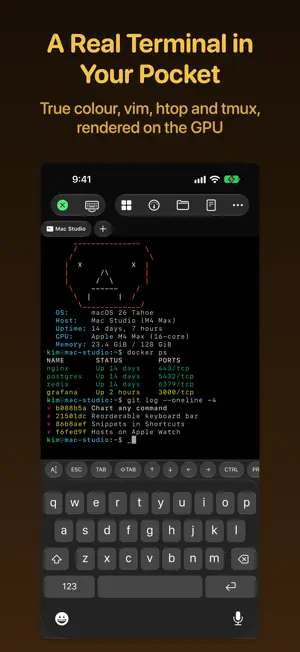
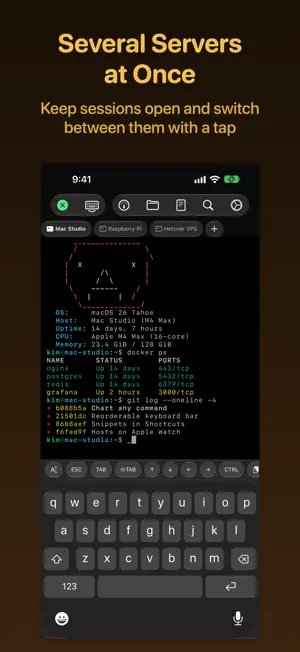
Rumskrot Terminal is a native SSH terminal for the machines you actually run — the Mac under the desk, the Raspberry Pi in the cupboard, the VPS in a data centre. Save a server once, connect with a tap, and get a real terminal, a live dashboard for every host, and your servers on Apple Watch. EVERY SERVER, ONE TAP AWAY • Saved hosts with password or key authentication • Nearby SSH machines found automatically with Bonjour • Import hosts from ~/.ssh/config, or open ssh:// links • Multi-hop jump hosts (ssh -J bastion target) • Give each host its own accent colour so you always know where you are A REAL TERMINAL • xterm-256color and 24-bit true colour, rendered on the GPU • vim, htop, tmux and other full-screen programs just work • Scrollback with search, mouse reporting, hyperlinks and inline images • A keyboard bar with Esc, Tab, Ctrl and arrows — reorder or hide any key • Full external keyboard and trackpad support on iPad • Predictive local echo for responsive typing on slower connections • Draft and paste multiline text in a prose composer before sending • Powerline and Nerd Font prompt symbols, plus custom themes and ANSI palettes • Shell integration keeps your history as the commands you actually ran, with suggestions above the keyboard DASHBOARDS FOR EVERY HOST • Turn any command into a tile: a number, a line chart or a bar chart • Dozens of ready-made tiles for CPU, memory, disk, Docker and more • One page per host — swipe between your servers • Tiles refresh on their own, and a Home Screen widget keeps an eye on them for you SEVERAL SERVERS AT ONCE • Keep multiple sessions open and switch between them with a tap • On iPad, active sessions sit in the sidebar beside the terminal TMUX, FILES AND SNIPPETS • A native tmux browser: attach, detach, create and kill sessions without typing a command • An SFTP file browser on the same connection: upload, download and navigate • Snippets for the commands you run every day, with groups and parameters, also available in Shortcuts DESCRIBE IT, GET THE COMMAND • Say what you want in plain English and get a shell command with an explanation of what it does • Runs on device, and nothing runs until you choose to insert it ON APPLE WATCH • Your hosts sync from iPhone through iCloud • Standalone SSH from your wrist: run a command, restart a service, read the output • Your dashboards, mirrored to the watch • Passwords never sync through iCloud — they reach the watch only when you confirm it on iPhone PRIVATE BY DESIGN • Passwords and keys stay in the Keychain on your device • Host key verification, SSHFP support, Ed25519 and ECDSA keys, and passphrase-protected OpenSSH keys • No account, no analytics, no telemetry — your connections go straight to your servers Terms of Use (EULA): https://www.apple.com/legal/internet-services/itunes/dev/stdeula/ Privacy Policy: https://danskrumskrot.com/privacy
What’s new
Version 1.0.2 · Updated September 26, 2026
Your servers on your wrist, live dashboards, and a faster, more capable terminal: APPLE WATCH • Connect over SSH, run commands and snippets, browse tmux sessions, and read live terminal output from your wrist. • Hosts sync through iCloud. Direct SSH and jump-host connections work on the watch; an iPhone relay helps keep sessions available. • Passwords stay in each device’s Keychain and reach the watch only after you confirm the transfer on iPhone. • Dashboard readings mirror from iPhone, with their age and an honest indication when the phone is unreachable. LIVE DASHBOARDS & WIDGETS • Dashboards now have their own tab, with a page for every saved host. • Turn command output into a value, line chart or bar chart, with units, thresholds, axis bounds and a configurable history window. • 45 built-in samples help you monitor CPU, memory, disks, networks, Docker and more. • Home and Lock Screen widgets show your chosen tile, how old its reading is, and when it has gone stale. Tap a widget to open that host’s dashboard. • Optional background refresh keeps widget readings moving while the app is in the background, subject to system scheduling. TERMINAL & CUSTOMISATION • Predictive local echo makes typing feel more responsive on slower connections. • A new prose composer lets you draft and paste multiline text, then send it to the terminal in one action. • Powerline and Nerd Font prompt symbols render out of the box, including on watch. • Create custom terminal themes and ANSI palettes, and choose the app’s accent colour or a separate colour for each host. • Snippets can be limited to particular hosts, and command suggestions favour frequently and recently used commands. FIXES & POLISH • Jump-host fingerprints are remembered independently, ending repeated trust prompts on reconnect. • More reliable reconnects, background sessions, terminal rendering, command history and tmux attach/detach behaviour. • Keyboard controls and prose input behave better across multiple sessions; subscribing immediately stops the free-session countdown. • Existing host edits save automatically, and rotating the device keeps open sheets and dialogs in place. • Improved text contrast, larger-text layouts and confirmation dialogs, plus a refreshed app icon.
App privacy
The developer, Dansk Rumskrot ApS, reported these privacy practices to Apple.
Data Not Collected
The developer does not collect any data from this app.
Alternatives to Rumskrot Terminal
Looking for apps like Rumskrot Terminal? Here are 6 similar apps on the App Store. The highest rated is Appended (5.0/5), and 5 of the 6 are free to download.


| App | Rating | Price | Last updated | Compare |
|---|---|---|---|---|
| Rumskrot Terminal | – | Free | September 26, 2026 | |
| mssh | – | Free | Apr 20, 2026 | Compare |
| Appended | 5.0 / 5 (5) | 5.99 USD | Oct 12, 2026 | Compare |
| OmniGate | – | Free | Sep 30, 2026 | Compare |
| Zelmux | – | Free | Jun 17, 2026 | Compare |
| OffPass - Local Card Codes | – | Free | Jul 29, 2025 | Compare |
| ToBe SAID: Offline TTS Engine | 5.0 / 5 (1) | Free | Oct 16, 2026 | Compare |
Compare Rumskrot Terminal with the top alternatives: ratings, updates, ASO score and keyword gaps →