

mssh
Jadesada Ponyium Utilities iPhoneiPadiPod touch
mssh is a free Utilities app for iPhone and iPad by Jadesada Ponyium. Requires iOS 18.0. Updated April 20, 2026.
- Price
- Free
- on the App Store
- Size
- 10 MB
- Age 4+
- Updated
- Apr 20
- 2026 · v1.2.2
Screenshots

About mssh
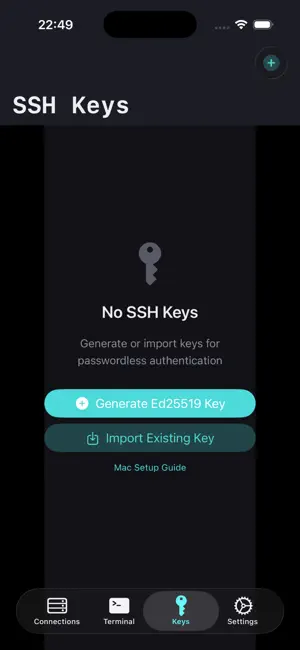
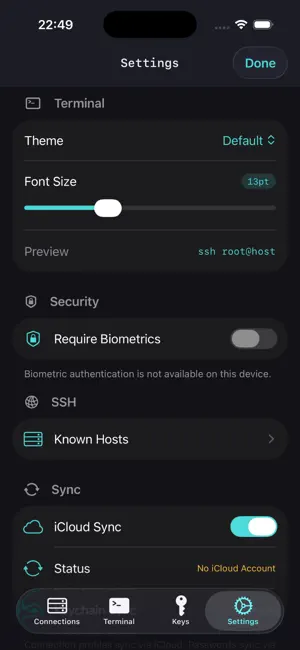
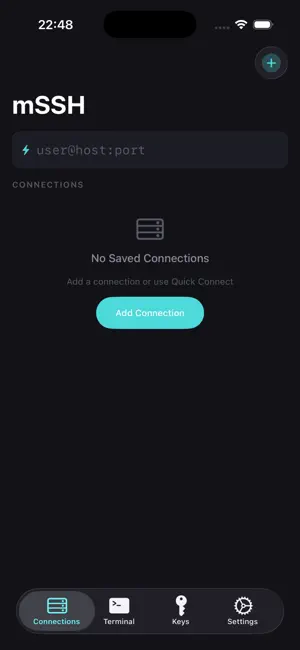
mSSH is a professional SSH and SFTP client for iPhone, iPad, and Mac. Connect to your remote servers with password or key-based authentication (Ed25519, ECDSA, RSA). - Six terminal themes, saved command snippets, and cross-device iCloud sync - Everything you need to manage servers on the go. Cross-Device Sync — Your connections, SSH keys, snippets, and settings sync across all your devices via iCloud. Private SSH keys sync optionally through end-to-end encrypted iCloud Keychain. On Mac, your existing ~/.ssh folder is imported automatically. Terminal Themes & Fonts — Choose from six built-in themes: Default, Solarized Dark, Monokai, Nord, Dracula, and Tokyo Night. Pick your preferred font family and size (9–24pt), cursor style (block, bar, or underline), and blink behavior. Changes apply instantly. Snippets — Save commands you run often (deploy scripts, log tailing, service restarts) and send them to any active session with one tap. Access snippets from the terminal toolbar or the iOS keyboard accessory bar. Connection Organization — Star favorites to pin them at the top. Group connections by environment (Production, Staging, Personal). Add color tags for visual scanning. Search across all connections by name, host, username, or group. SSH Terminal — Full shell access with xterm-256color support. Manage multiple sessions with tabs. Split terminal view on iPad. Custom keyboard accessory bar with Esc, Tab, Ctrl, arrow keys, and quick-access snippets. format. Generate Ed25519 keys directly in the app. Import keys by pasting PEM text or from your Mac's ~/.ssh folder. All private keys stored in the Keychain with hardware encryption. SFTP File Browser — Browse remote filesystems, upload and download files, and manage directories with an intuitive touch interface. Security — Face ID and Touch ID for app-level protection. All credentials in the Keychain, hardware-encrypted. Host key verification via Trust On First Use (TOFU) with SHA-256 fingerprints. No accounts, no telemetry, no ads. Mac Support — Native macOS app with sidebar navigation. Import your ~/.ssh keys and config with one click. Sync connections from iPhone via iCloud. Open Source — mSSH is open source at github.com/nirasnet/mssh. Built with SwiftTerm and Citadel.
What’s new
Version 1.2.2 · Updated April 20, 2026
Added tip jar — support development with optional tips. All features remain free.
App privacy
The developer, Jadesada Ponyium, reported these privacy practices to Apple.
Data Not Collected
The developer does not collect any data from this app.
Alternatives to mssh
Looking for apps like mssh? Here are 6 similar apps on the App Store. The highest rated is CrushClient (5.0/5), and all 6 are free to download.
-
 PocketTerm SSH
-
 CrushClient
5.0
CrushClient
5.0
-
 Only Text Editor
4.5
Only Text Editor
4.5
-
 Kept: Receipts & Documents
5.0
Kept: Receipts & Documents
5.0
-
 Nexus LLM
-
 Ham Satting
3.7
Ham Satting
3.7
| App | Rating | Price | Last updated | Compare |
|---|---|---|---|---|
| mssh | – | Free | April 20, 2026 | |
| PocketTerm SSH | – | Free | Aug 6, 2026 | Compare |
| CrushClient | 5.0 / 5 (1) | Free | May 13, 2026 | Compare |
| Only Text Editor | 4.5 / 5 (2) | Free | Oct 1, 2026 | Compare |
| Kept: Receipts & Documents | 5.0 / 5 (1) | Free | Oct 13, 2026 | Compare |
| Nexus LLM | – | Free | Nov 3, 2024 | Compare |
| Ham Satting | 3.7 / 5 (3) | Free | Oct 15, 2026 | Compare |
Compare mssh with the top alternatives: ratings, updates, ASO score and keyword gaps →