

Border Pro
PAUL JOHN PRIDE Photo & Video iPhoneiPadiPod touchMac
Border Pro is a paid Photo & Video app for iPhone and iPad by PAUL JOHN PRIDE. Rated 5.0/5 from 3 ratings. Requires iOS 17.0. Updated September 28, 2026.
- Rating
- 5.0
- 3 ratings
- Price
- 2.99 USD
- on the App Store
- Size
- 3 MB
- Age 4+
- Updated
- Sep 28
- 2026 · v1.6.5
Screenshots

About Border Pro
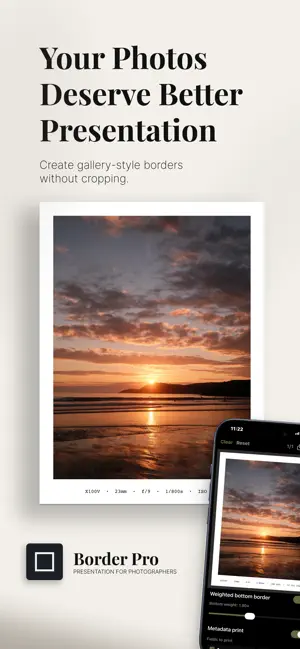
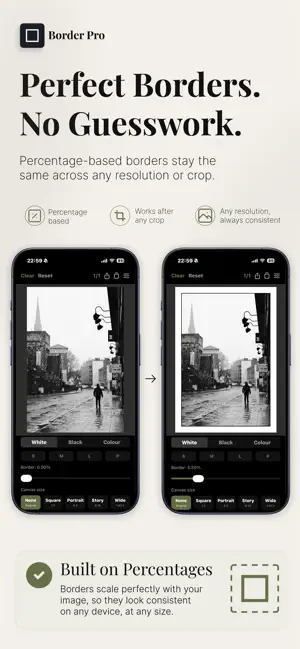
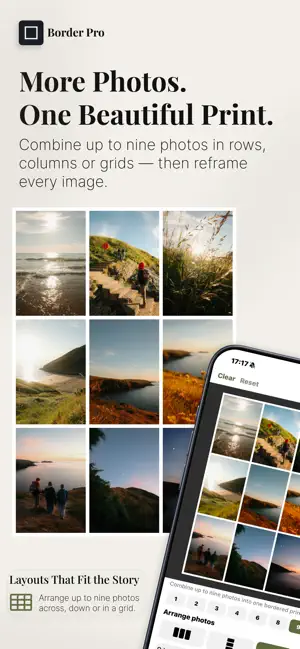
Border Pro is the photographer’s tool for adding beautiful, precise borders to your photos — whether you shoot on iPhone, mirrorless, or film. Built for people who care about their images, Border Pro preserves your EXIF data on every save. Your camera model, lens, focal length, aperture, shutter speed and date all stay intact. BORDERS THAT MEAN SOMETHING Borders are calculated as a percentage of your image, so they stay perfectly consistent across every aspect ratio and resolution — from a phone snap to a 102MP medium format file. PRINT YOUR SHOOTING DATA Turn on Metadata Print and your camera data is printed directly onto your border — just like a lab print. Choose from 20 fonts including elegant scripts, classic serifs and clean sans-serifs. Set the colour to auto or pick any custom colour. Print on any edge — bottom, top, left or right — with the weighted border following automatically. COLOUR BORDERS Choose from curated classic tones, vibrant presets, or sample any colour directly from your photo using the built-in eyedropper with magnifier loupe. Save up to 6 custom colours for quick access. SHAPE YOUR BORDERS Control each corner independently — from fully rounded to square, mixed, or anything between. Create arches, D-shapes and compositions that are entirely your own. SOCIAL MEDIA READY Export to Instagram square, portrait, landscape or Story/TikTok formats with a single tap. Preview the canvas before you save. EXPORT YOUR WAY Choose JPEG, HEIC or lossless PNG. Set your own quality level. Your images, your format. EVERYTHING ELSE • White, black and custom colour borders • Double border with custom keyline colour — black, white, or any colour • Weighted border on any edge for that classic print look • Save up to 10 named profiles, synced to iCloud • Batch export up to 100 photos at once • Works completely offline • Saves to a dedicated Border Pro album in Photos VIDEO SUPPORT Photos and videos, treated the same way. Add gallery-style borders without cropping, compression, or loss of quality. Border Pro is for photographers who want their images to look considered, not filtered.
What’s new
Version 1.6.5 · Updated September 28, 2026
New: choose exactly which edges get a border. Create a bottom-only frame, add borders to any combination of edges, or keep the classic all-round border. Find the new Edges controls in the Border section. Photo details and border captions now follow your selected edges automatically, and your edge choices are saved in presets.
App privacy
The developer, PAUL JOHN PRIDE, reported these privacy practices to Apple.
Data Not Collected
The developer does not collect any data from this app.
Alternatives to Border Pro
Looking for apps like Border Pro? Here are 6 similar apps on the App Store. The highest rated is Lumi Photo (5.0/5), and 5 of the 6 are free to download.
-
 Lumi Photo
5.0
Lumi Photo
5.0
-
 SnapVend Gallery
-
 JustFrames
-
 Stitch : Collage Maker
-
 PicClear Pro: Photo Cleaner
-
 Behindr — Text Behind Photo
| App | Rating | Price | Last updated | Compare |
|---|---|---|---|---|
| Border Pro | 5.0 / 5 (3 ratings) | 2.99 USD | September 28, 2026 | |
| Lumi Photo | 5.0 / 5 (1) | Free | Oct 25, 2026 | Compare |
| SnapVend Gallery | – | Free | Jul 24, 2026 | Compare |
| JustFrames | – | Free | Feb 27, 2026 | Compare |
| Stitch : Collage Maker | – | 0.99 USD | Jul 19, 2026 | Compare |
| PicClear Pro: Photo Cleaner | – | Free | Oct 9, 2026 | Compare |
| Behindr — Text Behind Photo | – | Free | Oct 22, 2026 | Compare |
Compare Border Pro with the top alternatives: ratings, updates, ASO score and keyword gaps →