

Behindr — Text Behind Photo
joshua allen Photo & Video iPhoneiPadiPod touch
Behindr — Text Behind Photo is a free Photo & Video app for iPhone and iPad by joshua allen. Requires iOS 17.0. Updated October 22, 2026.
- Price
- Free
- on the App Store
- Size
- 11 MB
- Age 4+
- Updated
- Oct 22
- 2026 · v2.1
Screenshots


About Behindr — Text Behind Photo
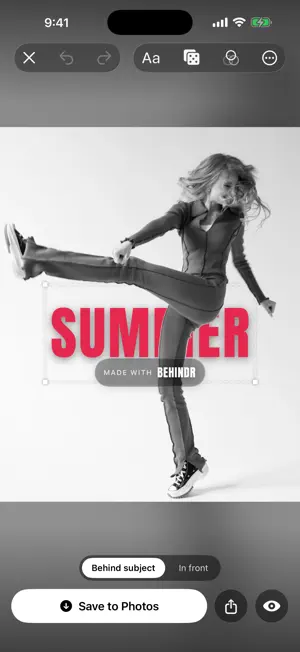
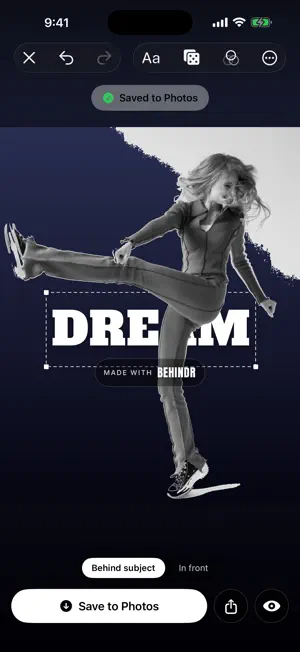
Behindr puts bold text BEHIND the subject of your photos and videos — that eye-catching, magazine-style effect where the words sit behind a person as if they were printed on the wall behind them. Add a word or a name and Behindr automatically tucks it behind the person (or pet, or object) so it looks like the text was there all along. It all happens in one tap. Behindr uses on-device AI to find your subject and lift them off the background instantly — no manual cut-outs, no green screen, and nothing ever leaves your phone. HOW IT WORKS 1. Pick a photo or video from your library. 2. Type your text. 3. Behindr slips it behind your subject automatically. 4. Fine-tune, then save to your camera roll or share. MAKE IT YOURS • 40 one-tap styles — POSTER, NEON, OUTLINE, Gold, MIAMI, CHERRY, VOGUE, Chalk and more. Tap one and the whole look is set for you. 28 are free; the other 12 arrive in the two look packs that come with Pro. • 22 display faces, 8 of them bundled with the app: Anton, Bebas Neue, Archivo Black, Alfa Slab One, Abril Fatface, Righteous, Pacifico and Permanent Marker — plus fourteen more your iPhone already has. • Rich text styles: gradients, outlines, drop shadows, highlights, plus custom size, spacing, rotation and opacity. • Move any layer behind OR in front of your subject for real depth. • Animate text on video: pop in, fade in, slide in, drop in and more. • 18 background looks. Five of them redraw the picture rather than recolour it — Cartoon, Anime, Comic, Sketch and Paint — and the other thirteen grade it: Blurred, Black & White, Vivid, Dreamy, Cyber, Sunset, Grain and more. • 17 drawn backdrops that replace the background entirely: nine patterns — Polka, Stripes, Checker, Sunburst, Blueprint, Halftone, Chevron, Waves and Confetti — and eight scenes. Every one is drawn on your phone, so it stays sharp at any size. • 4 subject effects that do something to the person, not the background. Clone and Pop-Out are free; Levitation and Giant come with Pro. • Your video's original sound carries straight through to the export. WORKS ON PHOTOS AND VIDEO In photos, Behindr lifts any clear subject — a person, a pet, an object. In video it tracks people, holding them separated across every single frame so your text stays locked behind them as they move. If a clip has no person in it, Behindr tells you before you export rather than after. PRIVATE BY DESIGN All of the AI processing runs entirely on your device. Your photos and videos are never uploaded to a server and never leave your phone. FREE TO TRY Every editing tool is free, and so is every font, every background look and every drawn backdrop — along with 28 of the 40 one-tap styles and 2 of the 4 subject effects. Free exports include a Behindr watermark, and free video exports are the first 10 seconds of your clip. Photos export at full resolution either way, and there is no daily limit on how many you can make. BEHINDR PRO Behindr Pro removes the watermark from your exports, exports your videos at their full length, and adds the Levitation and Giant subject effects. Pick the weekly, monthly or yearly plan — each starts with a free trial — or buy Behindr Pro once with a single purchase that never renews. The plans also include the look packs: 12 extra one-tap styles today, and new packs as they land. The price for your country, the billing period and the trial length are all shown on the upgrade screen before you buy. No account and no sign-up, ever. Subscriptions renew automatically unless cancelled at least 24 hours before the end of the current period. You can manage or cancel yours any time in your device's Settings. Terms of Use: https://verso-legal.pages.dev/terms Privacy Policy: https://verso-legal.pages.dev/privacy Make your next post look like it was designed by a pro. Download Behindr and put your text behind anything.
What’s new
Version 2.1 · Updated October 22, 2026
• A new look pack, included with Pro. SUNRISE and VAPOR fade your word through two colours, CHROME gives it a brushed-metal edge, and TAG, Highlight and QUOTE set it in a solid block the way a magazine would. • A yearly plan, for people who already know they are keeping this. • Free video exports are now the first 10 seconds of your clip. Pro exports the whole thing. Photos are unchanged — still free, still full resolution. • The suggestion strip no longer opens itself over your photo. It is still there when you want it — tap Ideas. • Removed five subject effects that did not do what their names promised. Clone, Giant, Levitation and Pop-out stay.
App privacy
The developer, joshua allen, reported these privacy practices to Apple.
Data Not Linked to You
The following data, which may be collected but is not linked to your identity, may be used for the following purposes:
- Usage Data: Product Interaction
- User Content: Other User Content
- Diagnostics: Crash Data, Performance Data
Used for: Analytics, App Functionality
Alternatives to Behindr — Text Behind Photo
Looking for apps like Behindr — Text Behind Photo? Here are 6 similar apps on the App Store. The highest rated is Add Text to Video - TEXT+IMAGE (5.0/5), and 5 of the 6 are free to download.
-
 AI Background Changer: Volai
4.8
AI Background Changer: Volai
4.8
-
 Photo Back to Life by Clever
1.0
Photo Back to Life by Clever
1.0
-
 Lightmeter: Pocket Film Camera
-
 Add Text to Video - TEXT+IMAGE
5.0
Add Text to Video - TEXT+IMAGE
5.0
-
 Video to Photo – Frame Capture
5.0
Video to Photo – Frame Capture
5.0
-
 Film Recipes App for Fujifilm
3.9
Film Recipes App for Fujifilm
3.9
| App | Rating | Price | Last updated | Compare |
|---|---|---|---|---|
| Behindr — Text Behind Photo | – | Free | October 22, 2026 | |
| AI Background Changer: Volai | 4.8 / 5 (5) | Free | Apr 15, 2026 | Compare |
| Photo Back to Life by Clever | 1.0 / 5 (1) | Free | Sep 20, 2025 | Compare |
| Lightmeter: Pocket Film Camera | – | Free | Oct 11, 2026 | Compare |
| Add Text to Video - TEXT+IMAGE | 5.0 / 5 (1) | Free | Jan 16, 2026 | Compare |
| Video to Photo – Frame Capture | 5.0 / 5 (3) | Free | Sep 10, 2026 | Compare |
| Film Recipes App for Fujifilm | 3.9 / 5 (7) | 24.99 USD | Jan 14, 2026 | Compare |