

Book Narrator
Dynamic Upgrade Book iPhoneiPadiPod touch
Book Narrator is a free Book app for iPhone and iPad by Dynamic Upgrade. Requires iOS 16.0. Updated September 3, 2026.
- Price
- Free
- on the App Store
- Size
- 68 MB
- Age 4+
- Updated
- Sep 3
- 2026 · v1.14
Screenshots


About Book Narrator
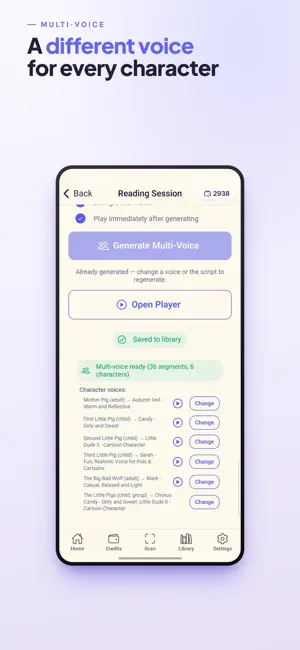
Book Voice turns any book — or any story you imagine — into a vivid, multi-voice audiobook with its own illustrations. Scan the pages of a printed book, paste in text, or let Book Voice create an original story for you. Then press play and hear it read aloud, giving the narrator and every character their own distinct, lifelike AI voice. HOW IT WORKS - Scan: Snap photos of any book's pages with your phone or tablet. - Or create: Type an idea — or paste a story — and Book Voice writes, narrates, and illustrates it. - Listen: Press play and enjoy a fully narrated, character-by-character performance, now with page art to match. FEATURES - Multi-voice narration: A separate voice for the narrator and each character brings every conversation to life. - AI illustrations: Give your created and pasted stories beautiful, storybook-style artwork — choose a style and every page gets its own picture. - Create a Story: Let Book Voice invent an original tale, then narrate and illustrate it. Book Voice turns any book — or any story you imagine — into a vivid, multi-voice audiobook with its own illustrations. Scan the pages of a printed book, paste in text, or let Book Voice create an original story for you. Then press play and hear it read aloud, giving the narrator and every character their own distinct, lifelike AI voice. HOW IT WORKS - Scan: Snap photos of any book's pages with your phone or tablet. - Or create: Type an idea — or paste a story — and Book Voice writes, narrates, and illustrates it. - Listen: Press play and enjoy a fully narrated, character-by-character performance, now with page art to match. FEATURES - Multi-voice narration: A separate voice for the narrator and each character brings every conversation to life. - AI illustrations: Give your created and pasted stories beautiful, storybook-style artwork — choose a style and every page gets its own picture. - Create a Story: Let Book Voice invent an original tale, then narrate and illustrate it. - Import & paste text: Drop in a story from anywhere — notes, the web, even AI Generated stories — and hear it performed with a voice for every character. - Read Along: Read the page out loud and watch each word highlight in real time. - Karaoke word highlighting: Follow along word by word as the story is spoken — perfect for new and developing readers. - Projector Mode: Cast the page and captions to a big screen for classrooms and story time. - Playlists: Queue up several books for hands-free, back-to-back listening. - Background music: Add gentle, mood-matched soundtracks to any story. - Offline playback: Save narrations to your device and listen anywhere, no connection needed. - Your library: Keep every book and story you create organized and ready to replay. GREAT FOR - Readers who would rather listen - Kids and early readers building literacy - Classrooms and homeschooling - Language learners - Anyone with dyslexia or low vision - Commutes, chores, and bedtime stories Bring your bookshelf — and your imagination — to life. Scan a book, paste a story, or create one, then press play.
What’s new
Version 1.14 · Updated September 3, 2026
This update makes scanning and generating smoother and more reliable: • Smoother audiobook generation — we fixed errors that could appear if you left a book generating and reopened the app. Generation keeps running in the background and your book is ready when you come back. • Faster, more reliable book-cover scanning. Re-scanning a cover now replaces the title instead of doing nothing. • The Scan tab now clearly shows books that still need finishing — no more misleading "processing" spinner — and lets you delete unfinished scans you haven't started. • Tapping Back from a scan now returns you to your scan list, where you'd expect. • Playback and stability improvements throughout. Thanks for using Book Voice! We read every review — if you have an idea or run into anything, we'd love to hear from you.
App privacy
The developer, Dynamic Upgrade, reported these privacy practices to Apple.
Data Used to Track You
The following data may be used to track you across apps and websites owned by other companies:
- Purchases: Purchase History
- Location: Coarse Location
- Identifiers: Device ID
- Usage Data: Product Interaction, Advertising Data
Data Linked to You
The following data, which may be collected and linked to your identity, may be used for the following purposes:
- Location: Coarse Location
- Identifiers: Device ID, User ID
- Usage Data: Product Interaction, Advertising Data, Other Usage Data
- Diagnostics: Other Diagnostic Data
- Purchases: Purchase History
- User Content: Other User Content, Photos or Videos, Audio Data
- Other Data: Other Data Types
- Contact Info: Email Address, Name
Used for: Third-Party Advertising, Developer’s Advertising or Marketing, Analytics, App Functionality
Data Not Linked to You
The following data, which may be collected but is not linked to your identity, may be used for the following purposes:
- Diagnostics: Performance Data, Crash Data
Used for: Third-Party Advertising, Developer’s Advertising or Marketing, Analytics, App Functionality
Alternatives to Book Narrator
Looking for apps like Book Narrator? Here are 6 similar apps on the App Store. The highest rated is Tambr: Multi Voice Reader (5.0/5), and all 6 are free to download.
-
 Text To Voice - LitVoice
-
 Tambr: Multi Voice Reader
5.0
-
 eBookly: Personal ePub Reader
-
 Vesper: EPUB, PDF, & AI Reader
-
 MagicReader: Hands-Free Reader
-
 10x AudioBooks
| App | Rating | Price | Last updated | Compare |
|---|---|---|---|---|
| Book Narrator | – | Free | September 3, 2026 | |
| Text To Voice - LitVoice | – | Free | Aug 17, 2026 | Compare |
| Tambr: Multi Voice Reader | 5.0 / 5 (1) | Free | Apr 24, 2026 | Compare |
| eBookly: Personal ePub Reader | – | Free | Oct 15, 2026 | Compare |
| Vesper: EPUB, PDF, & AI Reader | – | Free | Jun 1, 2026 | Compare |
| MagicReader: Hands-Free Reader | – | Free | Oct 10, 2026 | Compare |
| 10x AudioBooks | – | Free | Nov 17, 2024 | Compare |
Compare Book Narrator with the top alternatives: ratings, updates, ASO score and keyword gaps →