

eBookly: Personal ePub Reader
識途科技有限公司 Book iPhoneiPadiPod touch
eBookly: Personal ePub Reader is a free Book app for iPhone and iPad by 識途科技有限公司. Requires iOS 16.0. Updated October 15, 2026.
- Price
- Free
- on the App Store
- Size
- 25 MB
- Age 4+
- Updated
- Oct 15
- 2026 · v1.1.0
Screenshots

About eBookly: Personal ePub Reader
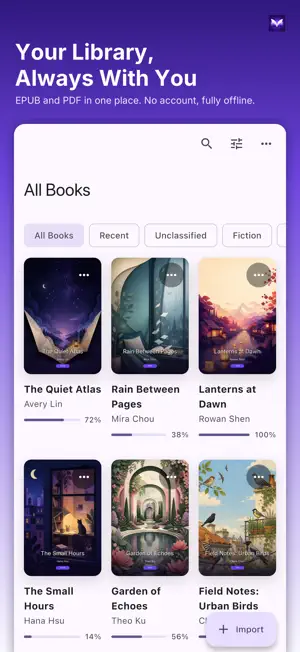
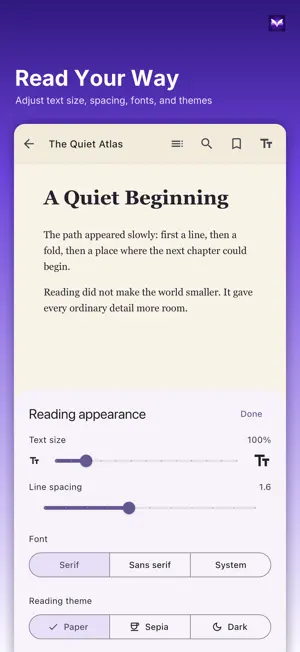
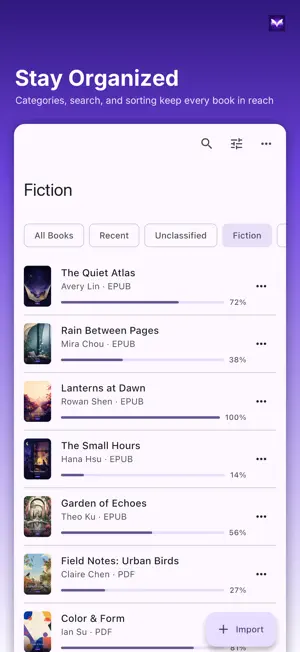
Turn your EPUB, PDF, and comic files into a private, offline library made for your device. eBookly is clean, ad-free, and requires no account. Choose books from Files, drag and drop them, or import them through the share sheet. Reading does not require a connection to an eBookly server, and eBookly never sends your books to us. Your private offline library • Import EPUB and PDF files • Organize novels, reference documents, and comics into folders • Search by title or author • Sort by recent import, recent reading, title, or author • Edit titles, authors, descriptions, and cover artwork • Keep reading progress and bookmarks on your device A comfortable EPUB reader • Adjust text size, line spacing, and font family • Choose paper, sepia, or dark reading themes • Browse the table of contents and search book text • Read fixed-layout EPUB and right-to-left publications PDF and comics • Read standard PDF documents directly • Enjoy comics and illustrated content supplied as PDF or fixed-layout EPUB • CBZ and CBR are not claimed as supported formats Privacy by design • No account • No ads or in-app purchases • No tracking • No data collection and no eBookly app servers
What’s new
Version 1.1.0 · Updated October 15, 2026
Foldable phone support • Unfold and turn sideways to read PDFs and fixed-layout EPUBs as a two-page spread, just like an open book. • When folded, the outer display can show the book's cover or a built-in cover. Tap to keep reading. • New settings for two-page mode (Automatic, Always on, Off) and the outer display. Refined design and usability • On phones, the library now uses category chips and a floating Import button for easier one-handed use. • Sorting, grid or list view, and cover size now live in one View options menu. Long-press a book to open its menu. • Covers keep true book proportions, and list view shows cover thumbnails and reading progress. • Reader toolbars match the paper, sepia, and dark themes, hide after you open a book, and come back with a tap in the middle of the page. • EPUB text is larger and easier to read on phones, and chapter openings are no longer hidden behind the toolbars. • Drag the progress bar to jump straight to that point, with the current chapter shown. • Reading appearance changes preview as you make them, and you can choose which direction taps and swipes turn the page. • Finish a book and you'll see a small celebration.
App privacy
The developer, 識途科技有限公司, reported these privacy practices to Apple.
Data Not Collected
The developer does not collect any data from this app.
Alternatives to eBookly: Personal ePub Reader
Looking for apps like eBookly: Personal ePub Reader? Here are 6 similar apps on the App Store. The highest rated is ereader (5.0/5), and all 6 are free to download.
-
 Duri: Book & PDF Reader
-
 ereader
5.0
-
 Actually Read: Focus Reader
5.0
-
 Readora: EPUB Ebook Reader
4.8
-
 FoxNovel-Read & Story Books
3.5
-
 古燈文庫 - 掌中閱讀必備利器
4.9
| App | Rating | Price | Last updated | Compare |
|---|---|---|---|---|
| eBookly: Personal ePub Reader | – | Free | October 15, 2026 | |
| Duri: Book & PDF Reader | – | Free | Oct 15, 2026 | Compare |
| ereader | 5.0 / 5 (1) | Free | Dec 20, 2023 | Compare |
| Actually Read: Focus Reader | 5.0 / 5 (41) | Free | Oct 29, 2026 | Compare |
| Readora: EPUB Ebook Reader | 4.8 / 5 (5) | Free | Oct 23, 2026 | Compare |
| FoxNovel-Read & Story Books | 3.5 / 5 (425) | Free | Apr 27, 2025 | Compare |
| 古燈文庫 - 掌中閱讀必備利器 | 4.9 / 5 (831) | Free | Apr 21, 2026 | Compare |