

My Notes: Cards & Pages
SAIKONTAN.LLC Lifestyle iPhoneiPadiPod touch
My Notes: Cards & Pages is a free Lifestyle app for iPhone and iPad by SAIKONTAN.LLC. Requires iOS 17.0. Updated August 31, 2026.
- Price
- Free
- on the App Store
- Size
- 7 MB
- Age 9+
- Updated
- Aug 31
- 2026 · v1.0
Screenshots



About My Notes: Cards & Pages
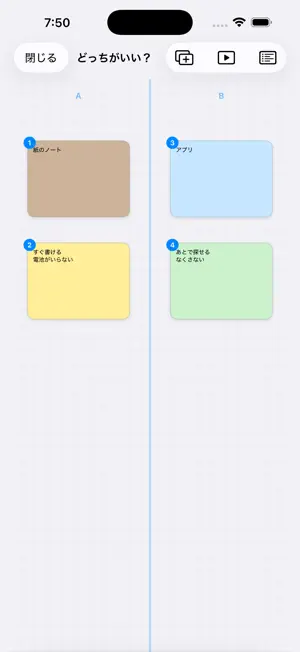
My Notes is a notebook where a note is a stack of cards you can move around. Write on pages like an ordinary notebook, or open the card board and spread the same pages out as cards. Drag them anywhere, connect them with lines, and stack the ones that belong together. When your thinking is settled, present the cards in order — full screen, one tap at a time. WRITE THE WAY YOU LIKE • Rich text — bold, italic, underline, highlight colors and text size • Handwriting on any page or card, with Apple Pencil or your finger • Photo cards for pictures from your library • Templates to start from: diary, to-do, shopping, habits, meals, meeting, class, reading, ideas, study checklist, travel, gratitude, review, dreams THINK ON THE BOARD • Place cards freely and connect them with lines • Stack related cards into one, and unstack them again • Three card sizes and six card colors • Board layouts to think inside: Compare (2 columns), Sort (4 quadrants), Timeline and Overlap (Venn) PRESENT WHAT YOU MADE • Follow the lines you drew and show cards one by one • Tap the right side to go forward, the left edge to go back • Autoplay for hands-free presenting KEEP IT SAFE, TAKE IT WITH YOU • Export a note as PDF or Markdown • Back up and restore your notes on the device • Attach files to a note • Set a reminder to come back to a note • Contents list to jump between pages JAPANESE AND ENGLISH Switch the display language between Japanese and English right from the home screen — no need to change your device settings. FREE AND PREMIUM The free version lets you create up to 10 pages or cards per note, and shows ads. You can watch an ad to add one more page. My Notes Premium removes the ads and the limit: • Monthly plan — renews every month • Yearly plan — renews every year, about 33% less than monthly, with the first week free Payment is charged to your Apple ID account at confirmation of purchase. Subscriptions renew automatically unless canceled at least 24 hours before the end of the current period. Manage or cancel any time from Subscriptions in the App Store. Terms of Use: https://www.apple.com/legal/internet-services/itunes/dev/stdeula/ Privacy Policy: https://saikontan.main.jp/2025/11/16/privacy-policy/
App privacy
The developer, SAIKONTAN.LLC, reported these privacy practices to Apple.
Data Not Linked to You
The following data, which may be collected but is not linked to your identity, may be used for the following purposes:
- Usage Data: Advertising Data
Used for: Third-Party Advertising, Analytics, Product Personalization
Alternatives to My Notes: Cards & Pages
Looking for apps like My Notes: Cards & Pages? Here are 6 similar apps on the App Store. The highest rated is Komoriba: Cozy Focus Timer (5.0/5), and 5 of the 6 are free to download.
-
 UV Index & Sun Tanning: Bronzr
-
 緘黙症サポート コミュサポ
-
 Genko Planner
-
 Komoriba: Cozy Focus Timer
5.0
-
 ホルモン焼道場蔵
-
 HERO'Sステーキハウス
| App | Rating | Price | Last updated | Compare |
|---|---|---|---|---|
| My Notes: Cards & Pages | – | Free | August 31, 2026 | |
| UV Index & Sun Tanning: Bronzr | – | Free | Aug 7, 2025 | Compare |
| 緘黙症サポート コミュサポ | – | Free | Mar 26, 2026 | Compare |
| Genko Planner | – | 2.99 USD | Oct 29, 2026 | Compare |
| Komoriba: Cozy Focus Timer | 5.0 / 5 (1) | Free | Sep 3, 2026 | Compare |
| ホルモン焼道場蔵 | – | Free | Dec 11, 2025 | Compare |
| HERO'Sステーキハウス | – | Free | Sep 1, 2025 | Compare |