

Genko Planner
TAKASA WORKS Lifestyle iPhoneiPadiPod touch
Genko Planner is a paid Lifestyle app for iPhone and iPad by TAKASA WORKS. Requires iOS 17.0. Updated October 19, 2026.
- Price
- 2.99 USD
- on the App Store
- Size
- 56 MB
- Age 4+
- Updated
- Oct 19
- 2026 · v1.21.5
Screenshots


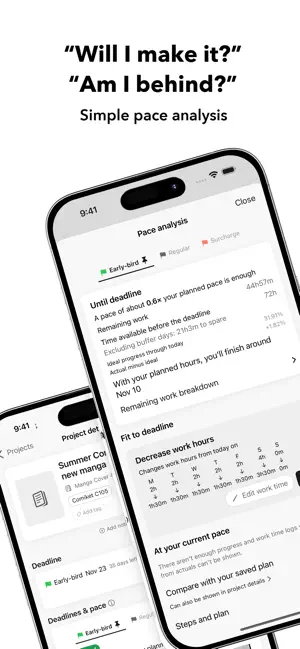
About Genko Planner
"How many pages a day do I need to make the deadline?" "I don't have time to work out my pace." "I might end up paying the late-submission surcharge…" Let Genko Planner take care of those worries. Genko Planner is a production planner for manga, novels, illustrations, merch, and every kind of creative project. It tracks your progress and pace so you can meet your print deadlines and finish your work in good health. ◆ Made for you if you… - Always end up submitting your doujinshi at the last minute - Want to manage several projects at once - Want to see your work pace in numbers - Want a tool to prepare for conventions [Features] ◆ Automatic schedule for every step Enter your page count, available work hours, and deadline, and Genko Planner builds a schedule for each step and for the whole project. Supports three print deadlines (early-bird, regular, and surcharge) and shows the big picture on a Gantt chart. Register as many print shops as you like, and customize your steps freely. Besides public holidays, you can set days off and days when you'll work more or less, for a schedule that fits real life. ◆ Pace analysis that catches delays early Every time you log progress, the app checks whether your current pace will meet the deadline. Along with an 8-level status, it shows the pace you need, your current pace, missing work time, and more. ◆ Progress logs for each step Log the cover and the main pages separately with a few taps. Log from the work timer and your work time is saved automatically. The timer supports custom breaks and reminders at regular intervals. ◆ Convention planning Includes presets for major conventions in Japan and South Korea, and you can add any event yourself. Keep venue info, your circle's space, items to bring, shopping lists, and prep checklists in one place. Link projects to conventions to see which project goes to which event. ◆ All-in-one calendar See deadlines, conventions, planned work, and work logs in month, week, and day views. Add notes to leave to-dos in your schedule. ◆ Reports & sharing See your monthly work time and page count in charts, and share progress cards on social media. It's also fun to look back on how much you worked this year. ◆ Dark mode ◆ iCloud sync Syncs automatically across your devices. Log on your iPhone, check on your iPad, and stay on top of things anywhere. Choose your holiday calendar (United States, Japan, South Korea, Taiwan, Hong Kong, Macao, Singapore, or Malaysia) in Settings > Language & region, and your schedule follows it. Schedules are calculated in your planning time zone. To protect your data, project names, step names, and notes you've saved are never translated automatically. Get through crunch time with a plan, with Genko Planner!
What’s new
Version 1.21.5 · Updated October 19, 2026
New - Genko Planner is now available in English and Chinese (Traditional and Simplified). - You can now choose United States (federal holidays) in Settings > Language & region > Holiday calendar. - You can now change the planning time zone in Settings > Language & region. Your deadlines, the work dates of past logs, progress, and work time stay the same; only the region used for switching days and sending notifications changes. - On Home, projects whose planned work for today is done now show a check mark. When all of today's planned work is done, the heading gets a flower stamp. This appears when "Celebrate planned work completion" is on in Settings. Fixes and improvements - If saving a log stops partway, what you entered is now kept so you can review it and save it again later. - Work logs on the calendar now follow your "Day rollover time" setting. - If you use more than one print shop, you can now check deadlines and pace on a tab for each shop. - Work reminders now put unfinished projects first, and stop for the day once all of today's planned work is done. - Fixed planned time and plan comparisons not showing correctly for projects that aren't split into steps. - Updated the dates of convention presets.
App privacy
The developer, TAKASA WORKS, reported these privacy practices to Apple.
Data Not Collected
The developer does not collect any data from this app.
Alternatives to Genko Planner
Looking for apps like Genko Planner? Here are 6 similar apps on the App Store. The highest rated is Komoriba: Cozy Focus Timer (5.0/5), and 5 of the 6 are free to download.
-
 つくログ
つくログ
-
 Min Habit - Habit Tracker
4.0
Min Habit - Habit Tracker
4.0
-
 Thermal - Daily Receipt
-
 Routine Task Timer
4.5
Routine Task Timer
4.5
-
 #OSHI for fan activities
4.0
#OSHI for fan activities
4.0
-
 Komoriba: Cozy Focus Timer
5.0
Komoriba: Cozy Focus Timer
5.0
| App | Rating | Price | Last updated | Compare |
|---|---|---|---|---|
| Genko Planner | – | 2.99 USD | October 19, 2026 | |
| つくログ | – | Free | Sep 15, 2026 | Compare |
| Min Habit - Habit Tracker | 4.0 / 5 (2) | 1.99 USD | Oct 2, 2026 | Compare |
| Thermal - Daily Receipt | – | Free | Sep 14, 2026 | Compare |
| Routine Task Timer | 4.5 / 5 (20) | Free | Jun 9, 2026 | Compare |
| #OSHI for fan activities | 4.0 / 5 (2) | Free | Oct 18, 2026 | Compare |
| Komoriba: Cozy Focus Timer | 5.0 / 5 (1) | Free | Sep 3, 2026 | Compare |
Compare Genko Planner with the top alternatives: ratings, updates, ASO score and keyword gaps →