

Lock Screen Studio
Arinitsolutions Productivity iPhoneiPadiPod touch
Lock Screen Studio is a free Productivity app for iPhone and iPad by Arinitsolutions. Requires iOS 17.0. Updated September 24, 2026.
- Price
- Free
- on the App Store
- Size
- 7 MB
- Age 4+
- Updated
- Sep 24
- 2026 · v1.14.0
Screenshots


About Lock Screen Studio
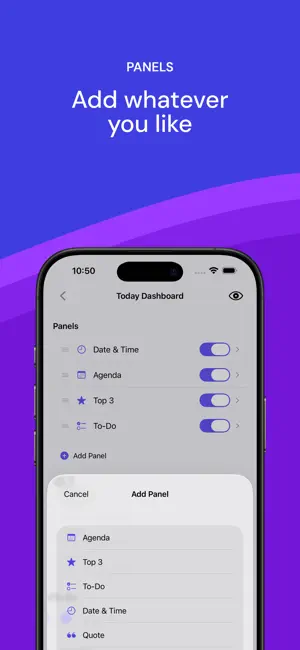
Turn your Lock Screen into a personal dashboard. Lock Screen Studio generates custom wallpaper images with your daily agenda, priorities, to-dos, countdowns, and more - all beautifully arranged on your Lock Screen. HOW IT WORKS 1. Choose from 14 built-in templates or create your own 2. Customize panels, themes, colors, and backgrounds 3. Generate - the wallpaper is saved to your Photos, ready to apply as your Lock Screen FEATURES • Calendar integration - see today's events at a glance • To-do lists - track tasks right on your Lock Screen, or sync them from Apple Reminders (pick a list, filter by today or the next 7 days) • Top 3 priorities - stay focused on what matters • Interactive Home Screen widget - tap to mark todos done without opening the app • Lock Screen widgets - today's progress above the clock, without unlocking • Consistency panel - your streak as a heatmap, counted from your completed todos or your Apple Health step count • Year in Pixels - a full-page widget showing your whole year at a glance (iOS 27) • Todo history with streak stats and a 13-week completion heatmap • Daily quote packs - hand-picked Stoic, Focus, Calm, and Motivation collections that rotate a fresh quote each day, or write your own • Share templates with friends - export as a file, import via AirDrop or Files • Countdown timers - count days to important events • Monthly calendar grid - see the full month • Custom notes • Photo backgrounds with blur and dim controls - or add up to 10 photos and get a different one each day • Dark, light, and gradient themes • 9 font color options for perfect readability • Adjustable font size and vertical text position • Export for any iPhone model (12 through 18 series) AUTOMATION Pair with Apple Shortcuts and your iPhone will generate a fresh wallpaper for you on a schedule - every morning at 7 AM, after your alarm, when Focus turns on, when you arrive at work, or at sunset. The app ships 5 ready-made recipes with clear, step-by-step setup instructions, written separately for iOS 26 and iOS 27. The new wallpaper is applied to your Lock Screen automatically - no tapping, no confirmation. A notification sums up your day: how many events and open to-dos you have. PRO Unlock all templates, unlimited exports, premium gradients, photo backgrounds, quote packs, custom panel creation, and advanced Shortcuts automation. The yearly plan starts with a 7-day free trial. No accounts, no ads, no third-party tracking. Your data never leaves your device. Health data is read only - never written back, never sent anywhere. Terms of Use (EULA): https://www.apple.com/legal/internet-services/itunes/dev/stdeula/ Privacy Policy: https://www.lockscreenstudio.com/privacy
What’s new
Version 1.14.0 · Updated September 24, 2026
• Apple Health steps now colour the Consistency panel, with a streak • New Lock Screen widgets, plus a full-page Year in Pixels widget on iOS 27 • Added iPhone 18 Pro and Pro Max • Automation guide rewritten for iOS 27 • Accessibility and stability fixes
App privacy
The developer, Arinitsolutions, reported these privacy practices to Apple.
Data Not Collected
The developer does not collect any data from this app.
Alternatives to Lock Screen Studio
Looking for apps like Lock Screen Studio? Here are 6 similar apps on the App Store. The highest rated is Lock Screen Notes: LockCards (5.0/5), and all 6 are free to download.
-
 Ingrained
-
 Glance Notes: Lock Screen
-
 Lock Screen Notes: LockCards
5.0
Lock Screen Notes: LockCards
5.0
-
 Habit & Goal Tracker: Dots
-
 Visual AI Text to Infographic
-
 Humanize AI - ByeGPT
5.0
Humanize AI - ByeGPT
5.0
| App | Rating | Price | Last updated | Compare |
|---|---|---|---|---|
| Lock Screen Studio | – | Free | September 24, 2026 | |
| Ingrained | – | Free | Jan 14, 2026 | Compare |
| Glance Notes: Lock Screen | – | Free | Sep 2, 2026 | Compare |
| Lock Screen Notes: LockCards | 5.0 / 5 (1) | Free | Sep 28, 2026 | Compare |
| Habit & Goal Tracker: Dots | – | Free | Oct 23, 2026 | Compare |
| Visual AI Text to Infographic | – | Free | Oct 9, 2026 | Compare |
| Humanize AI - ByeGPT | 5.0 / 5 (1) | Free | Jan 7, 2026 | Compare |
Compare Lock Screen Studio with the top alternatives: ratings, updates, ASO score and keyword gaps →