

QuickSign: Signature & Stamp
Butler Labs LLC Business iPhoneiPadiPod touch
QuickSign: Signature & Stamp is a free Business app for iPhone and iPad by Butler Labs LLC. Rated 5.0/5 from 3 ratings. Requires iOS 26.0.
- Rating
- 5.0
- 3 ratings
- Price
- Free
- on the App Store
- Size
- 42 MB
- Age 4+
- Updated
- Oct 12
- 2026 · v1.4.1
Screenshots


About QuickSign: Signature & Stamp
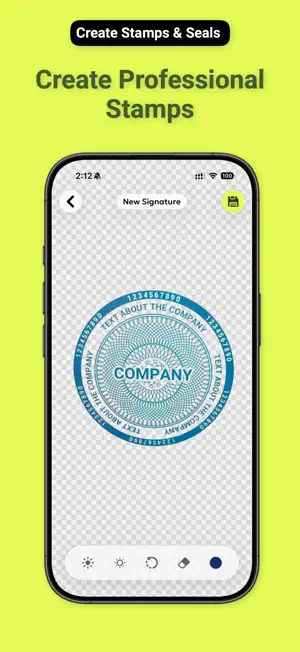
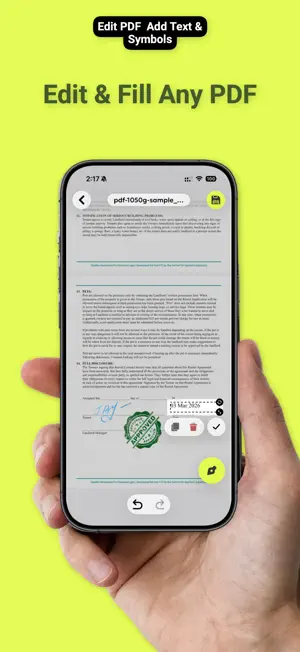
Stop faking it with a typed name. QuickSign lets you sign documents with your actual handwritten signature — captured by camera, refined by AI, and placed exactly where it needs to go. WHY QUICKSIGN • Real camera signature — scan your ink signature from paper; AI removes the background on your iPhone so it looks crisp on any document • Stamps & seals — create professional round stamps and custom seals in seconds, no design skills needed • No account, ever — nothing to sign up for. Your work syncs through your own iCloud, and only you can read it WHO USES QUICKSIGN Real estate agents who need to countersign contracts on the go. Notaries who want a clean digital workflow without compromising authenticity. Attorneys handling NDAs and engagement letters between meetings. Freelancers signing client agreements before a project kicks off. Small business owners processing invoices, packing slips, and service agreements without the overhead of enterprise e-sign platforms. HOW IT WORKS 1. Import or photograph your document — open any PDF from Files, Mail, or your camera roll, or bring in a Word, Excel, PowerPoint, Pages, Numbers, Keynote, or OpenDocument file and QuickSign turns it into a PDF for you 2. Place your signature or stamp — tap to add, drag to position, pinch to resize; done in under a minute 3. Share or save — export as a flattened PDF ready for email, print, or filing FEATURES • Camera scan → AI background removal for natural-looking signatures, processed on device • Draw directly on screen as an alternative signature method • Create and manage multiple signatures and stamps • Annotate PDFs: text boxes, highlights, freehand drawing, shapes • Fill in form fields on interactive PDFs • Import Office and OpenDocument files — converted to PDF automatically • Multi-page document support with full page management • Sign, stamp, and annotate offline — no connection required • Export to PDF, share via AirDrop, Mail, or any app PRIVACY There is no QuickSign account and no QuickSign server holding your documents. Your signatures, stamps, and files live on your device and sync through your own private iCloud, which only you can open — we cannot read any of it. The AI that cleans up a photographed signature runs on your iPhone, and the PDFs you sign are never sent anywhere. One exception, and we would rather state it plainly than bury it. An Office or OpenDocument file has to become a PDF before you can sign it. Word (.docx), Pages, Numbers, and Keynote files are converted on your device. Other Office formats — .doc, .xls, .xlsx, .ppt, .pptx, .rtf, and OpenDocument — are sent to our own conversion service, which returns the PDF and keeps nothing; the file name never travels with it. Turn it off in Settings and QuickSign converts on device whatever iOS can handle. Download QuickSign today and sign your next document the right way — with your real signature. Terms of Use: https://www.butlerlabs.io/apps/quicksign-sign-pdf-documents/terms Privacy Policy: https://www.butlerlabs.io/apps/quicksign-sign-pdf-documents/privacy
What’s new
Version 1.4.1 · Updated October 12, 2026
• Images with a transparent background — a cut-out signature, a stamp or a logo — now stay transparent on your documents • If camera access is turned off, QuickSign now explains how to turn it back on and offers other ways to add a document, signature or stamp • If you cancel a purchase, the subscription screen stays open so you can choose another plan • The scanner now fills the whole screen when you add pages to a document • Files from iCloud Drive and other apps now open reliably, and QuickSign tells you when a file can't be read • If Face ID is off for QuickSign or not set up, turning on app lock now explains why and lets you use a PIN only • Stability improvements
App privacy
The developer, Butler Labs LLC, reported these privacy practices to Apple.
Data Not Linked to You
The following data, which may be collected but is not linked to your identity, may be used for the following purposes:
- Usage Data: Product Interaction
- Diagnostics: Crash Data
Used for: Analytics, App Functionality
Alternatives to QuickSign: Signature & Stamp
Looking for apps like QuickSign: Signature & Stamp? Here are 6 similar apps on the App Store. The highest rated is Stamp & Signature (5.0/5), and 5 of the 6 are free to download.
-
 Sign. Just sign and seal
-
 Stamp & Signature
5.0
-
 KaşeİMZA: PDF İmzala, Kaşe
-
 QuickSign eSign: PDF Scanner
-
 Sign PDF - eSign & Fill Docs
5.0
-
 Electronic Signature Scanner
| App | Rating | Price | Last updated | Compare |
|---|---|---|---|---|
| QuickSign: Signature & Stamp | 5.0 / 5 (3 ratings) | Free | October 12, 2026 | |
| Sign. Just sign and seal | – | Free | Jun 2, 2026 | Compare |
| Stamp & Signature | 5.0 / 5 (1) | 1.99 USD | Oct 2, 2026 | Compare |
| KaşeİMZA: PDF İmzala, Kaşe | – | Free | Sep 12, 2026 | Compare |
| QuickSign eSign: PDF Scanner | – | Free | Mar 12, 2026 | Compare |
| Sign PDF - eSign & Fill Docs | 5.0 / 5 (1) | Free | Jun 6, 2026 | Compare |
| Electronic Signature Scanner | – | Free | Oct 21, 2026 | Compare |