

Electronic Signature Scanner
MANUEL MATAS GALEOTE Productivity iPhoneiPadiPod touch
Electronic Signature Scanner is a free Productivity app for iPhone and iPad by MANUEL MATAS GALEOTE. Requires iOS 17.6. Updated October 21, 2026.
- Price
- Free
- on the App Store
- Size
- 13 MB
- Age 4+
- Updated
- Oct 21
- 2026 · v1.6.0
Screenshots
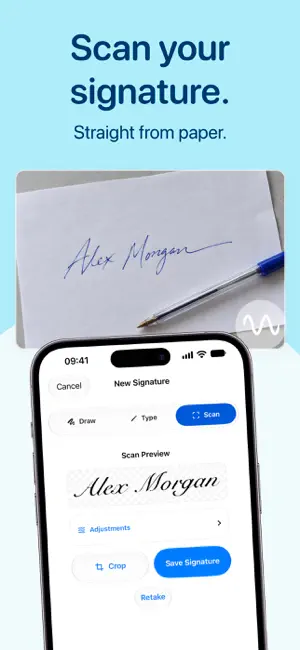


About Electronic Signature Scanner
Create your signature, sign PDF documents, and fill out forms on your iPhone or iPad. Signature Maker brings together the tools to prepare your documents, add your signature, and share the result in one app. Sign contracts, complete forms, or prepare documents to send without printing them. Import a PDF, choose an image from Photos, or scan a document with the camera. • Create signatures and initials by drawing with your finger or Apple Pencil. • Type your name or initials and choose from a range of handwriting-style fonts. • Scan a signature on paper, clean up the background, and adjust the contrast to make it clearer. • Crop scanned signatures and adjust stroke width, color, and smoothing. • Save your signatures and initials to reuse in other documents. • Undo and redo as you draw or edit. Work with single-page or multipage documents. Place each element where you need it and fine-tune the result before sharing. • Add signatures, text, dates, checkmarks, crosses, and circles. • Move, resize, and rotate signatures to fit your document. • Move elements between pages and rotate pages to correct their orientation. • Zoom in to position each element precisely. • Fill out PDF form fields, including text fields, checkboxes, radio buttons, and selection lists. • Assign your saved signatures to compatible signature fields. Export your signed documents as PDFs and share them directly from the app. Save a copy in My Documents to access later, and keep your signatures organized in a reusable gallery. Your documents and signatures are saved on your device. If you use iCloud sync, your data syncs through your own Apple Account. We do not sell your data or share your documents with third parties for advertising. Terms of Use (EULA): https://www.apple.com/legal/internet-services/itunes/dev/stdeula/ Privacy Policy: https://sites.google.com/view/privacysigantureapp/home
What’s new
Version 1.6.0 · Updated October 21, 2026
Bug fixes and performance improvements.
App privacy
The developer, MANUEL MATAS GALEOTE, reported these privacy practices to Apple.
Data Linked to You
The following data, which may be collected and linked to your identity, may be used for the following purposes:
- Purchases: Purchase History
- Identifiers: User ID
Used for: App Functionality
Alternatives to Electronic Signature Scanner
Looking for apps like Electronic Signature Scanner? Here are 6 similar apps on the App Store. The highest rated is Sign App: E-Signature Maker (5.0/5), and all 6 are free to download.
-
 Signature Maker: Scan&Sign PDF
-
 Sign App: E-Signature Maker
5.0
Sign App: E-Signature Maker
5.0
-
 PDFDone: Sign & Scan PDF
-
 PDF Pro – Scan, Sign & Convert
-
 SignHere | PDF & Doc Sign
-
 Signature Creator - eSign App
| App | Rating | Price | Last updated | Compare |
|---|---|---|---|---|
| Electronic Signature Scanner | – | Free | October 21, 2026 | |
| Signature Maker: Scan&Sign PDF | – | Free | Nov 5, 2025 | Compare |
| Sign App: E-Signature Maker | 5.0 / 5 (1) | Free | Jun 5, 2026 | Compare |
| PDFDone: Sign & Scan PDF | – | Free | Mar 2, 2026 | Compare |
| PDF Pro – Scan, Sign & Convert | – | Free | Jan 2, 2026 | Compare |
| SignHere | PDF & Doc Sign | – | Free | Mar 31, 2026 | Compare |
| Signature Creator - eSign App | – | Free | Aug 22, 2026 | Compare |