

Sign App: E-Signature Maker
Kenan Sezginbas Productivity iPhoneiPadiPod touch
Sign App: E-Signature Maker is a free Productivity app for iPhone and iPad by Kenan Sezginbas. Rated 5.0/5 from 1 ratings. Requires iOS 26.2.
- Rating
- 5.0
- 1 ratings
- Price
- Free
- on the App Store
- Size
- 13 MB
- Age 4+
- Updated
- Jun 5
- 2026 · v1.4.1
Screenshots
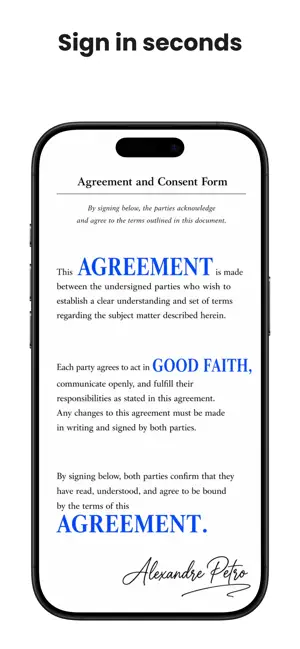


About Sign App: E-Signature Maker
"Sign App" is a fast and intuitive mobile app for e-signing PDF documents, scanning paper files, and managing all your signed paperwork in one place. Create your electronic signature once — draw, type, or upload — and apply it to any document in seconds with the signature maker. • Sign Documents Instantly • - E-sign PDF documents with a legally-binding electronic signature. - Create unique e-signatures: draw to sign with your finger or Apple Pencil, type to sign with elegant handwriting fonts, or upload your real signature from a photo. - Save multiple signatures and reuse them across all your documents. - Automatic background removal for uploaded signature images — clean, professional results every time. • Import & Scan Documents • - Import PDF files directly from the Files app. - Scan paper documents using your iPhone camera and convert them to PDF instantly. - Import images (JPEG, PNG) from your photo library and automatically convert to PDF. - Supports documents up to 50 MB for seamless PDF signing. • Powerful Document Editor • - Add e-signatures, text fields, dates, and checkmarks to any page of your PDF. - Drag and drop annotations to position them precisely on the document. - Navigate and sign multi-page PDF documents with ease. - Undo and redo edits — never worry about making a mistake. • Organize & Manage Documents • - Create folders to keep contracts, invoices, and agreements neatly organized. - Search, rename, and filter documents by status: Draft, Signed, or Shared. - Switch between grid and list views to browse your document library. - Automatic thumbnail previews for quick document identification. • Export & Share Signed Documents • - Share signed PDF documents via email, messaging apps, AirDrop, and more. - Save signed documents as PDF to the Files app for easy access. - Export individual pages as images to your photo gallery. - Track shared documents — every exported file is marked for your records. • Securely Stored on Your Device • - All documents and signatures are stored locally on your device — your data never leaves your phone without your permission. - No account or login required. Start signing documents immediately. - Your sensitive contracts and personal documents remain private and secure. • Free & Pro Plans • - Sign up to 3 documents per month for free with the document signer. - Upgrade to Sign App Pro for unlimited document signing, unlimited saved signatures, folder organization, all editing tools, and priority support. - Choose Monthly, Yearly, or Lifetime plans — cancel anytime. Whether you need to sign a contract, fill out a form, e-sign an invoice, or scan and digitize paper documents — Sign App is the fastest way to get documents signed on your iPhone. Download the #1 e-signature app and start signing documents today. • Subscription Information • Payment will be charged to your Apple ID account upon confirmation of purchase. The subscription automatically renews unless auto-renewal is turned off at least 24 hours before the end of the current billing period. You can manage your subscription and turn off auto-renewal in your device's Account Settings after purchase. No cancellation of the current subscription is allowed during the active subscription period. Lifetime purchase is a one-time payment with no renewal. Privacy Policy: https://kenansezginbas.com/privacy-policy/ Terms of Service: https://www.apple.com/legal/internet-services/itunes/dev/stdeula/
What’s new
Version 1.4.1 · Updated June 5, 2026
Added new premium document stamps: Approved, Copy, Urgent, Paid, Confidential, Received, Draft, Void.
App privacy
The developer, Kenan Sezginbas, reported these privacy practices to Apple.
Data Not Collected
The developer does not collect any data from this app.
Alternatives to Sign App: E-Signature Maker
Looking for apps like Sign App: E-Signature Maker? Here are 6 similar apps on the App Store. The highest rated is Signature Maker - e Sign App (5.0/5), and all 6 are free to download.
-
 Signature Maker - e Sign App
5.0
-
 JetSign: Fill & Sign PDF Docs
4.9
-
 Sign AI - Signature Maker App
4.5
-
 Sign PDF documents
1.0
-
 Signature Maker & Esign Now
4.7
-
 remoteID
2.0
| App | Rating | Price | Last updated | Compare |
|---|---|---|---|---|
| Sign App: E-Signature Maker | 5.0 / 5 (1 rating) | Free | June 5, 2026 | |
| Signature Maker - e Sign App | 5.0 / 5 (5) | Free | Sep 8, 2026 | Compare |
| JetSign: Fill & Sign PDF Docs | 4.9 / 5 (1,459) | Free | Sep 15, 2026 | Compare |
| Sign AI - Signature Maker App | 4.5 / 5 (62) | Free | Oct 7, 2026 | Compare |
| Sign PDF documents | 1.0 / 5 (1) | Free | Aug 1, 2026 | Compare |
| Signature Maker & Esign Now | 4.7 / 5 (9,978) | Free | Oct 14, 2026 | Compare |
| remoteID | 2.0 / 5 (8) | Free | Sep 30, 2024 | Compare |