

MaruReader: Read in Japanese
SAMUEL ALLEN SMOKER Education iPhoneiPadiPod touch
MaruReader: Read in Japanese is a free Education app for iPhone and iPad by SAMUEL ALLEN SMOKER. Rated 5.0/5 from 5 ratings. Requires iOS 26.0.
- Rating
- 5.0
- 5 ratings
- Price
- Free
- on the App Store
- Size
- 47 MB
- Age 17+
- Updated
- Oct 26
- 2026 · v1.3.1
Screenshots

About MaruReader: Read in Japanese
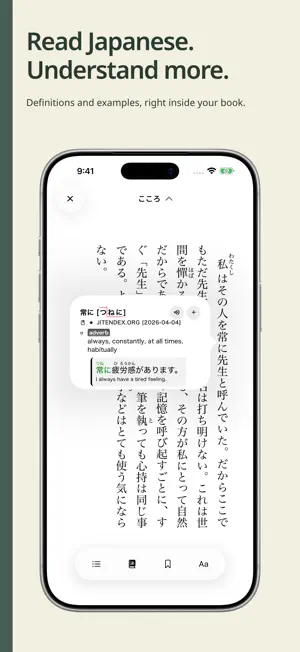
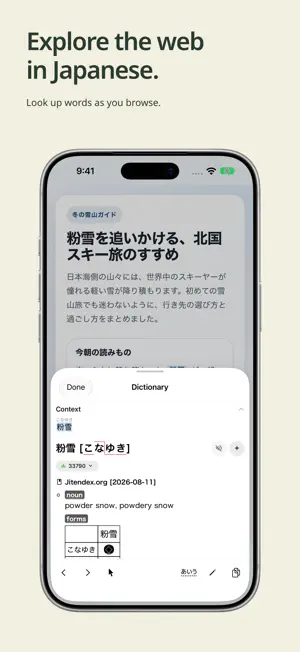
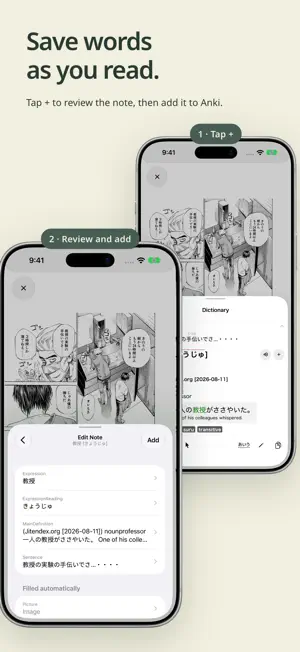
MaruReader helps you make Japanese books, manga, websites, and videos part of your daily study routine. Look up unfamiliar words as you read or watch, save vocabulary to Anki, and learn a little more every day. POWERFUL DICTIONARY • Look up words across the book reader, manga reader, web browser, YouTube transcripts, and photo scanner • Hear pronunciations from audio sources you add, and include them in Anki notes • Automatically convert inflected words to dictionary form • Look up words within definitions to explore related vocabulary • Add dictionaries in Yomitan/Yomichan format, including bilingual, monolingual, pitch accent, and frequency dictionaries • Get started with included dictionaries, audio source, and grammar guide, or add your own grammar dictionaries READ MANGA WITH TEXT RECOGNITION • Recognize text on manga pages with on-device OCR, no preparation needed • Tap an area of the page, then choose a recognized word to look it up • Import ZIP/CBZ files from your collection • Prefer to prepare text ahead of time? Attach a mokuro file and MaruReader uses its text instead • Extract titles and authors from filenames on devices with Apple Intelligence enabled JAPANESE EBOOK READER • Enjoy vertical Japanese text (tategaki) • Look up words in a compact popup without leaving your book • Read EPUB files from your Japanese ebook collection BROWSE THE WEB WITH A DICTIONARY • Look up selected text or use OCR on visible webpage content • Read edge to edge with a floating toolbar that stays out of the way • Reduce ads and distractions with the built-in content blocker • Read web articles, online manga, and more LEARN FROM YOUTUBE • Open a video's transcript next to the player and tap any word to look it up • The transcript follows along as the video plays; pause, skip, or tap a timestamp to jump without leaving it • Save words to Anki with the sentence, a frame from the video, and a link back to that moment Transcripts are provided by YouTube and are available for videos that have them. PHOTO SCANNER • Take or import a photo to look up words on signs • Look up text in screenshots of apps and games • Share text or images from compatible apps for quick dictionary lookups ANKI INTEGRATION • After setup, save words from the reader to Anki with one tap, including context, readings, and definitions • Review and edit a note before adding it: reorder or remove values, add text, or choose a different audio clip or dictionary • When duplicate detection would reject a word, add it anyway from the editor • Use the built-in field mapping for the Lapis note type, or configure fields for your preferred note types • Connect to AnkiMobile on your device or to desktop Anki with the Anki-Connect add-on • Notes created through the Share extension for AnkiMobile are kept as pending notes you can send from MaruReader Anki integration requires a separate Anki setup. Install your chosen note type in Anki before configuring the integration. WHY MARUREADER? • Free and open source • No analytics or tracking • All text recognition runs on your device • Bring your own books, manga, and videos, and choose the dictionaries that suit your learning SCREENSHOT CREDIT The manga shown in the screenshots is used under the author's terms. Title: Give My Regards to Black Jack Author: SHUHO SATO
Ratings & reviews
5.0
5 ratings
What’s new
Version 1.3.1 · Updated October 26, 2026
Learn from YouTube Open a video's transcript in the web browser and tap any word to look it up. The transcript follows the video as it plays, and words you save to Anki include the sentence, a frame from the video, and a link back to that moment. Edit Anki notes before adding Long-press the + button to review a note first. Reorder or remove values, add text, or pick a different audio clip or dictionary. If duplicate detection would reject a word, you can now add it anyway. Mokuro support for manga Attach a mokuro file to a manga and MaruReader uses its text instead of on-device recognition. A .mokuro file inside a CBZ is attached automatically on import. Better text recognition Furigana, dense pages, and unusual layouts are recognized more reliably. Also in this update • Support for iPhone Duo • The web browser now shows pages edge to edge with a floating toolbar • Improved compatibility with sites like YouTube and X • New plain and no-title glossary values for Anki fields
App privacy
The developer, SAMUEL ALLEN SMOKER, reported these privacy practices to Apple.
Data Not Collected
The developer does not collect any data from this app.
Alternatives to MaruReader: Read in Japanese
Looking for apps like MaruReader: Read in Japanese? Here are 6 similar apps on the App Store. The highest rated is Toku Japanese & Chinese Reader (5.0/5), and all 6 are free to download.
-
 LibreDict: Offline Dictionary
4.0
LibreDict: Offline Dictionary
4.0
-
 Toku Japanese & Chinese Reader
5.0
Toku Japanese & Chinese Reader
5.0
-
 Quizdy
-
 Yomikiri
5.0
Yomikiri
5.0
-
 Kanji Write: Stroke Order
-
 Kalley's Machine Plus Cats
4.7
Kalley's Machine Plus Cats
4.7
| App | Rating | Price | Last updated | Compare |
|---|---|---|---|---|
| MaruReader: Read in Japanese | 5.0 / 5 (5 ratings) | Free | October 26, 2026 | |
| LibreDict: Offline Dictionary | 4.0 / 5 (4) | Free | Oct 27, 2026 | Compare |
| Toku Japanese & Chinese Reader | 5.0 / 5 (6) | Free | Oct 29, 2026 | Compare |
| Quizdy | – | Free | May 22, 2026 | Compare |
| Yomikiri | 5.0 / 5 (14) | Free | Jan 21, 2025 | Compare |
| Kanji Write: Stroke Order | – | Free | Oct 23, 2026 | Compare |
| Kalley's Machine Plus Cats | 4.7 / 5 (38) | Free | Dec 14, 2023 | Compare |