

Kanji Write: Stroke Order
Anastasiia Trofimova Education iPhoneiPadiPod touch
Kanji Write: Stroke Order is a free Education app for iPhone and iPad by Anastasiia Trofimova. Requires iOS 16.0. Updated November 18, 2026.
- Price
- Free
- on the App Store
- Size
- 25 MB
- Age 4+
- Updated
- Nov 18
- 2026 · v1.15
Screenshots
Save to Pinterest


About Kanji Write: Stroke Order
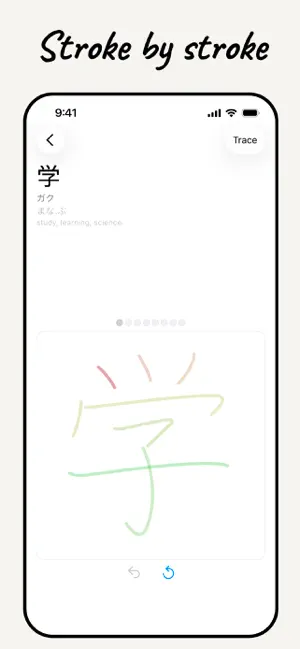
Learn to write Japanese by hand: kanji, hiragana and katakana, with correct stroke order and instant feedback on every stroke. Kanji Write teaches you to write Japanese stroke by stroke: over 2,000 JLPT kanji plus basic hiragana and katakana, including voiced forms and yōon. Practice with your finger on iPhone or with Apple Pencil on iPad, and build real muscle memory. ◆ Correct Stroke Order Every character is animated stroke by stroke and color-coded, so you learn the right order and direction from the start. No guessing, no bad habits. ◆ Instant Feedback Each stroke you draw is checked against the correct shape and order. Miss a few times in Guided mode and a hint appears automatically. ◆ Trace. Guide. Memorize. Three practice modes: trace over the character, follow the strokes one at a time, then write it from memory with the guides hidden. ◆ Hiragana & Katakana All 46 basic kana in both scripts, plus the voiced forms (が, ぱ…) and yōon combinations (きょ, シャ…), each written in one box. Search by romaji: type "ka" to find か and カ. ◆ Complete JLPT Library (N5–N1) Filter kanji by JLPT level, search by meaning or reading, and see on'yomi, kun'yomi and meanings for every character. ◆ Built for Apple Pencil & iPad Pressure and tilt shape every stroke like a real brush. On iPad, practice in a notebook-style grid, like a calligraphy workbook. ◆ Quick Sessions Tap play for a random set of characters from any level or script and review your results at the end.
What’s new
Version 1.15 · Updated November 18, 2026
• A smoother brush: strokes keep their shape when you lift the pen, with cleaner corners and stroke ends. • Choose your ink color (Sumi, Indigo or Vermilion) and your guide colors separately in Settings. • A new Home screen shows what you finished today, and Progress shows a calendar of the last month. On iPad, Progress uses two columns. • On iPad, random Practice uses the same layout as single-character practice, and you can resize the canvas in Recall and the cells in Writing. • In Writing, a new mode takes effect right away. • The app is now called Kanji Write on your Home screen. • Privacy policy and support links are now in Settings.
App privacy
The developer, Anastasiia Trofimova, reported these privacy practices to Apple.
Data Not Collected
The developer does not collect any data from this app.
Alternatives to Kanji Write: Stroke Order
Looking for apps like Kanji Write: Stroke Order? Here are 6 similar apps on the App Store. The highest rated is Tegaki - Kanji Writing (5.0/5), and all 6 are free to download.
-
 Tegaki - Kanji Writing
5.0
-
 Kanji Pad: Learn by Writing
4.2
-
 Kalley's Machine Plus Cats
4.7
-
 Morse Code Go - Audio Trainer
-
 Japanese Vocabulary & JLPT
5.0
-
 Chuchu Academy: Kids Chinese
3.0
| App | Rating | Price | Last updated | Compare |
|---|---|---|---|---|
| Kanji Write: Stroke Order | – | Free | November 18, 2026 | |
| Tegaki - Kanji Writing | 5.0 / 5 (3) | Free | Nov 8, 2026 | Compare |
| Kanji Pad: Learn by Writing | 4.2 / 5 (9) | Free | Nov 11, 2026 | Compare |
| Kalley's Machine Plus Cats | 4.7 / 5 (38) | Free | Dec 14, 2023 | Compare |
| Morse Code Go - Audio Trainer | – | Free | Jun 19, 2026 | Compare |
| Japanese Vocabulary & JLPT | 5.0 / 5 (2) | Free | Nov 18, 2026 | Compare |
| Chuchu Academy: Kids Chinese | 3.0 / 5 (1) | Free | Nov 19, 2026 | Compare |