

DepiDrive – USB Photo Backup
Taron Sahakyan Photo & Video iPhoneiPadiPod touch
DepiDrive – USB Photo Backup is a free Photo & Video app for iPhone and iPad by Taron Sahakyan. Requires iOS 18.0. Updated October 23, 2026.
- Price
- Free
- on the App Store
- Size
- 9 MB
- Age 4+
- Updated
- Oct 23
- 2026 · v1.5
Screenshots

About DepiDrive – USB Photo Backup
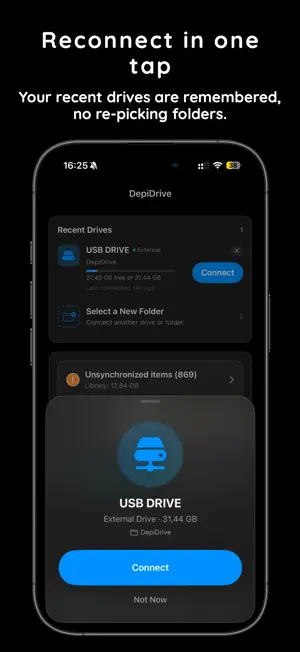
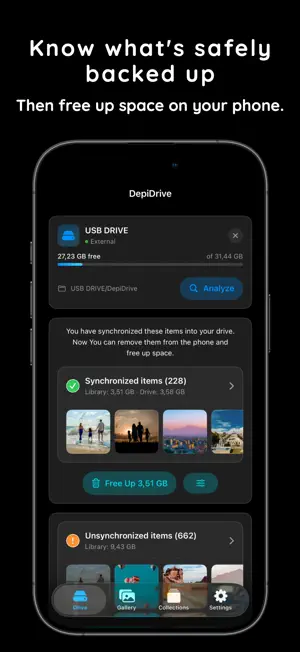
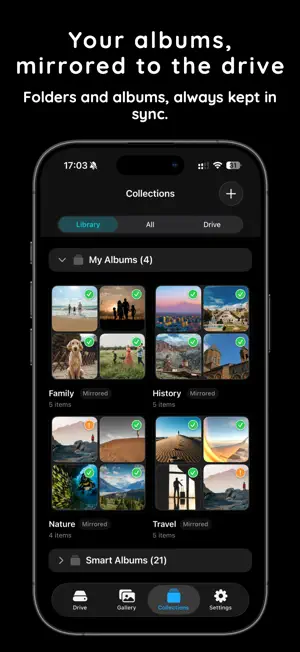
DepiDrive backs up your photo and video library to external drives — USB drives, SSDs, SD cards, or any folder in the Files app. No cloud. No account. Nothing is ever uploaded. Your memories stay between your iPhone and your drive. But DepiDrive isn't just backup — it's also a beautiful way to browse everything on your drive. Your photos and videos are organized by date into day-by-day sections, so you can scroll through your memories just like you would in Photos. BROWSE & VIEW • A familiar, Photos-style library grouped by date • Full-screen photo and video playback, with Live Photo support • See at a glance what's backed up, on your drive, or still only on your phone BACK UP WITH CONFIDENCE • Sync mode tracks every file and verifies it with integrity checks • Instantly spot missing, damaged, or out-of-date files on your drive • Choose what to include — full-size photos and videos, Live Photos, and more EXPORT, YOUR WAY • Export mode makes a simple one-time copy to any folder • New: export in Camera Roll (DCIM) format — files land in the standard DCIM/100APPLE layout, so they drop straight back into Photos, or open on any computer, camera, or card reader • Edited photos keep both the original and the edit, so they come back as a single edited photo — not two copies ORGANIZE • Create albums and collections that live right on your drive • Add and remove photos, and keep everything neatly arranged PRIVATE BY DESIGN • No cloud, no account, no tracking • Everything happens directly between your iPhone and your drive Your library. Your drive. Your memories — safely backed up and easy to browse.
What’s new
Version 1.5 · Updated October 23, 2026
- Camera Roll (DCIM) export - Export your photos and videos in the standard camera format (DCIM/100APPLE/IMG_0001) — so they import straight back into Photos, or onto any computer, camera, or card reader, with no special software needed. - Edited photos keep both the original and the edit, so they come back as one edited photo — not two copies. - Plus reliability and performance improvements throughout. - Questions or ideas? Reach us anytime from Settings.
App privacy
The developer, Taron Sahakyan, reported these privacy practices to Apple.
Data Not Linked to You
The following data, which may be collected but is not linked to your identity, may be used for the following purposes:
- Location: Coarse Location
- Identifiers: Device ID
- Usage Data: Product Interaction
- Diagnostics: Crash Data, Performance Data, Other Diagnostic Data
Used for: Analytics
Alternatives to DepiDrive – USB Photo Backup
Looking for apps like DepiDrive – USB Photo Backup? Here are 6 similar apps on the App Store. The highest rated is USB Backup - Photo & Video (4.7/5), and all 6 are free to download.
-
 DrivePort: Photos to USB Drive
-
 PhotoVideoBackup: SSD Transfer
-
 My Photo Copy: USB Backup
-
 PhotoTransfer: Sync with Drive
-
 OffloadPro
-
 USB Backup - Photo & Video
4.7
USB Backup - Photo & Video
4.7
| App | Rating | Price | Last updated | Compare |
|---|---|---|---|---|
| DepiDrive – USB Photo Backup | – | Free | October 23, 2026 | |
| DrivePort: Photos to USB Drive | – | Free | Oct 7, 2026 | Compare |
| PhotoVideoBackup: SSD Transfer | – | Free | Oct 21, 2026 | Compare |
| My Photo Copy: USB Backup | – | Free | Sep 22, 2026 | Compare |
| PhotoTransfer: Sync with Drive | – | Free | Oct 20, 2026 | Compare |
| OffloadPro | – | Free | Jun 7, 2026 | Compare |
| USB Backup - Photo & Video | 4.7 / 5 (20) | Free | Aug 25, 2026 | Compare |