

QuickPaste Keyboard
Michael Babitski Productivity iPhoneiPadiPod touch
QuickPaste Keyboard is a free Productivity app for iPhone and iPad by Michael Babitski. Requires iOS 26.0. Updated March 27, 2026.
- Price
- Free
- on the App Store
- Size
- 8 MB
- Age 4+
- Updated
- Mar 27
- 2026 · v1.1
Screenshots


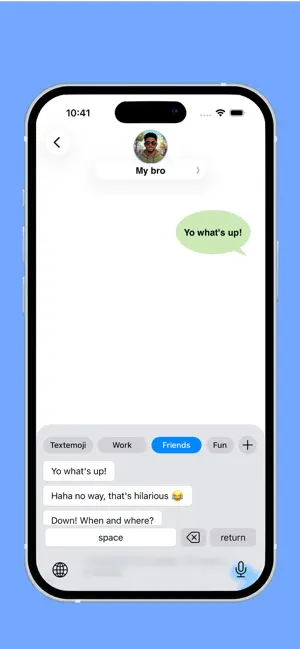
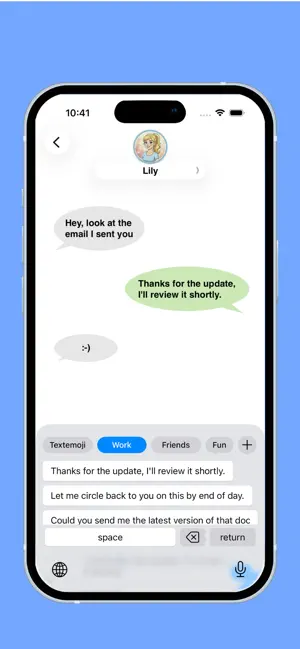
About QuickPaste Keyboard
Stop Typing the Same Messages Over and Over! Do you find yourself constantly typing your email address, home address, or common replies to customers? QuickPaste Keyboard is the ultimate productivity tool designed to save you hours of tedious typing by putting your most-used text snippets right at your fingertips. - Speed Up Your Workflow Whether you are a business owner responding to FAQs, a gamer using chat commands, or just someone tired of repetitive typing, QuickPaste turns minutes of work into a single tap. - How It Works: Create: Open the app and save your frequently used phrases, templates, or emojis. Switch: Enable the QuickPaste Keyboard in your iOS settings. Paste: Tap a snippet from the keyboard to insert it instantly into any app—WhatsApp, Mail, Slack, Instagram, and more! - Key Features: Unlimited Snippets: Store everything from short emails to complex templates. Organized Categories: Group your snippets (e.g., "Work," "Personal," "Social") for lightning-fast access. One-Tap Insertion: No more switching between apps to copy and paste. Privacy First: We don’t track what you type. Your snippets stay on your device. Dark Mode Support: A sleek design that looks great with any iOS theme. - Perfect For: Customer Support: Send "canned responses" in seconds. Sales & Real Estate: Send listings and contact info instantly. Job Seekers: Keep your bio and LinkedIn links ready to go. Social Media: Store your favorite hashtag sets. Download QuickPaste Keyboard today and start reclaiming your time!
What’s new
Version 1.1 · Updated March 27, 2026
Bug fixes
App privacy
The developer, Michael Babitski, reported these privacy practices to Apple.
Data Used to Track You
The following data may be used to track you across apps and websites owned by other companies:
- Location: Coarse Location
- Identifiers: Device ID
Data Not Linked to You
The following data, which may be collected but is not linked to your identity, may be used for the following purposes:
- Location: Coarse Location
- Identifiers: Device ID
Used for: Third-Party Advertising, Analytics, App Functionality
Alternatives to QuickPaste Keyboard
Looking for apps like QuickPaste Keyboard? Here are 6 similar apps on the App Store. The highest rated is Unstuck:App Blocker (5.0/5), and all 6 are free to download.
-
 Unstuck:App Blocker
5.0
Unstuck:App Blocker
5.0
-
 QuickPaste – Snippet Keyboard
-
 MangoPad - AI Writing Keyboard
-
 Calculator with History ⁺
-
 Text Preset: Keyboard Phrases
5.0
Text Preset: Keyboard Phrases
5.0
-
 Current Tasks & Reminders
5.0
Current Tasks & Reminders
5.0
| App | Rating | Price | Last updated | Compare |
|---|---|---|---|---|
| QuickPaste Keyboard | – | Free | March 27, 2026 | |
| Unstuck:App Blocker | 5.0 / 5 (2) | Free | May 15, 2026 | Compare |
| QuickPaste – Snippet Keyboard | – | Free | Feb 14, 2026 | Compare |
| MangoPad - AI Writing Keyboard | – | Free | Oct 4, 2026 | Compare |
| Calculator with History ⁺ | – | Free | Apr 23, 2026 | Compare |
| Text Preset: Keyboard Phrases | 5.0 / 5 (1) | Free | Oct 5, 2026 | Compare |
| Current Tasks & Reminders | 5.0 / 5 (3) | Free | Sep 14, 2026 | Compare |