

Swipy Photos
Davide Filipucci Photo & Video iPhoneiPadiPod touch
Swipy Photos is a free Photo & Video app for iPhone and iPad by Davide Filipucci. Requires iOS 17.0. Updated June 6, 2026.
- Price
- Free
- on the App Store
- Size
- 8 MB
- Age 4+
- Updated
- Jun 6
- 2026 · v1.3.2
Screenshots

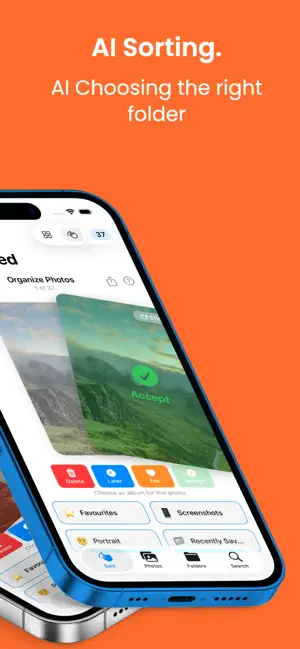
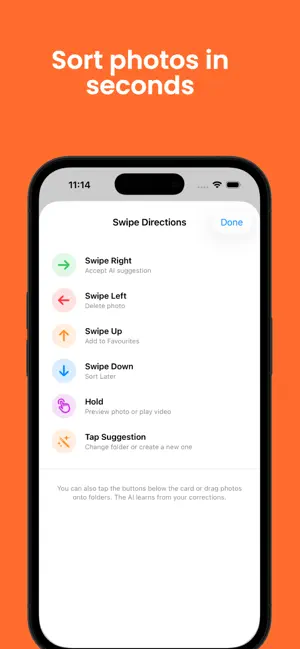

About Swipy Photos
Swipy makes organizing your photo library fast and fun. Just swipe right to sort a photo into a folder, or swipe left to skip it. It's that simple. Your camera roll is full of thousands of photos, but finding the ones you need is a nightmare. Swipy uses on-device AI to suggest the right folder for each photo, so you can fly through your entire library in minutes. KEY FEATURES • Swipe to Sort: Tinder-style card swiping to organize photos into folders • AI-Powered Suggestions: On-device Vision AI recommends folders based on what's in each photo • Smart Search: Search by date, content, text in photos, faces, and more • Custom Folders: Create your own folder structure with emoji icons • Drag & Drop: Select multiple photos and drag them into any folder • Photo Map: See where your photos were taken on an interactive map • Duplicate Detection: Find and remove duplicate photos to free up space • Recently Deleted: 30-day safety net before photos are permanently removed • Privacy First: All AI analysis happens on your device. Your photos never leave your phone. • Cloud Sync: Sign in with Apple to sync your folder structure across devices FREE TO START Sort your first 100 photos completely free. Then upgrade to Swipy Pro for unlimited sorting: • 4 Weeks: €3.99 • Yearly: €39.99 • Lifetime: €89.99 one-time purchase Subscription automatically renews unless cancelled at least 24 hours before the end of the current period. Manage your subscription in Settings > Apple ID > Subscriptions. Privacy Policy: https://swipyphotos.com/privacy Terms of Service: https://swipyphotos.com/terms Designed and developed by Khairos AI — https://khairos.ai
What’s new
Version 1.3.2 · Updated June 6, 2026
Fixes a rare issue that could duplicate photos in your library. Smoother return when switching back from other apps. New iOS-Photos-style layout for Years and Months — tap any year or month to drill in, tap a photo to view. Double-tap the Photos tab to jump to your latest photos.
App privacy
The developer, Davide Filipucci, reported these privacy practices to Apple.
Data Linked to You
The following data, which may be collected and linked to your identity, may be used for the following purposes:
- Purchases: Purchase History
- Identifiers: User ID
Used for: App Functionality
Data Not Linked to You
The following data, which may be collected but is not linked to your identity, may be used for the following purposes:
- User Content: Photos or Videos
- Usage Data: Product Interaction
Used for: App Functionality
Alternatives to Swipy Photos
Looking for apps like Swipy Photos? Here are 6 similar apps on the App Store. The highest rated is Pickley - Organize Your Photos (5.0/5), and all 6 are free to download.
-
 Swipe Photo Sorting - Albumate
-
 Screenshot Organizer AI
-
 Pickley - Organize Your Photos
5.0
-
 EyeSay: AI Photo Organizer
-
 Gallery Cleaner: Swyra
-
 Minute It - Recap Video Maker
| App | Rating | Price | Last updated | Compare |
|---|---|---|---|---|
| Swipy Photos | – | Free | June 6, 2026 | |
| Swipe Photo Sorting - Albumate | – | Free | Sep 27, 2026 | Compare |
| Screenshot Organizer AI | – | Free | Sep 4, 2026 | Compare |
| Pickley - Organize Your Photos | 5.0 / 5 (1) | Free | Aug 11, 2026 | Compare |
| EyeSay: AI Photo Organizer | – | Free | Oct 15, 2026 | Compare |
| Gallery Cleaner: Swyra | – | Free | Oct 22, 2026 | Compare |
| Minute It - Recap Video Maker | – | Free | Sep 24, 2026 | Compare |
Compare Swipy Photos with the top alternatives: ratings, updates, ASO score and keyword gaps →