

EyeSay: AI Photo Organizer
Mingliang Liang Photo & Video iPhoneiPadiPod touchMac
EyeSay: AI Photo Organizer is a free Photo & Video app for iPhone and iPad by Mingliang Liang. Requires iOS 17.0. Updated October 15, 2026.
- Price
- Free
- on the App Store
- Size
- 279 MB
- Age 12+
- Updated
- Oct 15
- 2026 · v1.0.5
Screenshots


About EyeSay: AI Photo Organizer
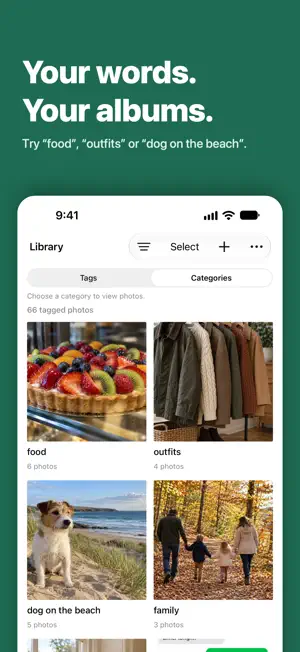
EyeSay is a photo organizer for iPhone and Mac that sorts your photo library into albums by the categories you type: screenshots, receipts, outfits, pets, trips, or any word of your own. Its AI is built into the app and runs on your device, with no account to create. Tagging, search and categories are free; albums are saved into Apple Photos, and on iOS 27 or macOS 27 your categories can also become Photos keywords. YOUR CATEGORIES, YOUR ALBUMS • Add as many categories as you like, in your own words: dogs, food, cars, beach, birthday cake, screenshots, receipts. • Every analyzed photo is scored against every category. A new category works without analyzing the library again. • Each photo also gets AI tags, so you can browse and filter by what's in it. Tags the AI is unsure about appear as suggestions. YOU STAY IN CONTROL • Review each category before saving. Remove a photo that doesn't belong, or add one that was missed. • Albums are named "ES · " plus your category. Undo a whole save from Album History. Removing an album never deletes its photos. • Your albums stay in Photos, even if you stop using EyeSay. • Analyze new or changed photos using compatible saved results, or re-tag the whole library. Interrupted work can resume from a compatible checkpoint. FIND ANY PHOTO • Search your tags, describe a photo, or search by a reference image. Find Similar shows photos that look alike. • Browse by place, trip, date and number of people, or combine them in one search: "Paris 2024 food". Place names come from a list built into the app; looking them up with Apple Maps is optional and off by default. • Results have two parts: Top Results that clearly match, and More Results that might. • Review exact and possible duplicates and confirm before deleting. Deleted photos go to Recently Deleted in Photos. • EyeSay's AI can make mistakes. Please double-check tags, search results and albums before saving or deleting. ON YOUR DEVICE On-device processing is the default for tagging, search and categories; the Mac app always processes on your Mac. First use connects to Apple to unlock the encrypted model; that request carries no photo or text. After updating, the next Organize run re-reads your library once on your device. On iPhone, an optional server mode in Settings → Advanced uploads reduced copies only after you consent. LANGUAGES The app is in English and Simplified Chinese. The AI reads English. Common Chinese words such as 美食, 穿搭, 宠物 and 截图 are understood directly. On iOS 18 or macOS 26 and later, Apple Translation translates other Chinese and non-Latin input into English on your device, and EyeSay shows the English used. Other languages in Latin letters are not translated. FREE AND UNLOCK On-device tagging, categories, search and similar photos are free and unlimited. Your first 5 albums saved into Photos are free; adding photos to them is free. Albums made before 1.0.4 don't count. Deleting an album from Photos frees its place. On iOS 27 or macOS 27 and later, write categories as Photos keywords. Only missing keywords are added; undo a save from history. Try it free on 1,000 photos. For more albums and keywords, open Settings → EyeSay Unlock. Buy EyeSay Unlock once or subscribe to Pro Monthly through the App Store. The App Store shows prices. Pro Monthly renews automatically until canceled in your Apple subscriptions. Saved results and albums remain after Pro ends; adding photos to albums beyond the first 5 needs Unlock or Pro. Terms of Use: https://eyesay.app/app/terms Privacy Policy: https://eyesay.app/app/privacy
What’s new
Version 1.0.5 · Updated October 15, 2026
- Much faster on-device organizing: the AI now runs on the Neural Engine. After updating, EyeSay re-tags your library once on this device. - Better tags: two-word names like "ice cream" now show, and screenshots no longer get "phone". - Photo details: automatic tags come first, and Find Similar is in the top bar. - A steadier "Time left" estimate while organizing.
App privacy
The developer, Mingliang Liang, reported these privacy practices to Apple.
Data Linked to You
The following data, which may be collected and linked to your identity, may be used for the following purposes:
- Purchases: Purchase History
- Contact Info: Email Address
- Identifiers: User ID, Device ID
- Usage Data: Product Interaction
Used for: App Functionality
Data Not Linked to You
The following data, which may be collected but is not linked to your identity, may be used for the following purposes:
- Other Data: Other Data Types
Used for: App Functionality
Alternatives to EyeSay: AI Photo Organizer
Looking for apps like EyeSay: AI Photo Organizer? Here are 6 similar apps on the App Store. The highest rated is ImagePilot (5.0/5), and all 6 are free to download.
-
 ImagePilot
5.0
ImagePilot
5.0
-
 LensMind - Intelligent Photos
5.0
LensMind - Intelligent Photos
5.0
-
 Headshot & AI Photo - VeoSnap
-
 Fewer: Similar Photo Cleaner
-
 KaleidoBox: Photo Cleaner
-
 Swipy Photos
| App | Rating | Price | Last updated | Compare |
|---|---|---|---|---|
| EyeSay: AI Photo Organizer | – | Free | October 15, 2026 | |
| ImagePilot | 5.0 / 5 (1) | Free | Jul 28, 2026 | Compare |
| LensMind - Intelligent Photos | 5.0 / 5 (1) | Free | Sep 13, 2026 | Compare |
| Headshot & AI Photo - VeoSnap | – | Free | Oct 15, 2026 | Compare |
| Fewer: Similar Photo Cleaner | – | Free | Sep 22, 2026 | Compare |
| KaleidoBox: Photo Cleaner | – | Free | Jul 14, 2026 | Compare |
| Swipy Photos | – | Free | Jun 6, 2026 | Compare |