

Pay Box Timers 2027
limitedressources Utilities iPhoneiPadiPod touch
Pay Box Timers 2027 is a free Utilities app for iPhone and iPad by limitedressources. Requires iOS 15.0. Updated November 8, 2026.
- Price
- Free
- on the App Store
- Size
- 21 MB
- Age 4+
- Updated
- Nov 8
- 2026 · v1.6
Screenshots
Save to Pinterest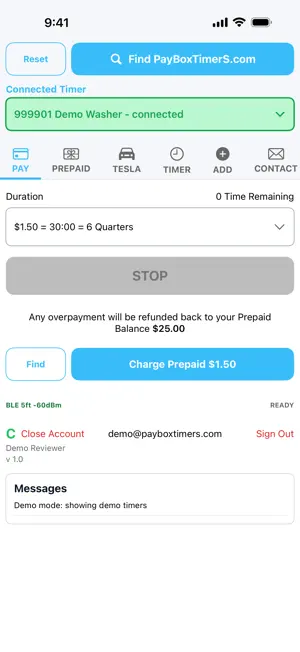


About Pay Box Timers 2027
Pay Box Timers 2027 turns your iPhone into the payment and control hub for PayBox-equipped laundromat washers, dryers and Tesla chargers. Skip the coin slot: start a machine, prepay for time, and know exactly when your cycle finishes, all from one app. WHAT YOU CAN DO • Look before you sign in: open the app and see the PayBox machines around you, found over Bluetooth. An account is only needed to pay for time. • Tap to pay: start a connected washer, dryer or charger over Bluetooth. No coins or cards at the machine required. • Prepay for time: buy a block of time up front and start instantly. Pay by card, or scan your card with the camera instead of typing the number. • Countdown notification: once you have paid, a notification shows how much time is left on your machine. Put your phone away and still know when to come back. It clears itself when the time is up, and its Stop button takes you straight back to that machine in the app. • Stop early, get refunded: end a running machine from the app and the unused prepaid time is refunded pro rata. • Clear pricing: every machine shows exactly what your money buys, for example "$12 buys 10 min", before you pay. • Tesla charging: link your Tesla and pay for charging at PayBox-equipped chargers. Charging starts when you pay and stops when your time runs out. FOR LAUNDRY AND CHARGER OWNERS • Configure each timer from your phone: set price, time, coin type and activation behavior, then push it to the machine over Bluetooth. • Update machines in the field without a trip to the back office. • Keep coin and card payments in sync with the physical pay box. HOW IT WORKS Pay Box Timers 2027 connects to PayBox timers using secure Bluetooth Low Energy. Pricing and machine settings come from your location's account, so what you see in the app always matches the machine in front of you. The app talks to your machine over Bluetooth only while you are on the payment screen. Once you have paid, the machine runs its own countdown. Nothing keeps running on your phone in the background, and the countdown notification simply counts down and clears itself. Location is used only, with your permission, to confirm you are at your own home Tesla charger so home charging is never gated by payment. No location data is sold or shared. Sign in with Apple or Google. Built for self-service laundromats, apartment laundry rooms, EV charging spots and any location running PayBox timers.
What’s new
Version 1.6 · Updated November 8, 2026
- Card payments for prepaid now use Stripe's secure card entry, with a Done button to hide the keyboard. - Buying prepaid: your card stays filled in for the next top-up, and the auto-reload switch shows and changes your saved setting. - Older PayBox timers stay in the timer list after you pay, and nearby timers appear faster. - Older PayBox timers: your card number and expiry are saved securely on this phone and filled in next time. - Car chargers: Start charging is disabled while your own charge is running.
App privacy
The developer, limitedressources, reported these privacy practices to Apple.
Data Linked to You
The following data, which may be collected and linked to your identity, may be used for the following purposes:
- Financial Info: Payment Info
- Contact Info: Email Address, Name
- Other Data: Other Data Types
Used for: App Functionality
Alternatives to Pay Box Timers 2027
Looking for apps like Pay Box Timers 2027? Here are 6 similar apps on the App Store. The highest rated is Make Passport Photo (5.0/5), and 5 of the 6 are free to download.
-
 Chinese Yuan To US Dollars
4.9
-
 Funnel - SMS and Call Filter
-
 MengQi Access
-
 Omni TV Remote
-
 Yes or No: Should I?
4.6
-
 Make Passport Photo
5.0
| App | Rating | Price | Last updated | Compare |
|---|---|---|---|---|
| Pay Box Timers 2027 | – | Free | November 8, 2026 | |
| Chinese Yuan To US Dollars | 4.9 / 5 (7) | 0.99 USD | Feb 21, 2024 | Compare |
| Funnel - SMS and Call Filter | – | Free | Oct 4, 2026 | Compare |
| MengQi Access | – | Free | Aug 5, 2026 | Compare |
| Omni TV Remote | – | Free | Oct 9, 2026 | Compare |
| Yes or No: Should I? | 4.6 / 5 (7) | Free | Apr 4, 2026 | Compare |
| Make Passport Photo | 5.0 / 5 (1) | Free | Nov 6, 2026 | Compare |