

Make Passport Photo
BISHAL SHRESTHA Utilities iPhoneiPadiPod touch
Make Passport Photo is a free Utilities app for iPhone and iPad by BISHAL SHRESTHA. Rated 5.0/5 from 1 ratings. Requires iOS 17.0. Updated October 3, 2026.
- Rating
- 5.0
- 1 ratings
- Price
- Free
- on the App Store
- Size
- 7 MB
- Age 4+
- Updated
- Oct 3
- 2026 · v2.1.0
Screenshots


About Make Passport Photo
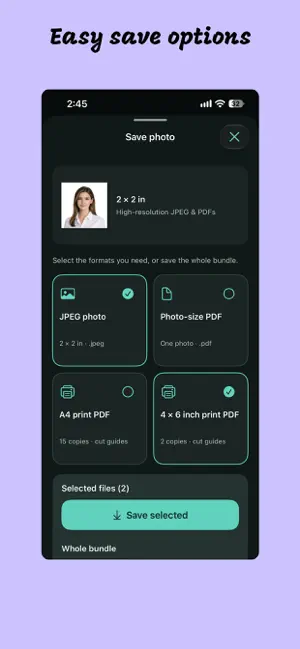
Easily create compliant passport, cv, visa, driving license, and ID photos directly from your iPhone or iPad. Passport Photo Edit gives you total control over framing, dimensions, resolution, and background colors without relying on expensive photo booths. Whether you need standard passport dimensions or custom dimensions for a specific application, Passport Photo Edit delivers print-ready, high-resolution results in seconds. Key Features - Flexible Photo Sizing: Choose from standard photo presets or enter precise custom dimensions in millimeters (mm), inches (in), or pixels (px). - Precision Framing & Cropping: Intuitive drag and zoom controls let you position and align your face to exact regulatory requirements. - Background Customization: Keep your original background or replace it with a solid color to meet official document standards. - Pro-Grade High DPI Exports: Export your final photo in PNG, JPG, or JPEG at print-ready resolutions—150, 300, or 600 DPI. - Flexible Storage Options: Save directly to your Photo Library or directly into your chosen folder in the Files app. How to Create Your Photo in 5 Simple Steps 1. Add a Photo: Select an image from your library or take a new one using your camera. 2. Choose a Size: Pick a preset or enter custom width and height specs in mm, inches, or pixels. 3. Adjust the Crop: Drag to position the photo, use the zoom controls for framing and use tilt option if image was captured tilted. 4. Choose a Background: Keep the original backdrop or choose a solid color. 5. Save & Export: Choose your format (JPG, JPEG, PDF) and (A4, 4*6 size photo paper), then save straight to Photos or Files.
What’s new
Version 2.1.0 · Updated October 3, 2026
* Made editing and saving edited image very easy, nice update to have asap.
App privacy
The developer, BISHAL SHRESTHA, reported these privacy practices to Apple.
Data Used to Track You
The following data may be used to track you across apps and websites owned by other companies:
- Location: Coarse Location
- Identifiers: Device ID
- Usage Data: Product Interaction, Advertising Data
- Diagnostics: Crash Data, Performance Data
Data Linked to You
The following data, which may be collected and linked to your identity, may be used for the following purposes:
- Location: Coarse Location
- Identifiers: Device ID
- Usage Data: Product Interaction, Advertising Data
- Diagnostics: Performance Data
Used for: Third-Party Advertising, Analytics
Data Not Linked to You
The following data, which may be collected but is not linked to your identity, may be used for the following purposes:
- Diagnostics: Crash Data
Used for: Third-Party Advertising, Analytics
Alternatives to Make Passport Photo
Looking for apps like Make Passport Photo? Here are 6 similar apps on the App Store.
-
 Deliver Laundry
-
 Passport Size Photo Editor
-
 DriverViewLT
-
 PhotoTrueSize
-
 Passport Photo & ID: IDReady
-
 Coddiq - Network Scanner
| App | Rating | Price | Last updated | Compare |
|---|---|---|---|---|
| Make Passport Photo | 5.0 / 5 (1 rating) | Free | October 3, 2026 | |
| Deliver Laundry | – | Free | Sep 29, 2026 | Compare |
| Passport Size Photo Editor | – | Free | Sep 11, 2026 | Compare |
| DriverViewLT | – | Free | Jul 18, 2024 | Compare |
| PhotoTrueSize | – | Free | Oct 8, 2026 | Compare |
| Passport Photo & ID: IDReady | – | Free | Jul 27, 2026 | Compare |
| Coddiq - Network Scanner | – | Free | Jun 26, 2026 | Compare |