

Stop Scrolling
Granular Development Limited Productivity iPhoneiPadiPod touch
Stop Scrolling is a free Productivity app for iPhone and iPad by Granular Development Limited. Rated 5.0/5 from 1 ratings. Requires iOS 26.0.
- Rating
- 5.0
- 1 ratings
- Price
- Free
- on the App Store
- Size
- 38 MB
- Age 4+
- Updated
- Sep 22
- 2026 · v1.11
Screenshots
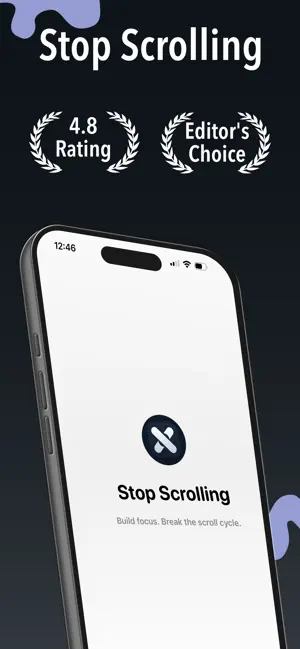


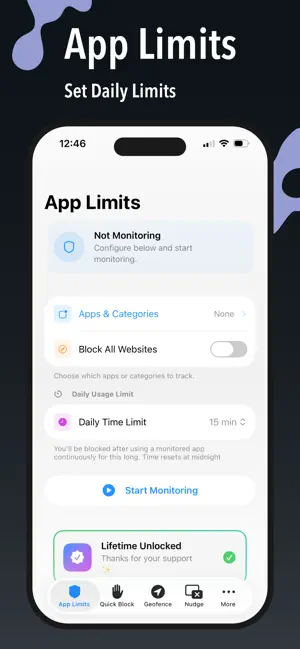
About Stop Scrolling
Take back control of your screen time — and help your kids do the same. Stop Scrolling puts real limits on the apps that eat your day. And now it goes further: you can set your child's daily app limit from your own iPhone. NEW — PARENTAL CONTROLS Set up your child's iPhone once, then manage their limits from yours. No more borrowing their phone every time you want to change something. • Set your child's daily app limit from your own iPhone • Turn website blocking on or off remotely • Lock their settings behind a parent PIN only you know • Link more than one child's phone • Sign in with Apple — your children are still there on any iPhone you sign in to, even after reinstalling HOW IT WORKS 1. On your child's iPhone, install Stop Scrolling while it's signed in to their Apple Account. Run the child setup: choose which apps to limit, set a daily limit, and create a parent PIN. 2. Their phone shows a 6-digit code. 3. On your iPhone, open More → Parental controls → My children, sign in, and enter that code. From then on, you change their daily limit from your own phone. FOR YOUR OWN SCREEN TIME • App Limits — pick the apps that distract you and set a daily time limit • Quick Block — block distracting apps right now, for as long as you choose • Nudge — get intercepted before a distracting app opens • Geofence — block apps automatically when you arrive somewhere • Squat & Push-Up Mode — earn your way back in with real movement • Analytics — see your blocking history and focus streaks PAY ONCE Premium unlocks with a single one-time purchase. No subscription, ever. PARENTAL CONTROLS — WHAT YOU NEED • Your child's iPhone must be signed in to their own Apple Account, and that account must be a child in your Family Sharing group. • Setup runs on your child's phone and needs Screen Time permission. • Limit changes you make apply on your child's iPhone the next time the app runs there. • Parental controls are part of the one-time Premium unlock. Stop Scrolling uses Apple's Screen Time (Family Controls) to apply limits. It never sees which apps your child uses or what they do on their phone.
What’s new
Version 1.11 · Updated September 22, 2026
NEW: PARENTAL CONTROLS You can now set your child's daily app limit from your own iPhone. • Set up your child's iPhone once — choose the apps to limit, set a daily limit, and lock it behind a parent PIN • Link their phone to yours with a 6-digit code • Change their daily limit and website blocking from your phone • Link more than one child • Unlink a child whenever you want • Sign in with Apple, so your children are still there if you get a new iPhone or reinstall Find it in More → Parental controls → My children. Step-by-step setup instructions are built into the screen. Parental controls are part of the one-time Premium unlock — no subscription. Also in this release: • Clearer setup guidance throughout the parental control flow • Fixes and improvements
App privacy
The developer, Granular Development Limited, reported these privacy practices to Apple.
Data Not Collected
The developer does not collect any data from this app.
Alternatives to Stop Scrolling
Looking for apps like Stop Scrolling? Here are 6 similar apps on the App Store. The highest rated is LightScroll: Limit Screen Time (5.0/5), and all 6 are free to download.
-
 Stop Scrolling!
-
 Kelso: Minimalist Dumb Phone
-
 Stop Scrolling - Refocus Life
-
 Mutely — App Blocker
-
 Anti-Scroll: Quit Social Media
-
 LightScroll: Limit Screen Time
5.0
LightScroll: Limit Screen Time
5.0
| App | Rating | Price | Last updated | Compare |
|---|---|---|---|---|
| Stop Scrolling | 5.0 / 5 (1 rating) | Free | September 22, 2026 | |
| Stop Scrolling! | – | Free | Sep 1, 2026 | Compare |
| Kelso: Minimalist Dumb Phone | – | Free | Apr 16, 2026 | Compare |
| Stop Scrolling - Refocus Life | – | Free | May 15, 2026 | Compare |
| Mutely — App Blocker | – | Free | Aug 17, 2026 | Compare |
| Anti-Scroll: Quit Social Media | – | Free | Oct 22, 2026 | Compare |
| LightScroll: Limit Screen Time | 5.0 / 5 (14) | Free | Oct 22, 2026 | Compare |
Compare Stop Scrolling with the top alternatives: ratings, updates, ASO score and keyword gaps →