

True Mirror: Selfie Makeup Cam
Jeje Labs Photo & Video iPhoneiPadiPod touch
True Mirror: Selfie Makeup Cam is a free Photo & Video app for iPhone and iPad by Jeje Labs. Rated 4.0/5 from 4 ratings. Requires iOS 18.0.
- Rating
- 4.0
- 4 ratings
- Price
- Free
- on the App Store
- Size
- 52 MB
- Age 4+
- Updated
- Oct 21
- 2026 · v2.2.4
Screenshots


About True Mirror: Selfie Makeup Cam
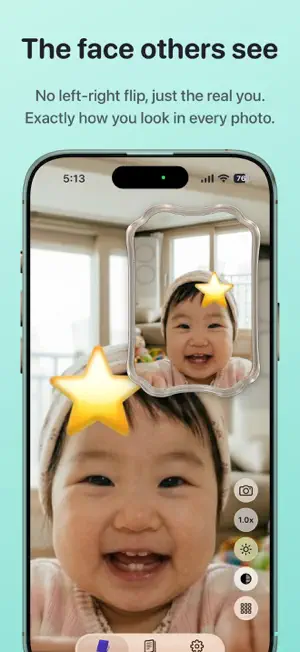
Looking for a mirror app? This one works a little differently. It shows True Mirror (how others see you) and a regular mirror — both at once, in PiP. Before a selfie. After doing makeup. Right before a big moment. For whenever you need a fast mirror. [ Showing You as You Really Are ] A regular mirror flips you left-to-right. That's why the face you've seen in the mirror your whole life looks different from photos of you. What other people see isn't your reflection — it's your actual face. This app shows you both at the same time: - Regular mirror: the familiar, flipped view - True Mirror: your face as others actually see it One fills the main screen. The other floats in a PiP window. Tap to swap. Drag to resize. [ Why Two Mirrors? ] Every mirror you've ever used shows a reflected image. Your right eyebrow appears on the left side of the screen; a mole on your left appears on the right. In the physical world, a True Mirror is made by placing two mirrors at a 90-degree angle. That arrangement cancels out the left-right flip, showing you exactly what others see. This app brings that principle to your phone, digitally. [ When to Use It ] - Doing makeup: Ever drawn eyeliner that looked even in the mirror but came out uneven in photos? True Mirror shows you what others will see. - Before a selfie: Check your real look and find your natural angle before you shoot. - Before an interview or date: See exactly the impression you'll make on the other person. - Face check: Pinch-zoom for a close-up inspection. - Checking facial asymmetry: Use True Mirror to see the left-right balance of your face. Spot facial asymmetry and experiment with expressions or makeup to balance it out. - Trying on an outfit: Switch to landscape for a full-body silhouette view. [ Everyday Mirror Moments ] - Last-second check in the elevator before work - Wiping something off your face after lunch - Outfit and hair check before a meeting - No mirror available while traveling - Face check after a workout - Evening skincare — up close Instead of a pocket mirror. Instead of a vanity mirror. Anywhere, anytime — just your phone. [ Features ] - Pinch-to-zoom - Landscape support - Mirror frames — switch between Classic / Ornate / Modern, or draw your own - Freely resizable PiP window - One-tap switch between True Mirror and regular mirror [ Capture Your Face, Every Day ] - Face check-ins: face comparison, area and habit tags, notes, time-lapse, weekly & monthly reports, gallery, streak - Two widgets: open the mirror, or see this week [ Your Photos Stay on Your Device ] - Your photos and entries are stored only on your device — never sent to any server. [ FAQ ] Q. Are my photos sent anywhere? A. No. Captures and entries are stored only on your device. Q. What do I get for free? A. Both mirrors at once, freeze, landscape, your daily check-ins with notes and tags, reports, gallery and streak are free — and every past record stays open, with no time limit. Pro lifts the zoom limit and adds overlay comparison, the self-timer, mirror frame switching and custom frames, background reminders, and no ads. [ Who This Is For ] - Anyone who just needs a quick mirror app - People who do makeup every day - Anyone who checks their look before selfies, interviews, or dates - Anyone curious about facial asymmetry or face asymmetry - Travelers who don't want to carry a mirror Open it now, and see yourself as others actually do. No sign-up. No account needed. Terms of Service: https://jejelabs.com/mirror/terms-of-service
What’s new
Version 2.2.4 · Updated October 21, 2026
• Minor fixes and improvements
App privacy
The developer, Jeje Labs, reported these privacy practices to Apple.
Data Used to Track You
The following data may be used to track you across apps and websites owned by other companies:
- Identifiers: Device ID
- Usage Data: Product Interaction, Advertising Data
Data Linked to You
The following data, which may be collected and linked to your identity, may be used for the following purposes:
- Identifiers: Device ID
- Usage Data: Product Interaction, Advertising Data
Used for: Third-Party Advertising, Analytics
Data Not Linked to You
The following data, which may be collected but is not linked to your identity, may be used for the following purposes:
- Diagnostics: Crash Data
Used for: Analytics
Alternatives to True Mirror: Selfie Makeup Cam
Looking for apps like True Mirror: Selfie Makeup Cam? Here are 6 similar apps on the App Store. The highest rated is BatchMark: Photo Watermark (5.0/5), and all 6 are free to download.
-
 Face Symmetry Test True Mirror
4.0
-
 BatchMark: Photo Watermark
5.0
-
 Stellar – Timelapse Camera
5.0
-
 MediaUtility
-
 Compare Photo - Before & After
3.3
-
 SlowCam - Create SloMo Videos
5.0
| App | Rating | Price | Last updated | Compare |
|---|---|---|---|---|
| True Mirror: Selfie Makeup Cam | 4.0 / 5 (4 ratings) | Free | October 21, 2026 | |
| Face Symmetry Test True Mirror | 4.0 / 5 (2) | Free | Jan 29, 2026 | Compare |
| BatchMark: Photo Watermark | 5.0 / 5 (4) | Free | Oct 19, 2026 | Compare |
| Stellar – Timelapse Camera | 5.0 / 5 (3) | Free | Apr 7, 2026 | Compare |
| MediaUtility | – | Free | Apr 12, 2026 | Compare |
| Compare Photo - Before & After | 3.3 / 5 (3) | Free | Sep 17, 2026 | Compare |
| SlowCam - Create SloMo Videos | 5.0 / 5 (1) | Free | Oct 28, 2026 | Compare |