

ShrimpSend-Fast File Transfer
明 程 Utilities iPhoneiPadiPod touch
ShrimpSend-Fast File Transfer is a free Utilities app for iPhone and iPad by 明 程. Requires iOS 15.5. Updated June 17, 2026.
- Price
- Free
- on the App Store
- Size
- 78 MB
- Age 4+
- Updated
- Jun 17
- 2026 · v1.4.8
Screenshots
About ShrimpSend-Fast File Transfer
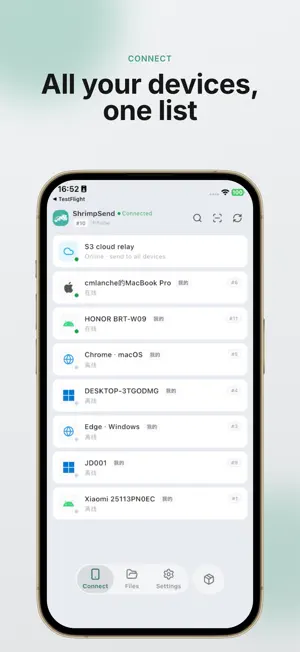
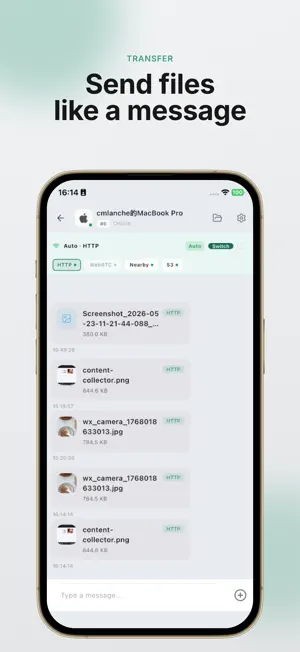
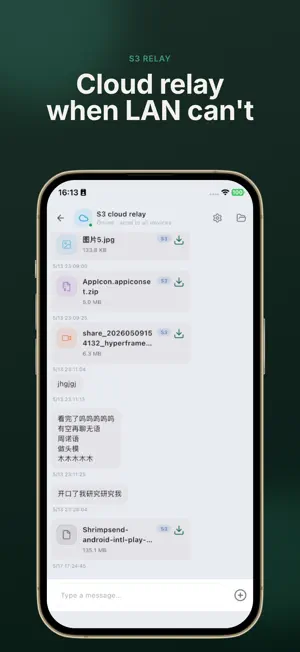
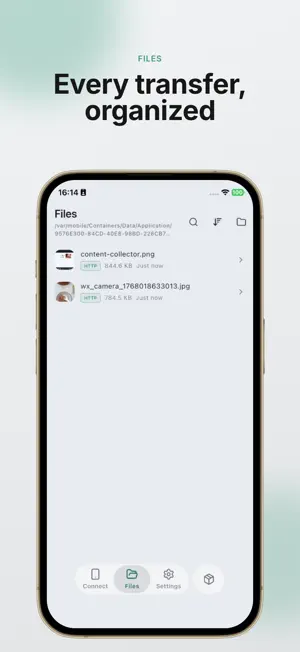
Cross-device file transfer, straight to your devices. ShrimpSend turns your phone, laptop, desktop, and browser into one device-to-device conversation. Drop in text, clipboard snippets, photos, videos, folders, or large files, choose where they should go, and keep moving. No public link to create. No chat thread to clean up. Just send once and reach the device you need. WHY SHRIMPSEND • Built for your own devices — move daily work between phone, computer, and browser • LAN-first by design — use direct LAN / WebRTC paths on the same network when available • Big-file friendly — native apps can resume interrupted transfers instead of starting over • One flow for everything — text, media, documents, and large files live in the same device session • Web when you need it — sign in to bring a browser into your device list • Reliable fallback — use hosted storage or your own S3-compatible bucket when direct paths are not available HOW IT FEELS Open ShrimpSend, pick a target device, and send. Screenshots arrive on your laptop. A video lands on your desktop. A note from your browser shows up on your phone. Large files can prefer the local network, while cross-network delivery still has a fallback path. LAN & SIGN-IN On the same Wi-Fi, native apps can discover each other with mDNS without signing in. Sign in to sync devices, add web participation, and use server-assisted path setup for stricter firewall or NAT environments. MEMBERSHIP (OPTIONAL) Start free. Paid plans add more devices and hosted upload quota. Subscriptions are managed through the App Store and can be canceled anytime in Settings → Apple ID → Subscriptions. Learn more: https://shrimpsend.com/en Privacy: https://shrimpsend.com/en/docs/privacy
What’s new
Version 1.4.8 · Updated June 17, 2026
Add transfer notification bar to display transfer progress Automatically copy received text to clipboard
App privacy
The developer, 明 程, reported these privacy practices to Apple.
Data Not Linked to You
The following data, which may be collected but is not linked to your identity, may be used for the following purposes:
- Usage Data: Product Interaction
- Diagnostics: Crash Data, Performance Data, Other Diagnostic Data
- Purchases: Purchase History
- Location: Precise Location
- Contact Info: Email Address
- User Content: Photos or Videos, Audio Data
- Identifiers: User ID, Device ID
Used for: Analytics, App Functionality
Alternatives to ShrimpSend-Fast File Transfer
Looking for apps like ShrimpSend-Fast File Transfer? Here are 6 similar apps on the App Store. The highest rated is EzFilez (5.0/5), and all 6 are free to download.
-
 EzFilez
5.0
EzFilez
5.0
-
 EasyJoin Pad: Local File Share
-
 Folder (hidden data)
-
 CrossSend
-
 小利PAY商户端
-
 iSpeedScan – Quick Doc Scanner
5.0
iSpeedScan – Quick Doc Scanner
5.0
| App | Rating | Price | Last updated | Compare |
|---|---|---|---|---|
| ShrimpSend-Fast File Transfer | – | Free | June 17, 2026 | |
| EzFilez | 5.0 / 5 (3) | Free | Apr 3, 2026 | Compare |
| EasyJoin Pad: Local File Share | – | Free | Jul 4, 2026 | Compare |
| Folder (hidden data) | – | Free | Jun 3, 2026 | Compare |
| CrossSend | – | Free | Sep 10, 2026 | Compare |
| 小利PAY商户端 | – | Free | Jun 4, 2025 | Compare |
| iSpeedScan – Quick Doc Scanner | 5.0 / 5 (17) | Free | Jan 29, 2026 | Compare |