

TDInput
ari lintzeris Developer Tools iPhoneiPadiPod touchApple Watch
TDInput is a paid Developer Tools app for iPhone and iPad by ari lintzeris. Requires iOS 18.6. Updated March 23, 2026.
- Price
- 0.99 USD
- on the App Store
- Size
- 2 MB
- Age 4+
- Updated
- Mar 23
- 2026 · v1.0
Screenshots



About TDInput
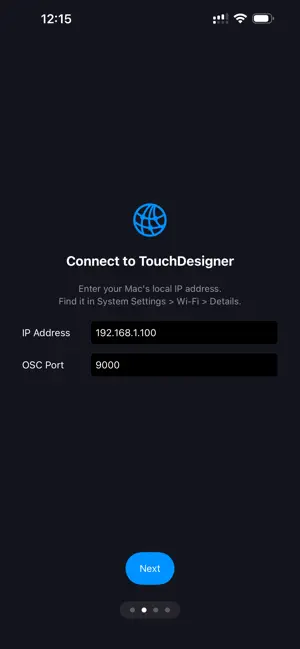
Your body is an input device. TDInput streams every sensor on your Apple Watch AND iPhone directly into TouchDesigner as live CHOP channels — no custom hardware, no complex setup. Tilt your wrist to rotate geometry. Let your heartbeat drive particle systems. Scroll the Digital Crown to scrub a timeline. Wave your phone to control camera angles. TDInput turns natural body movement into creative control. APPLE WATCH SENSORS • Wrist Orientation — pitch, roll, and yaw at 50Hz • Acceleration — raw hand movement with gravity removed • Gravity Vector — which way is down relative to the watch • Rotation Rate — angular velocity on each axis • Heart Rate — live BPM via workout session • Digital Crown — precise tactile scroll input iPHONE SENSORS • Device Motion — full 6-axis orientation and acceleration at 50Hz • Magnetometer — calibrated compass heading on three axes • Barometric Altitude — relative elevation changes and atmospheric pressure • Battery Level — use charge state as a slow-changing creative input HOW IT WORKS 1. Open TDInput on your iPhone and enter your Mac's IP address. 2. In TouchDesigner, drop in an OSC In CHOP set to port 9000. 3. Open TDInput on your Apple Watch and tap Start. 4. Toggle iPhone Sensors on for phone data. 5. 30+ channels appear instantly in TD. No pairing codes, no Bluetooth dongles, no plugins. Standard OSC over your local Wi-Fi — the same protocol TD already speaks. BUILT FOR • TouchDesigner artists and creative coders • Live performance and interactive installations • VJs and real-time visual performers • Educators teaching sensor-driven art • Anyone exploring embodied interaction FULL OSC ADDRESS MAP Watch: /watch/motion/pitch,roll,yaw • /watch/accel/x,y,z • /watch/gravity/x,y,z • /watch/rotation/x,y,z • /watch/heart/bpm • /watch/crown/delta Phone: /phone/motion/pitch,roll,yaw • /phone/accel/x,y,z • /phone/gravity/x,y,z • /phone/rotation/x,y,z • /phone/magnetic/x,y,z • /phone/altitude/relative,pressure • /phone/battery/level All values arrive as standard OSC floats — wire them into selectCHOP, filterCHOP, and mathCHOP like any other channel. PERFORMANCE 50Hz motion updates give smooth, responsive control. Watch battery lasts approximately 4-5 hours of continuous streaming. The app uses a HealthKit workout session to keep sensors active. Questions or feature requests? We'd love to hear from you.
App privacy
The developer, ari lintzeris, reported these privacy practices to Apple.
Data Not Collected
The developer does not collect any data from this app.
Alternatives to TDInput
Looking for apps like TDInput? Here are 5 similar apps on the App Store. The highest rated is ZIGCAM (5.0/5), and 4 of the 5 are free to download.
-
 ZIGCAM
5.0
ZIGCAM
5.0
-
 Credit Card Generator: Test
-
 Terminal - VPS client
-
 Breadpad - SPICE Simulator
3.9
Breadpad - SPICE Simulator
3.9
-
 Python IDE & Jupyter – Juno
4.6
Python IDE & Jupyter – Juno
4.6
| App | Rating | Price | Last updated | Compare |
|---|---|---|---|---|
| TDInput | – | 0.99 USD | March 23, 2026 | |
| ZIGCAM | 5.0 / 5 (1) | Free | Mar 24, 2026 | Compare |
| Credit Card Generator: Test | – | 0.99 USD | Sep 30, 2026 | Compare |
| Terminal - VPS client | – | Free | Aug 27, 2026 | Compare |
| Breadpad - SPICE Simulator | 3.9 / 5 (168) | Free | Oct 13, 2026 | Compare |
| Python IDE & Jupyter – Juno | 4.6 / 5 (1,145) | Free | Oct 27, 2026 | Compare |
Compare TDInput with the top alternatives: ratings, updates, ASO score and keyword gaps →