

Voice Keyboard Pro: Dictation
Caretopia Network Private Limited Utilities iPhoneiPadiPod touchApple Watch
Voice Keyboard Pro: Dictation is a free Utilities app for iPhone and iPad by Caretopia Network Private Limited. Rated 3.3/5 from 3 ratings.
- Rating
- 3.3
- 3 ratings
- Price
- Free
- on the App Store
- Size
- 8 MB
- Age 4+
- Updated
- Oct 22
- 2026 · v9.1
Screenshots

About Voice Keyboard Pro: Dictation
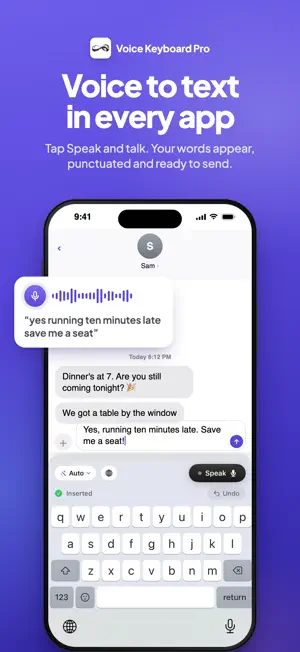
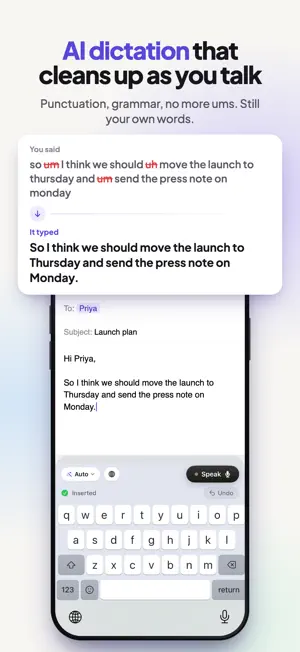
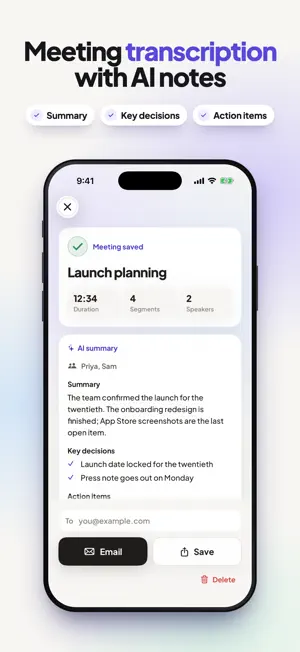
Voice Keyboard Pro is a voice to text keyboard for iPhone and iPad. Tap Speak in any app, talk naturally, and speech to text turns your words into clean, punctuated writing that's ready to send. Dictation that's about 4x faster than typing with your thumbs, and far less tiring. HOW IT WORKS 1. Switch to Voice Keyboard Pro with the globe key. 2. Tap Speak and talk. 3. Tap again. Your words land right where you're typing. WHY TALK INSTEAD OF TYPE Most people speak about 150 words a minute but type around 40 on a phone. Voice typing lets you reply, write and take notes at the speed you think, with your hands free and your eyes up. VOICE TO TEXT IN EVERY APP Because it's a keyboard, talk to text works everywhere you type: Messages, Mail, Notes, documents, social apps, AI chat apps and your browser. No recording in one app and pasting into another. AI DICTATION THAT CLEANS UP AS YOU TALK Speak the way you think. Smart Rewrite adds punctuation, fixes grammar and removes the "ums" while keeping your own words. Choose a tone when you want it to sound more professional or more casual. FIX IT BY VOICE Changed your mind? Use Voice Edit after a dictation and say what to change. Or tap Undo to put things back as they were. AI ACTIONS FOR ANY TEXT Long-press Speak for quick AI actions: clean up, fix grammar, make it professional, shorter or longer, continue writing, or turn it into bullet points. SPEECH TO TEXT IN 19 LANGUAGES Dictate in English, Spanish, French, German, Hindi, Portuguese, Italian, Dutch, Japanese, Chinese, Korean, Russian, Arabic, Turkish and more, or let it detect your language automatically. Speak in one language and type in another with built-in translate. INSTANT, HANDS-FREE VOICE TYPING Tap Speak and start talking right away: it catches your first words. Say "new line", "comma" or "full stop" and it formats as you go, and you can dictate numbered lists out loud. A live indicator in the Dynamic Island shows when you're dictating. A FAST SWIPE TYPING KEYBOARD TOO When you'd rather type, you get a full keyboard with accurate swipe typing, word predictions, emoji and long-press numbers. Slide left on delete to remove whole words. It looks right in light and dark mode, and you can pick your Speak button colour and key font. MEETING TRANSCRIPTION AND AI NOTES Record meetings, lectures and interviews, follow the live transcript, then get an AI summary with key decisions and action items. Email the notes or save them in a tap. LEARNS YOUR NAMES AND JARGON Your personal dictionary learns names, specialist terms and the corrections you make, so medical, legal and technical words come out right more often. Import names from your contacts so people's names are spelled correctly. PRIVATE BY DESIGN Your audio is turned into text and then discarded. Recordings aren't kept, and your dictation history stays on your device. You don't need an account to use it. WHO USES IT • Professionals replying to messages and email on the go • Doctors, lawyers and consultants dictating notes • Students taking notes and writing essays by voice • Writers and creators getting first drafts down fast • People with RSI, dyslexia or ADHD who find typing slow or tiring • Anyone who wants hands-free texting while busy ON YOUR MAC TOO Voice Keyboard Pro is also on the Mac: hold a key, speak, and your words appear in any Mac app. Already have Pro on the Mac? Sign in on your iPhone and use the same plan. PLANS Start with 5 free dictations every day, no account needed. Upgrade to Pro for unlimited voice to text. Payment is charged to your Apple ID at confirmation. Subscriptions renew automatically unless cancelled at least 24 hours before the end of the current period. Manage or cancel any time in your App Store account settings. Terms of Use: https://www.apple.com/legal/internet-services/itunes/dev/stdeula/ Privacy Policy: https://voicekeyboardpro.com/privacy
What’s new
Version 9.1 · Updated October 22, 2026
Voice Keyboard Pro 9.0 is our biggest update yet: a brand new voice to text keyboard, rebuilt from the ground up. A WHOLE NEW LOOK • A fresh design across the whole app: home, settings, meeting notes, your personal dictionary and the upgrade screen. • A redesigned dictation keyboard that looks great in light and dark mode. • Choose your Speak button colour in Settings: black, violet, blue, teal, green or pink. NO ACCOUNT NEEDED • Start dictating right away. Signing in is now optional. • Sign in only if you want to use one Pro plan on both iPhone and Mac. FASTER SPEECH TO TEXT • Speak now starts instantly. Tap and talk straight away: it catches your first words instead of making you wait. • A clearer screen when voice typing needs turning on, with a quick way back to the app you were in. MUCH MORE ACCURATE SWIPE TYPING • A completely new swipe typing engine recognises the word you meant far more often, especially longer words and quick, sloppy swipes. TYPING IMPROVEMENTS • Slide left on the delete key to remove whole words at a time. • Hold a top-row letter to type its number: q for 1, w for 2, all the way to p for 0. • Accent options open toward the middle of the screen and start on the first choice, like the system keyboard. • Symbols and numbers stay on screen while you type them, and switch back to letters after space or return. • An action return key ("Send", "Search", "Go") now stands out in your chosen colour. A SIMPLER SETUP • A quicker, friendlier setup that walks you through adding the keyboard, allowing Full Access and trying your first dictation. • Pick your language during setup, from 19 languages or automatic detection. MEETING TRANSCRIPTION • Redesigned meeting notes with a cleaner live transcript, speaker labels and AI summaries with key decisions and action items. Thank you for using Voice Keyboard Pro. If voice typing saves you time, a quick rating helps other people find it.
App privacy
The developer, Caretopia Network Private Limited, reported these privacy practices to Apple.
Data Linked to You
The following data, which may be collected and linked to your identity, may be used for the following purposes:
- Contact Info: Email Address, Name
Used for: Product Personalization, App Functionality
Data Not Linked to You
The following data, which may be collected but is not linked to your identity, may be used for the following purposes:
- Diagnostics: Crash Data, Performance Data, Other Diagnostic Data
- User Content: Audio Data
Used for: Analytics, App Functionality
Alternatives to Voice Keyboard Pro: Dictation
Looking for apps like Voice Keyboard Pro: Dictation? Here are 6 similar apps on the App Store. The highest rated is Voicy: Speech to Text Keyboard (5.0/5), and 5 of the 6 are free to download.
-
 dictate. — Voice to Text
-
 Walkie: Voice Keyboard
-
 dikta - AI Voice Keyboard
-
 Voicy: Speech to Text Keyboard
5.0
Voicy: Speech to Text Keyboard
5.0
-
 Typeoff - AI Voice Keyboard
-
 Nook | Private Link Saver
| App | Rating | Price | Last updated | Compare |
|---|---|---|---|---|
| Voice Keyboard Pro: Dictation | 3.3 / 5 (3 ratings) | Free | October 22, 2026 | |
| dictate. — Voice to Text | – | Free | Aug 15, 2026 | Compare |
| Walkie: Voice Keyboard | – | Free | Oct 22, 2026 | Compare |
| dikta - AI Voice Keyboard | – | Free | Mar 11, 2026 | Compare |
| Voicy: Speech to Text Keyboard | 5.0 / 5 (1) | Free | Sep 9, 2026 | Compare |
| Typeoff - AI Voice Keyboard | – | Free | Jun 26, 2026 | Compare |
| Nook | Private Link Saver | – | 4.99 USD | Jul 6, 2026 | Compare |