

Typeoff - AI Voice Keyboard
TRACUP PTE.LTD. Utilities iPhoneiPadiPod touch
Typeoff - AI Voice Keyboard is a free Utilities app for iPhone and iPad by TRACUP PTE.LTD. Requires iOS 16.0. Updated June 26, 2026.
- Price
- Free
- on the App Store
- Size
- 110 MB
- Age 4+
- Updated
- Jun 26
- 2026 · v1.0.3
Screenshots



About Typeoff - AI Voice Keyboard
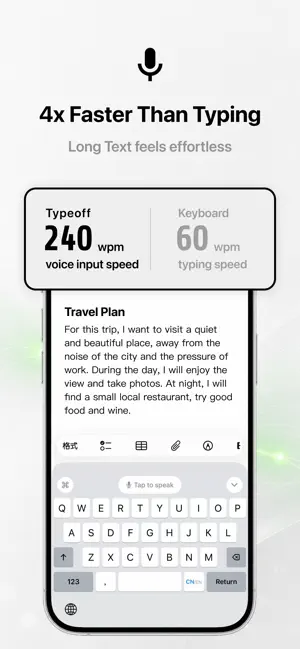
Typeoff is an AI powered voice keyboard for iPhone. Tap the microphone button on the keyboard, speak naturally, and your words are automatically formatted and typed directly where your cursor is in any app. No switching apps for dictation. No copy and paste. Typeoff works wherever you type. HOW IT WORKS 1. Install the Typeoff keyboard from Settings > Keyboards 2. Open any app where you want to type 3. Tap the microphone button on the Typeoff keyboard 4. Speak and Typeoff streams your voice, formats the text with AI, and inserts it instantly KEY FEATURES AI Text Formatting Choose from three formatting levels: Light: Adds punctuation and fixes typos only Medium: Removes filler words, fixes errors, and adds paragraphs Strong: Restructures sentences and removes redundancy Writing Styles Auto, Professional, Casual, Concise, or Detailed. Typeoff adapts to your context. Chinese Input (RIME powered) Full pinyin to Chinese conversion with candidate bar. Supports full keyboard and nine key layouts. Background Recording Floating window and voice standby modes let you dictate without switching apps. Translation Speak in one language and type in another. Set your target language in settings. Custom Vocabulary Add names, places, and technical terms to improve recognition accuracy. Transcription History All history is stored only on your device and is never uploaded. Copy any record with one tap. Live Activity and Dynamic Island See recording status in real time on the lock screen or Dynamic Island. PRIVACY FIRST Audio is used only for real time transcription and deleted immediately after processing. Your voice and text are never used for model training. Transcription history stays on your device and can be deleted anytime. Requires Allow Full Access for the keyboard to communicate with the main app. Terms of Use: https://www.apple.com/legal/internet-services/itunes/dev/stdeula/
What’s new
Version 1.0.3 · Updated June 26, 2026
- Added support for moving the cursor by long-pressing the space bar, making text editing easier. - Improved power efficiency for better battery life. - Optimized the symbol keyboard layout for a more efficient typing experience. - Fixed an issue where the keyboard would occasionally flicker when appearing.
App privacy
The developer, TRACUP PTE.LTD., reported these privacy practices to Apple.
Data Not Collected
The developer does not collect any data from this app.
Alternatives to Typeoff - AI Voice Keyboard
Looking for apps like Typeoff - AI Voice Keyboard? Here are 6 similar apps on the App Store. The highest rated is Ninan - AI Voice Keyboard (5.0/5), and all 6 are free to download.
-
 Ninan - AI Voice Keyboard
5.0
Ninan - AI Voice Keyboard
5.0
-
 Flow Keyboard: AI Voice Typing
4.5
Flow Keyboard: AI Voice Typing
4.5
-
 WorkBuddy - AI Work Agent
3.9
WorkBuddy - AI Work Agent
3.9
-
 灵光-全模态AI助手
4.0
灵光-全模态AI助手
4.0
-
 UU远程-远程办公/游戏串流
4.9
UU远程-远程办公/游戏串流
4.9
-
 微信输入法
4.0
微信输入法
4.0
| App | Rating | Price | Last updated | Compare |
|---|---|---|---|---|
| Typeoff - AI Voice Keyboard | – | Free | June 26, 2026 | |
| Ninan - AI Voice Keyboard | 5.0 / 5 (2) | Free | Oct 21, 2026 | Compare |
| Flow Keyboard: AI Voice Typing | 4.5 / 5 (11) | Free | Oct 23, 2026 | Compare |
| WorkBuddy - AI Work Agent | 3.9 / 5 (21) | Free | Oct 21, 2026 | Compare |
| 灵光-全模态AI助手 | 4.0 / 5 (82) | Free | Oct 17, 2026 | Compare |
| UU远程-远程办公/游戏串流 | 4.9 / 5 (1,194) | Free | Sep 25, 2026 | Compare |
| 微信输入法 | 4.0 / 5 (782) | Free | Oct 21, 2026 | Compare |