

Tobydoro: Focus & Flow Timer
Michael Pulgar Productivity iPhoneiPadiPod touchMac
Tobydoro: Focus & Flow Timer is a free Productivity app for iPhone and iPad by Michael Pulgar. Requires iOS 18.0. Updated October 14, 2026.
- Price
- Free
- on the App Store
- Size
- 223 MB
- Age 4+
- Updated
- Oct 14
- 2026 · v1.4.0
Screenshots
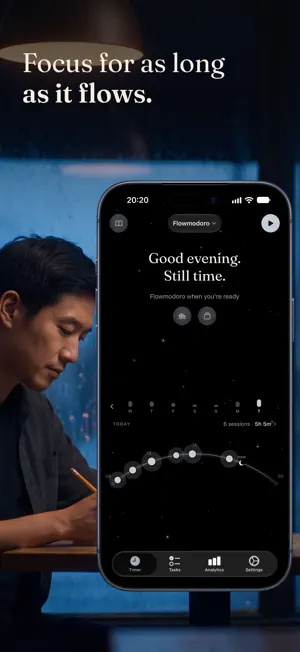


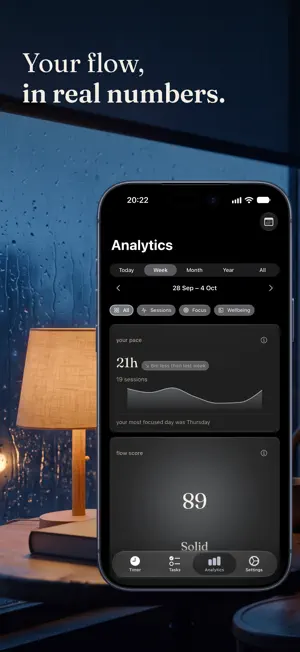
About Tobydoro: Focus & Flow Timer
Rigid 25-minute timers break your flow. Tobydoro lets you work until concentration ends — then gives you the break science says you need. Flowmodoro is a variable-interval method: no forced timers, proportional rest, longer sessions when you are locked in. Built for knowledge workers who want depth, not buzzers. LIVE ACTIVITY & DYNAMIC ISLAND Track your session from Lock Screen, Dynamic Island, and StandBy. Stop directly from the Live Activity. FLOW SCORE & ANALYTICS Your Flow Score across five dimensions is free. Pro unlocks 30+ analytics and the Month, Year, and All Time periods (Today and Week are free). Map your Focus Fingerprint on six axes: Consistency, Resilience, Recovery, Depth, Reflection, Wellbeing. Discover your peak focus hours with chronotype detection. See work patterns, distraction timing, mood trends, and cross-variable correlations. PRIVACY BY DESIGN No account. No ads. No analytics SDKs. No tracking. Your sessions, tasks and journal stay on your device — and in your own iCloud if you turn on sync. Photos and audio stay on the device where you add them, and voice transcription runs on the device itself. Purchases are processed by Apple and verified by RevenueCat. FREE FOREVER The full Flowmodoro timer, the five built-in routines, tasks, reflection, breaks, journal, daily summary, and most widgets are completely free. No ads. FLOW TIMER No fixed intervals. Work as long as concentration lasts. Tobydoro calculates an evidence-based break proportional to your session. Three break formulas: Simple, Balanced, Custom. FOCUS ROUTINES Flowmodoro adapts the break to how long you focused; Classic, Deep Work, Quick Sprint, and Long Focus keep a fixed rhythm. Breathe first if you like, with the technique you prefer. Create your own routines with Pro. REFLECTION & JOURNAL After each session, rate your mood, write a reflection, review what you accomplished. Daily journal with session-by-session timelines. Weekly reviews surface your patterns. SMART BREAKS While you focus, gentle reminders tell you to look away from the screen, stand up and move, and drink water. Routines add a long break after a set number of blocks. TASKS & PROJECTS Organize with tasks, projects, tags, priorities, and four cognitive modes: Focus, Learning, Execution, Collaborative. Estimate time, track progress, add comments. WELLBEING OBSERVATIONS Tobydoro notices when your sessions run long and suggests a pause. Fatigue nudges, sedentarism observations, and quiet hours keep habits sustainable. SEVEN HOME SCREEN WIDGETS Daily Focus (time and sessions), Daily Motivation, Focus Streak, Quick Start, Today's Stats, Summary, and Session Control. STREAKS WITH GRACE DAYS One rest day per week does not break your streak — because rest is part of the process. DATA EXPORT & IMPORT (Pro) Export everything as JSON or CSV. Import backups with Skip, Replace, or Keep Both strategies. Your data, your rules. TOBYDORO PRO Advanced analytics across all periods, chronotype detection, Flow Score history, Focus Fingerprint, data export and import, extended journal history, and weekly reviews. New subscribers get a 7-day free trial on the yearly plan; the subscription then renews automatically unless cancelled. Your first flow session starts today. --- Tobydoro is a productivity tool that tracks work patterns and suggests breaks. It is not a medical device and does not diagnose, treat, cure, or prevent any disease or condition. Terms of Use (EULA): https://www.apple.com/legal/internet-services/itunes/dev/stdeula/
What’s new
Version 1.4.0 · Updated October 14, 2026
What's new in 1.4.0 • Focus routines — start with five built-in routines (Flowmodoro, Classic 25/5/15, Deep Work 50/10/30, Quick Sprint 15/5/10 and Long Focus 45/15/30), or create your own with Pro. Built-in routines run their whole set by themselves; turn off "Run automatically" to start each break and block yourself. • Routines replace rituals. • Inspect and edit a routine, then return where you left off. Start it from Home. • Block distracting apps (Pro) — choose the apps that stay closed while a routine's focus runs. If you really need one, you can unblock the rest of that block; your session keeps going. • A new Journal — several notes a day, rich formatting, photos and voice notes. Voice notes are transcribed on your device, in the language you choose. • A new timer screen — your focus under a textured moon, your day drawn as an arc of finished sessions, earlier days a swipe away and your daily summary a tap away. Minimize a running timer with a tap or a swipe down and keep using the app. On iPhone, it glides into the mini-player. • Session details — tap a session in your day arc to see its routine, task, mood and note in one small sheet. Use the arrows to move between that day's sessions without closing the sheet. Fill in what's missing the same day, or start it again with one tap. • Tobydoro now speaks Portuguese, French and Polish. • An optional soft tick every second, while you focus and during breaks. • Breathing before a session now plays in a calm rain scene, whatever technique you pick. • Assign a task or category while a session runs, or during a break for the next block. • Safer iCloud sync — an older copy can no longer overwrite newer work, and merging duplicates keeps your edits. Update to 1.4.0 on all your devices. • A session in progress, paused or not, is recovered if the app closes or updates mid-flow, and the Live Activity handles breaks, pauses and Stop more reliably, with the same block time as the app on the Lock Screen and in the Dynamic Island. • Stop now ends a routine, Skip during a break starts the next block, choosing another routine no longer resets the one in progress, and a quick Stop leaves no phantom block in your history. • Smoother onboarding photo and moon entrances. Close the Pro page with the X at the top. • Many fixes and polish across the timer, the Journal and analytics.
App privacy
The developer, Michael Pulgar, reported these privacy practices to Apple.
Data Not Linked to You
The following data, which may be collected but is not linked to your identity, may be used for the following purposes:
- Purchases: Purchase History
- Identifiers: Device ID
Used for: Analytics, App Functionality
Alternatives to Tobydoro: Focus & Flow Timer
Looking for apps like Tobydoro: Focus & Flow Timer? Here are 6 similar apps on the App Store. The highest rated is Fokusd - App Blocker (5.0/5), and all 6 are free to download.
-
 Flowmodoro - Focus·Flow·Timer
-
 Pomodoro Focus Timer: PostPing
4.0
-
 Fokusd - App Blocker
5.0
-
 Document Scan, Edit & Merge
4.0
-
 FlowStack: Focus & Routine
4.9
-
 FaceDown: App Blocker & Focus
4.5
| App | Rating | Price | Last updated | Compare |
|---|---|---|---|---|
| Tobydoro: Focus & Flow Timer | – | Free | October 14, 2026 | |
| Flowmodoro - Focus·Flow·Timer | – | Free | Oct 2, 2026 | Compare |
| Pomodoro Focus Timer: PostPing | 4.0 / 5 (1) | Free | Oct 19, 2026 | Compare |
| Fokusd - App Blocker | 5.0 / 5 (7) | Free | Oct 6, 2026 | Compare |
| Document Scan, Edit & Merge | 4.0 / 5 (2) | Free | Aug 26, 2026 | Compare |
| FlowStack: Focus & Routine | 4.9 / 5 (8) | Free | Oct 19, 2026 | Compare |
| FaceDown: App Blocker & Focus | 4.5 / 5 (2) | Free | Sep 2, 2026 | Compare |