

Swoopic: Swipe Storage Cleaner
Levon Vardanyan Utilities iPhoneiPadiPod touch
Swoopic: Swipe Storage Cleaner is a free Utilities app for iPhone and iPad by Levon Vardanyan. Requires iOS 17.0. Updated October 17, 2026.
- Price
- Free
- on the App Store
- Size
- 57 MB
- Age 4+
- Updated
- Oct 17
- 2026 · v1.1.5
Screenshots

About Swoopic: Swipe Storage Cleaner
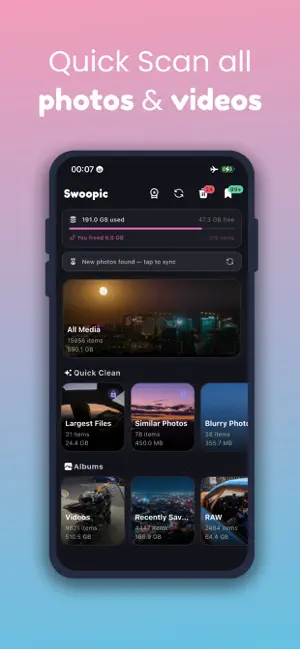
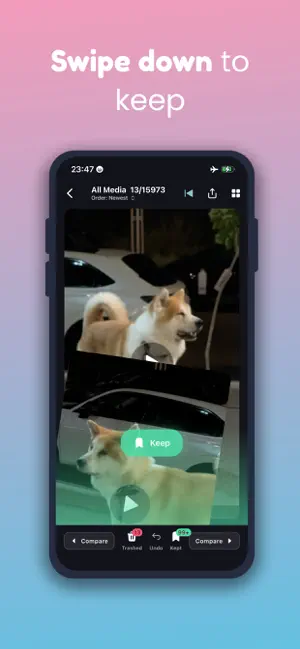
Your iPhone says "Storage Almost Full." Again. It's not random. Thousands of duplicate bursts, blurry shots, and screenshots you saved years ago are quietly eating your storage. Swoopic finds them all — and helps you delete them in minutes. Swipe up to trash a photo. Swipe down to keep it. That's it. QUICK CLEAN — FINDS THE JUNK FOR YOU Swoopic automatically scans your photo library and surfaces what's wasting the most space: - Largest Files — 4K videos and RAW bursts hogging gigabytes, sorted by size - Similar Photos — near-duplicate shots from the same moment, grouped so you keep only the sharpest one and delete the rest - Blurry Photos — out-of-focus images detected on-device, automatically - Screenshots — the receipts, maps, and memes you saved and forgot - Selfies, Live Photos, Burst Photos, Panoramas, Videos — every type, organized and ready to clean - By Year, Month, Country, and City — clean your travel photos together, tackle one era at a time SWIPE. TRASH. PURGE. Every photo you swipe away goes to your Trash — nothing is permanently deleted until you're ready. When you are, empty it in one tap. Swoopic shows you exactly how many gigabytes you just freed from your camera roll. COMPARE SIDE BY SIDE Two similar photos and you can't decide? Compare mode puts them next to each other with file size, resolution, and date for both — so you always delete the worse one and keep the better one. UNDO ANYTHING. DECIDE LATER. Trashed something by mistake? Undo brings it back instantly. Not sure? Send it to Check Later and move on — it'll be there when you're ready. You're in complete control of your gallery. YOUR PHOTOS NEVER LEAVE YOUR DEVICE Swoopic runs entirely on your iPhone. No uploads, no cloud scanning, no accounts required. Your photo library stays private. Always. SWOOPIC PREMIUM Unlock unlimited daily swipes and the full Quick Clean suite — Similar Photos, Largest Files, and Blurry detection — with a weekly or yearly subscription. Try Premium free for 3 days on the yearly plan. HOW TO FREE UP SPACE ON YOUR IPHONE Wondering how to delete duplicate photos on iPhone? How to find and remove blurry photos automatically? How to clean your camera roll without going through thousands of images one by one? Swoopic handles all of it. Open the app, let it scan your photo library, and start swiping. Most people free up 5–15 GB in their first session. HOW TO FIND SIMILAR PHOTOS ON IPHONE iOS finds exact duplicates — but it misses the hundreds of near-identical burst shots, similar-looking photos, and slightly different versions of the same moment. Swoopic's on-device analysis groups similar photos together so you can compare them side by side and keep only the best one. HOW TO FIND AND DELETE BLURRY PHOTOS ON IPHONE Blurry photos are hard to spot when scrolling through thousands of images. Swoopic's on-device blur detection automatically identifies out-of-focus shots and groups them separately, so you can review and delete them all in one go without hunting through your entire camera roll. HOW TO DELETE LARGE VIDEOS ON IPHONE Large videos are the biggest space wasters on most iPhones — a single 4K clip can eat 500 MB or more. Swoopic's Largest Files group scans your entire camera roll and sorts everything by file size, so you can find the biggest offenders instantly and delete them in one swipe. HOW TO CLEAN UP SCREENSHOTS ON IPHONE Screenshots pile up fast. Swoopic groups all your screenshots together so you can swipe through them in one session and delete what you no longer need — receipts, directions, saved posts, all of it gone in minutes. HOW TO ORGANIZE PHOTOS BY LOCATION Swoopic automatically groups your photos by country and city using the GPS data embedded in each shot — no manual tagging needed. Want to clean up all your photos from a specific trip? Just open the location group and start swiping. Terms of Use (EULA): https://www.apple.com/legal/internet-services/itunes/dev/stdeula/
What’s new
Version 1.1.5 · Updated October 17, 2026
Bug fixes
App privacy
The developer, Levon Vardanyan, reported these privacy practices to Apple.
Data Used to Track You
The following data may be used to track you across apps and websites owned by other companies:
- Identifiers: Device ID
- Usage Data: Advertising Data
Data Not Linked to You
The following data, which may be collected but is not linked to your identity, may be used for the following purposes:
- Identifiers: Device ID
- Usage Data: Advertising Data
Used for: Third-Party Advertising, Analytics, App Functionality
Alternatives to Swoopic: Swipe Storage Cleaner
Looking for apps like Swoopic: Swipe Storage Cleaner? Here are 6 similar apps on the App Store. The highest rated is Cough Level (5.0/5), and all 6 are free to download.
-
 Translo - all
-
 Map Area & Distance Calc
-
 Cough Level
5.0
-
 Impulse Noise Decibel Meter
-
 PDF Scanner: Scan Docs & PDF
-
 Prayer Times - Adhan Alerts
| App | Rating | Price | Last updated | Compare |
|---|---|---|---|---|
| Swoopic: Swipe Storage Cleaner | – | Free | October 17, 2026 | |
| Translo - all | – | Free | Oct 24, 2026 | Compare |
| Map Area & Distance Calc | – | Free | Sep 20, 2026 | Compare |
| Cough Level | 5.0 / 5 (1) | Free | Aug 1, 2026 | Compare |
| Impulse Noise Decibel Meter | – | Free | Jul 14, 2026 | Compare |
| PDF Scanner: Scan Docs & PDF | – | Free | Sep 29, 2026 | Compare |
| Prayer Times - Adhan Alerts | – | Free | Aug 15, 2026 | Compare |