

LocalVoiceNote
Liang Cheng Productivity iPhoneiPadiPod touch
LocalVoiceNote is a free Productivity app for iPhone and iPad by Liang Cheng. Requires iOS 17.0. Updated October 5, 2026.
- Price
- Free
- on the App Store
- Size
- 571 MB
- Age 4+
- Updated
- Oct 5
- 2026 · v3.2.1
Screenshots
About LocalVoiceNote
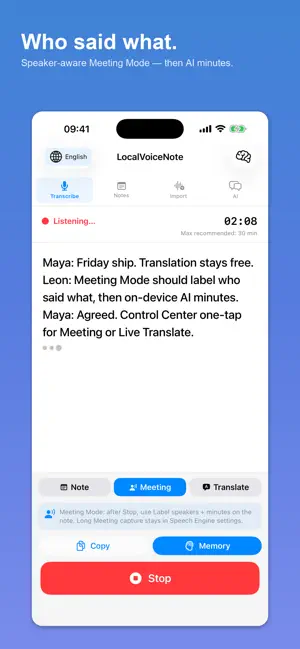
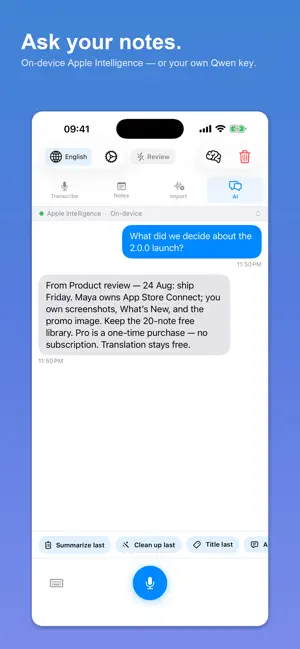
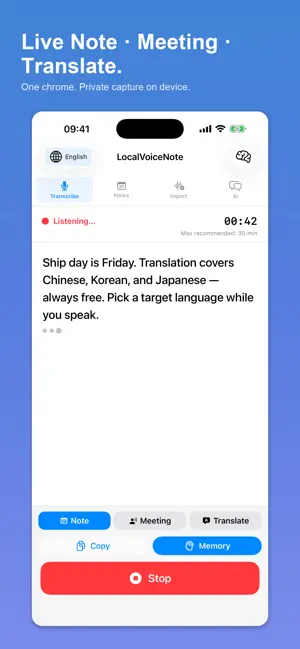
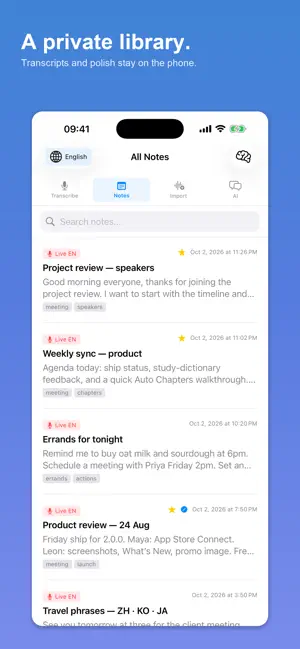
LocalVoiceNote turns speech into text directly on your iPhone or iPad — built around Apple's own on-device intelligence, with privacy first. Apple Speech comes first. On supported devices, LocalVoiceNote transcribes with Apple's built-in on-device speech recognition — the same engine the system uses — so you get fast, natural, low-power results with no setup and no account. Apple Intelligence powers the thinking. On devices with Apple Intelligence, your transcripts are polished, summarised, and turned into actions entirely on-device. Nothing is uploaded, nothing is stored on a server, and none of it costs you a subscription. Whisper keeps you covered. If Apple Speech isn't available for your device or your language, LocalVoiceNote falls back automatically to a bundled Whisper Large model. It ships inside the app, needs no download and no network, and covers languages and older devices Apple Speech doesn't reach — so transcription always works. LocalVoiceNote is designed for fast capture: tap once to start recording, speak naturally, and watch your transcript appear live. Save transcripts automatically, rename them, search later, revise text, and translate supported content when needed. Whether you are capturing meeting notes, voice memos, ideas on the go, lecture summaries, bilingual phrases, or quick dictated drafts, LocalVoiceNote keeps the workflow simple and local.
What’s new
Version 3.2.1 · Updated October 5, 2026
Fixes speaker labels in Meeting Mode. On 3.2.0 they produced nothing unless you had switched the speech engine to Whisper; they now work on Apple Speech too, which is the default Speaker labels are no longer lost when a recording ends through an interruption, such as a phone call If speaker labels can’t be prepared — no Wi-Fi for the one-time download, not enough space, or an older iPhone — the note now says why instead of simply having none Meeting Mode now explains that speakers are identified while you record, so you stay in Meeting Mode until you stop Meeting, Translate and Speakers are now translated in Chinese, Japanese and Korean Fixes the Meeting and Translate buttons wrapping onto two lines on the free tier
App privacy
The developer, Liang Cheng, reported these privacy practices to Apple.
Data Not Collected
The developer does not collect any data from this app.
Alternatives to LocalVoiceNote
Looking for apps like LocalVoiceNote? Here are 6 similar apps on the App Store. The highest rated is LocalNote: Private Voice Notes (5.0/5), and all 6 are free to download.
-
 LocalNote: Private Voice Notes
5.0
LocalNote: Private Voice Notes
5.0
-
 SessionScribe: Voice to Text
-
 Task Optimist
-
 Offline Dictation: VoiceCrisp
-
 TypeVoice: AI Voice Keyboard
5.0
TypeVoice: AI Voice Keyboard
5.0
-
 EchoScribe
| App | Rating | Price | Last updated | Compare |
|---|---|---|---|---|
| LocalVoiceNote | – | Free | October 5, 2026 | |
| LocalNote: Private Voice Notes | 5.0 / 5 (1) | Free | Aug 14, 2026 | Compare |
| SessionScribe: Voice to Text | – | Free | Sep 16, 2026 | Compare |
| Task Optimist | – | Free | May 28, 2026 | Compare |
| Offline Dictation: VoiceCrisp | – | Free | Aug 19, 2026 | Compare |
| TypeVoice: AI Voice Keyboard | 5.0 / 5 (1) | Free | Jun 4, 2026 | Compare |
| EchoScribe | – | Free | Jul 29, 2026 | Compare |
Compare LocalVoiceNote with the top alternatives: ratings, updates, ASO score and keyword gaps →