

SUBCAM
Daisaku Harasaki Graphics & Design iPhoneiPadiPod touch
SUBCAM is a paid Graphics & Design app for iPhone and iPad by Daisaku Harasaki. Requires iOS 17.0. Updated October 12, 2026.
- Price
- 1.99 USD
- on the App Store
- Size
- 2 MB
- Age 4+
- Updated
- Oct 12
- 2026 · v1.5
Screenshots



About SUBCAM
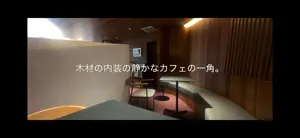
SUBCAM is a camera that burns live captions right into your video as you shoot. Speak while recording and your words appear on screen in real time — and they are baked into the saved video. No editing, no exporting to another app. KEY FEATURES - Live Speech Captions On-device speech recognition turns your voice into subtitles the moment you speak — captions appear live even before you start recording. Supports Japanese, English, Chinese, Korean, and more. - On-Device Translation (iOS 18 or later) Speak in one language, caption in another. Real-time translation runs entirely on device, no internet connection required. Switch it on with one tap from the capture screen. - AI Scene Captions Point the camera at anything and AI describes what it sees, as short words or full sentences. Bring your own API key for Claude, ChatGPT, or Gemini, connect a local LLM, or use Apple Intelligence fully on device. You can even choose the exact model for each provider. - Cinematic Looks Switch between Standard, CinemaScope (2.39:1 letterbox), Cinematic tone, and Monochrome with one tap, right above the shutter. Letterbox color is customizable. - Style Captions While You Shoot Tap the "Aa" button to change caption size, position (top / center / bottom), and font — with a live preview behind the panel. Five fonts including Japanese Gothic and Mincho. - A Camera That Feels Familiar Standard camera layout: big shutter, recent-clip thumbnail, 0.5x/1x lens switch, pinch zoom, tap to focus. Non-essential controls fade away while recording so you can focus on the shot. FREE - 1080p 30fps recording (with a small #SUBCAM watermark) - All caption features: speech captions, AI captions, translation - All looks, caption styling, and fonts SUBCAM PRO (one-time purchase) - 4K and 60fps recording - HDR video - Exposure adjustment - Removes the #SUBCAM watermark Perfect for vlogs, street snaps, interviews, travel videos, language learning, and accessibility — shoot once, share immediately, captions included.
What’s new
Version 1.5 · Updated October 12, 2026
- Fixed speech recognition not working for languages other than Japanese (falls back to server recognition when no on-device model is available) - Long captions no longer get cut off: up to 3 lines in Standard and 2 lines in Scope, with automatic shrinking - Captions in recordings now match the preview size, especially for portrait Scope shots - Recordings are saved safely when you leave the app or receive a call - Videos are no longer lost if saving to Photos fails (retried on next launch) - AI captions now ask for confirmation before images are sent to a cloud AI provider - More reliable Pro status (auto-restore after reinstall, refunds handled) - Removed the danmaku caption mode - Stability improvements and bug fixes
App privacy
The developer, Daisaku Harasaki, reported these privacy practices to Apple.
Data Not Collected
The developer does not collect any data from this app.
Alternatives to SUBCAM
Looking for apps like SUBCAM? Here are 6 similar apps on the App Store. The highest rated is Add Subtitle Translate - Subit (5.0/5), and 5 of the 6 are free to download.
-
 AIペンシル
-
 Add Subtitle Translate - Subit
5.0
Add Subtitle Translate - Subit
5.0
-
 Photo Editor | Collage Maker
4.4
Photo Editor | Collage Maker
4.4
-
 Comic & Story Maker - Arcstory
3.6
Comic & Story Maker - Arcstory
3.6
-
 Image Resizer.
4.7
Image Resizer.
4.7
-
 Toolbox for Pages: Templates
4.8
Toolbox for Pages: Templates
4.8
| App | Rating | Price | Last updated | Compare |
|---|---|---|---|---|
| SUBCAM | – | 1.99 USD | October 12, 2026 | |
| AIペンシル | – | Free | Mar 20, 2026 | Compare |
| Add Subtitle Translate - Subit | 5.0 / 5 (3) | Free | Jun 17, 2026 | Compare |
| Photo Editor | Collage Maker | 4.4 / 5 (38) | Free | Sep 30, 2026 | Compare |
| Comic & Story Maker - Arcstory | 3.6 / 5 (33) | Free | Jul 2, 2026 | Compare |
| Image Resizer. | 4.7 / 5 (91) | 2.99 USD | May 6, 2026 | Compare |
| Toolbox for Pages: Templates | 4.8 / 5 (35) | Free | Jul 7, 2026 | Compare |
Compare SUBCAM with the top alternatives: ratings, updates, ASO score and keyword gaps →