

DayLine - Daily Planner
masafumi matsumoto Productivity iPhoneiPadiPod touch
DayLine - Daily Planner is a free Productivity app for iPhone and iPad by masafumi matsumoto. Requires iOS 15.1. Updated May 4, 2026.
- Price
- Free
- on the App Store
- Size
- 39 MB
- Age 4+
- Updated
- May 4
- 2026 · v1.3.0
Screenshots

About DayLine - Daily Planner
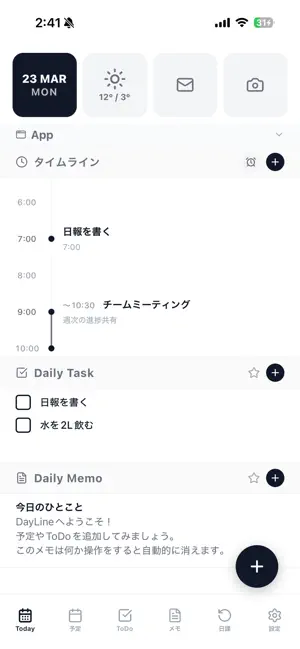
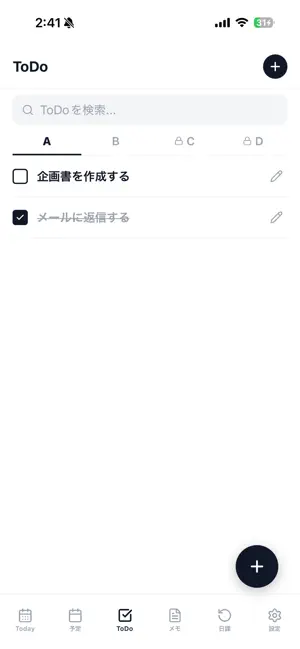
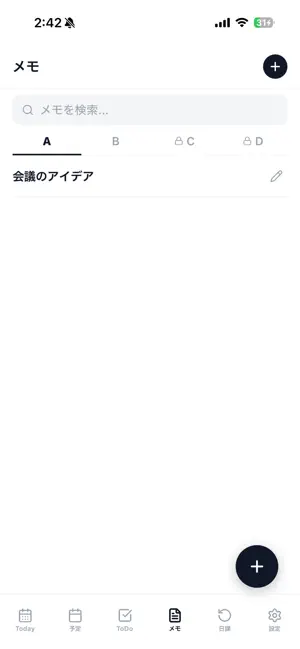
DayLine organizes your entire day on one beautifully calm timeline. Schedules, todos, memos, and daily habits live together in a single screen — no more switching between apps. The integrated calendar, weather forecast, photo gallery, and quick app shortcuts let you see and act on your day at a glance. KEY FEATURES • Timeline view — visualize your day from morning to night • Schedules, todos, memos, daily tasks & habits in one place • Daily habit tracker with streak tracking • Built-in calendar with optional Outlook & Google Calendar sync • Weather forecast for 40+ cities worldwide • Photo gallery — see today's photos automatically • 10 themes including Dark, Sakura, Midnight, Matcha • Adjustable font size for accessibility • Encrypted cloud sync between iPhone, iPad, and PC web app • Works fully offline — sync only when you sign in PREMIUM FEATURES • Ad-free experience • PC web app sync (use DayLine in any browser on Mac, Windows, Chromebook) • 8 additional themes • 4 ToDo / Memo slot tabs (free version: 2) DAYLINE ON YOUR PC Subscribe to Premium and sign in once — your data syncs to the DayLine web app at https://dayline-yaneyuka.web.app, so you can plan from your desktop too. PRIVACY Your data stays yours. We use Firebase for sync, store no data we don't need, and never sell your information. See our Privacy Policy for details. For auto-renewable subscriptions: Terms of Use (EULA): https://www.apple.com/legal/internet-services/itunes/dev/stdeula/ Privacy Policy: https://yaneyuka.com/dayline-app-privacy-policy-en
What’s new
Version 1.3.0 · Updated May 4, 2026
• Full English support — auto-detects device language, manual switch in Settings • Weather forecast now covers 26 international cities across Asia, Europe, North America, Oceania, and South America • All-day events: add date-only schedule items, pinned at the top of the timeline • Calendar highlights past days with unfinished todos in yellow • Habits scheduled for the day now appear in the Daily Task section • Memo editor: double-click to edit, with confirmation when leaving unsaved changes • Timeline header shows -Today- or the selected date so it's always clear which day you're viewing • Various UI improvements and bug fixes
App privacy
The developer, masafumi matsumoto, reported these privacy practices to Apple.
Data Linked to You
The following data, which may be collected and linked to your identity, may be used for the following purposes:
- Purchases: Purchase History
- Contact Info: Email Address
- User Content: Other User Content
- Identifiers: User ID
Used for: App Functionality
Data Not Linked to You
The following data, which may be collected but is not linked to your identity, may be used for the following purposes:
- Identifiers: Device ID
Used for: Analytics
Alternatives to DayLine - Daily Planner
Looking for apps like DayLine - Daily Planner? Here are 6 similar apps on the App Store. The highest rated is Habit Tracker Pro: Routine (5.0/5), and all 6 are free to download.
-
 Daytin: Routine & To-Do List
-
 Notes Tasks Calendar - Utility
-
 Remember To Do: Daily Routine
-
 BLISS Glim: Daily Planner
-
 Habit Tracker Pro: Routine
5.0
Habit Tracker Pro: Routine
5.0
-
 The Next To-Do
5.0
The Next To-Do
5.0
| App | Rating | Price | Last updated | Compare |
|---|---|---|---|---|
| DayLine - Daily Planner | – | Free | May 4, 2026 | |
| Daytin: Routine & To-Do List | – | Free | Sep 13, 2026 | Compare |
| Notes Tasks Calendar - Utility | – | Free | Oct 9, 2026 | Compare |
| Remember To Do: Daily Routine | – | Free | Aug 31, 2026 | Compare |
| BLISS Glim: Daily Planner | – | Free | Sep 19, 2026 | Compare |
| Habit Tracker Pro: Routine | 5.0 / 5 (1) | Free | Jun 19, 2026 | Compare |
| The Next To-Do | 5.0 / 5 (1) | Free | Sep 26, 2026 | Compare |