

WigWag: Pitch Calling
David Castillo Sports iPhoneiPadiPod touchApple Watch
WigWag: Pitch Calling is a free Sports app for iPhone and iPad by David Castillo. Requires iOS 15.1. Updated October 3, 2026.
- Price
- Free
- on the App Store
- Size
- 45 MB
- Age 4+
- Updated
- Oct 3
- 2026 · v1.0.2
Screenshots
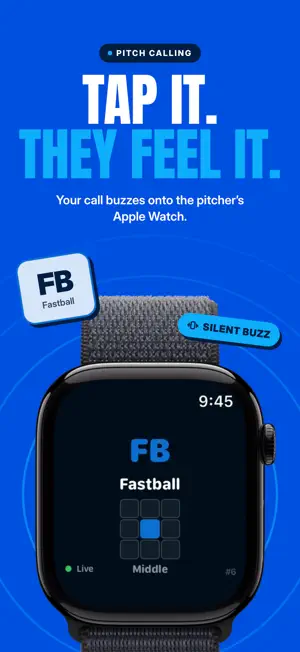


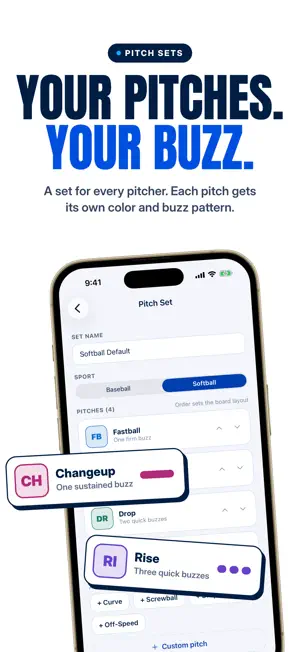
About WigWag: Pitch Calling
WigWag turns your iPhone into a pitch-calling system. Tap a pitch in the dugout and your pitcher or catcher sees it on their Apple Watch with a haptic buzz, in about a second. No wristband cards, no shouting across the field, no signs to steal. CALL PITCHES • Build pitch sets for baseball or softball: fastball, curve, change, rise, drop and your own • Add a location on a 3x3 zone with one tap • Special calls for step off, time out and pickoff • Resend or wipe a call instantly if the catcher missed it • See delivery confirmation for every receiver ONE DIRECTION, BY DESIGN The watch only shows the call. Players cannot reply, acknowledge or shake off. A plain-language Rules & Compliance page explains exactly how the system works, so you can show any umpire who asks. League rules on electronic devices vary: check yours before using WigWag in a sanctioned game. CHART EVERY PITCH • Record what was thrown, where it ended and what happened • Ball, called strike, swing and miss, foul, in play, with where the ball went • Count, outs, runners and pitch count tracked as you go • Undo anything in one tap KNOW EVERY HITTER • Save opponents with their batting order and notes • Key in a whole lineup before first pitch • See each hitter's zone map and how their last at-bats went, right at the plate • Reports build game after game BUILT FOR THE DUGOUT • Practice mode for bullpens, game mode for the real thing • Invite players with a link; they receive calls on their own watch • One coach calls while another charts on a second phone • Optional heart-rate sharing, only when a player turns it on PLANS Free: 20 pitch calls a month to your own Apple Watch. WigWag Pro: unlimited calls to your players, charting, hitter reports and saved opponents, for 2 people or your whole team. Plans are managed on getwigwag.com, with a 7-day free trial on monthly and yearly. Requires an iPhone. Receiving calls requires an Apple Watch with WigWag installed. Terms of Use (EULA): https://www.apple.com/legal/internet-services/itunes/dev/stdeula/ Privacy: getwigwag.com/privacy Terms: getwigwag.com/terms
What’s new
Version 1.0.2 · Updated October 3, 2026
• Settings now shows the correct app version. Recent improvements: • Team invite links open straight in the app, so players can join in one tap. • Players can open Settings and switch to a team they coach. • Smoother onboarding: the team name field can be cleared and retyped. • More reliable screens when access changes mid-game, with no more dead ends. • Fixed a crash some players hit right after joining a team. Thanks for calling pitches with WigWag! Questions or ideas? Reach us from Settings → Support.
App privacy
The developer, David Castillo, reported these privacy practices to Apple.
Data Linked to You
The following data, which may be collected and linked to your identity, may be used for the following purposes:
- Health & Fitness: Health
- Contact Info: Email Address, Name
- User Content: Other User Content
- Identifiers: User ID, Device ID
- Diagnostics: Other Diagnostic Data
Used for: App Functionality
Alternatives to WigWag: Pitch Calling
Looking for apps like WigWag: Pitch Calling? Here are 6 similar apps on the App Store. The highest rated is Call Home: Pitch Calling (5.0/5), and all 6 are free to download.
-
 PitchLink - Pitch Calling
-
 Call Home Player
-
 Pitchcall Play Calling
-
 Call Home: Pitch Calling
5.0
Call Home: Pitch Calling
5.0
-
 PitchKallr
5.0
PitchKallr
5.0
-
 PitchTAC
5.0
PitchTAC
5.0
| App | Rating | Price | Last updated | Compare |
|---|---|---|---|---|
| WigWag: Pitch Calling | – | Free | October 3, 2026 | |
| PitchLink - Pitch Calling | – | Free | Sep 10, 2026 | Compare |
| Call Home Player | – | Free | Aug 1, 2026 | Compare |
| Pitchcall Play Calling | – | Free | Oct 1, 2026 | Compare |
| Call Home: Pitch Calling | 5.0 / 5 (1) | Free | Aug 18, 2026 | Compare |
| PitchKallr | 5.0 / 5 (1) | Free | Oct 7, 2026 | Compare |
| PitchTAC | 5.0 / 5 (3) | Free | Oct 22, 2026 | Compare |