

Vylo: Budget & Expense Tracker
Faraz Shafaghi Finance iPhoneiPadiPod touch
Vylo: Budget & Expense Tracker is a free Finance app for iPhone and iPad by Faraz Shafaghi. Requires iOS 17.0. Updated September 30, 2026.
- Price
- Free
- on the App Store
- Size
- 23 MB
- Age 4+
- Updated
- Sep 30
- 2026 · v1.0.3
Screenshots


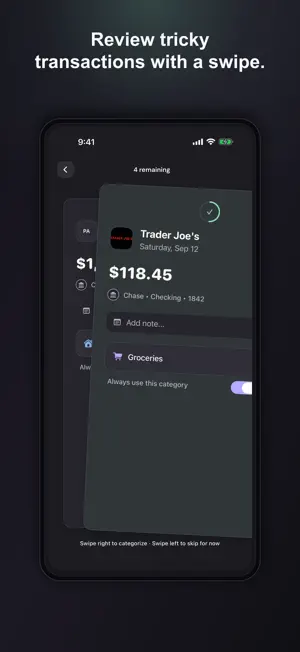

About Vylo: Budget & Expense Tracker
Vylo brings your household’s accounts, transactions, budgets and net worth together—with less manual work and full control over how everything is organized. Now, we know what you’re thinking … another money app? Really? Fair question. Look, we built Vylo because keeping track of household money still takes too much work. Some apps are complicated. Others are expensive or packed with features you don’t need. Spreadsheets give you control, but leave you doing the sorting, formulas and upkeep. Vylo gives you both: automation for the repetitive work and spreadsheet-like flexibility for everything else. That’s the whole idea. Vylo is built to answer four questions about your household’s money—and nothing more. “Where is our money going?” • Automatic categories — Vylo sorts familiar purchases as they arrive. Optional AI, enabled only with your consent, helps identify unfamiliar merchants. When Vylo isn’t confident, it leaves the transaction for review instead of guessing. • Quick review — Keep uncertain transactions in one queue. Swipe right to categorize or confirm; choose a category first if Vylo couldn’t place it. Swipe left to skip for now. • Your categories, your rules — Create, rename or merge categories, move purchases and update several transactions at once. Set up Vylo exactly how you want to track your finances. • Remember merchants — Correct a purchase once and select “Always use this category.” Future purchases from that merchant land where you expect. • Monthly reports — Compare spending with the previous month and see which categories changed most. “How’s this month looking?” • Start with real spending — Build a budget from recent activity instead of a blank page. Adjust any category and apply it when it feels right. • Track it live — Every purchase updates what you’ve spent, what remains and how each category is tracking. • Look ahead — Vylo combines your current pace with likely upcoming recurring expenses to project total spending at month-end. Confirm what’s still ahead and adjust before the month gets away from you. • See the trends — Compare months, spot categories creeping up or coming down and see whether small changes are adding up. “Are we looking at the same numbers?” Invite your partner, family or housemates at no additional charge. Everyone gets a separate login and connects their own supported accounts. Everyone’s purchases update the same household budget, with no screenshots to send or separate spreadsheets to reconcile. “Are we actually getting somewhere?” See cash and investments alongside property, vehicles and debt. Add anything that isn’t connected, follow net worth over time and see whether progress comes from growing assets, reducing debt or both. “Will my accounts connect?” Vylo connects supported bank, credit card and investment accounts through Plaid and Finicity, a Mastercard company. Plaid’s broader network spans 12,000+ institutions. In the U.S., coverage includes Chase, Bank of America, Wells Fargo, Capital One, Citi, U.S. Bank, PNC, Navy Federal, American Express, Merrill, Robinhood and many more. Availability varies by institution and account type. SECURE BY DESIGN Connections are permissioned and read-only. Vylo can read balances and transactions after you authorize access, but it can’t move money, make payments or change your bank accounts. Vylo doesn’t see or store your banking username or password. ACTUAL HUMAN SUPPORT Have a question, feedback or a feature you think is missing? Email [email protected]. A real person from our team reads every message and replies. SUBSCRIPTION One auto-renewable monthly subscription includes all Vylo features and unlimited household members. No annual commitments; cancel anytime. It renews unless canceled at least 24 hours before the end of the current period. Manage it in your Apple Account settings. Terms of Use: https://app.myvylo.com/terms-of-use Privacy Policy: https://app.myvylo.com/privacy-policy
What’s new
Version 1.0.3 · Updated September 30, 2026
More improvements, thanks to your feedback. • Another round of performance improvements, including less waiting when you open the app. • Money coming in now shows a +. Money going out shows a −. Turns out those are quite different things. Keep the feedback coming: [email protected]
App privacy
The developer, Faraz Shafaghi, reported these privacy practices to Apple.
Data Linked to You
The following data, which may be collected and linked to your identity, may be used for the following purposes:
- Diagnostics: Performance Data, Other Diagnostic Data
- Purchases: Purchase History
- Financial Info: Other Financial Info
- Contact Info: Email Address, Name
- User Content: Customer Support, Other User Content
- Identifiers: User ID, Device ID
- Usage Data: Product Interaction
- Other Data: Other Data Types
Used for: Analytics, App Functionality
Data Not Linked to You
The following data, which may be collected but is not linked to your identity, may be used for the following purposes:
- Usage Data: Product Interaction
Used for: Analytics
Alternatives to Vylo: Budget & Expense Tracker
Looking for apps like Vylo: Budget & Expense Tracker? Here are 6 similar apps on the App Store.
-
 Money Tracker: Secure Budget
-
 Atlantic: Budget & Expenses
-
 YBUD: Budget & Expense Tracker
-
 bud: easy budget money planner
-
 What's Left - Money Tracker
-
 Money: Simple Tracker
| App | Rating | Price | Last updated | Compare |
|---|---|---|---|---|
| Vylo: Budget & Expense Tracker | – | Free | September 30, 2026 | |
| Money Tracker: Secure Budget | – | Free | Apr 14, 2026 | Compare |
| Atlantic: Budget & Expenses | – | Free | Aug 3, 2026 | Compare |
| YBUD: Budget & Expense Tracker | – | Free | Oct 22, 2026 | Compare |
| bud: easy budget money planner | – | Free | Oct 20, 2026 | Compare |
| What's Left - Money Tracker | – | Free | Apr 22, 2025 | Compare |
| Money: Simple Tracker | – | Free | Mar 14, 2026 | Compare |