

Light Kit Pro
JTVizion LLC Photo & Video iPhoneiPadiPod touch
Light Kit Pro is a free Photo & Video app for iPhone and iPad by JTVizion LLC. Rated 5.0/5 from 1 ratings. Requires iOS 17.0. Updated April 2, 2026.
- Rating
- 5.0
- 1 ratings
- Price
- Free
- on the App Store
- Size
- 282 MB
- Age 4+
- Updated
- Apr 2
- 2026 · v1.0.2
Screenshots

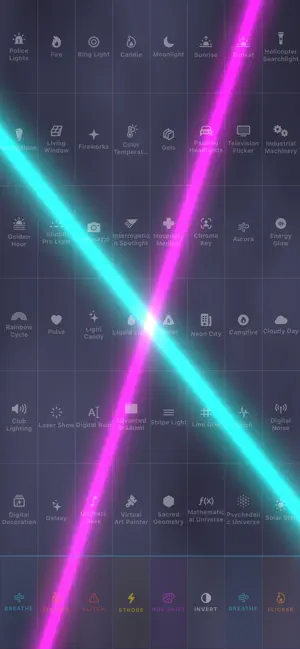


About Light Kit Pro
Light Kit Pro turns your iPhone and iPad into powerful cinematic light sources. Featuring 65+ customizable lighting effects, multi-device sync, and a universal controller, Light Kit Pro expands your lighting setup with advanced wireless control and mobile virtual production in 3D and 360. Connect and control other devices running Light Kit Pro to create the ultimate light kit. You control the light. Light Kit Pro is for filmmakers, cinematographers, content creators, virtual production artists, streamers, photographers, and anyone who wants to creatively use screens for lighting and 3D/360 virtual production. FREE version includes (15 FREE EFFECTS) with advanced clean screen-mirroring output. (Film Slate Included) PRO version unlocks all of the lighting effects and tools with (65+ EFFECTS & Tools), Light Link (Multi-Device Sync), Light Stream (Multi-Device Streaming), Lightboard (Light Performance) and 3D/360 Virtual Production (3D Scene Light / HDRI Light) Subscriptions and Lifetime Unlock are run through Apple — manage in Settings anytime. Key Features • Turn your screens into professional lighting instruments • Multi-device lighting sync and control • Universal Controller across all connected devices • Mobile Virtual Production with 3D and HDRI environments • Wireless Light Streaming to non-iOS devices • LightBoard performance trigger pad • Cinematic Camera Recorder and Screen Recorder • 65+ Professional Lighting Effects & Tools • dynamic film slate Virtual Production: (PRO Feature) Virtual Production via 3D scenes and 360 HDRI image viewports gives users a lightweight wireless virtual production solution. These 3D/360 active viewports enable users to quickly load in 3D backgrounds/models and HDRI environments onto their device and mirror them to large screen LED TVs, LED walls, projectors, and other devices. Additional Light Kit Pro devices can be used to quickly match lighting to virtual backgrounds — all wirelessly. Supported 3D Formats: USDZ, USD, USDA, USDC, GLB, GLTF, OBJ, STL, PLY, DAE Supported HDRI (360 Image Formats): EXR, HDR, then JPEG, PNG, HEIC, TIFF, BMP Universal Controller: Light Kit Pro for iOS features the Universal Controller system. With this controller, you have full control over your entire light kit and, once connected to other devices, you can use the controller on any of your devices to control the other devices connected to the light kit. Lighting effects can be customized, saved as presets, and shared with other Light Kit users. Light Link: (PRO Feature) Light Link connects your iOS lighting devices together through advanced networking. Control devices independently or in sync. Light Link supports Wi-Fi or Bluetooth depending on your needs. Light Stream: (PRO Feature) Light Stream broadcasts lighting effects from your main host device, allowing you to multiply lighting across multiple screens by scanning a QR code or joining via URL in a web browser. LightBoard: (PRO Feature) LightBoard is a video trigger pad that enables you to perform with light by triggering various lighting effects at the touch of your fingertips. More in the Kit: • Cinematic Camera Recorder • Screen Recorder • Pro Flashlight • Screen Mirroring • Digital Film Slate • Presets & Clips • Patterns & Stylized Effects Cinematic Camera Recorder — PiP record with front or rear camera while your light fills the shot. Screen Recorder — Capture the full screen—effects, UI, and output—for shares and approvals. Pro Flashlight — LED on-set light with real controls, not the stock flashlight toggle. Screen Mirroring — Mirror to Apple TV, monitors, or projectors so crew sees your exact plate. Digital Film Slate — On-screen slate with scene/take metadata for sync with external audio or video. Presets & Clips — Save looks as presets and a clip library—repeat setups in one tap. Patterns & Stylized Effects — Cinematic, ambient, and creative looks—color, motion, and patterned light. JTVizion · www.vizionline.tv/light-kit-pro
What’s new
Version 1.0.2 · Updated April 2, 2026
Sign-in flow — Improved so you’re asked to sign in with Apple less often at launch, with a clearer path after setup. Offer codes — Easier to find and use and made more accessible. Help & messaging — New billing / account help and clearer notes for when Apple may ask for your Apple ID.
App privacy
The developer, JTVizion LLC, reported these privacy practices to Apple.
Data Not Linked to You
The following data, which may be collected but is not linked to your identity, may be used for the following purposes:
- Diagnostics: Crash Data, Other Diagnostic Data
Used for: App Functionality
Alternatives to Light Kit Pro
Looking for apps like Light Kit Pro? Here are 6 similar apps on the App Store. The highest rated is ObiPhone (5.0/5), and 5 of the 6 are free to download.
-
 ObiPhone
5.0
-
 Chromaform
-
 J.W. Lee Media Homes
-
 Light Spirit
-
 Sweet Mountain Media
-
 Lumenicer · Video Light Panel
5.0
| App | Rating | Price | Last updated | Compare |
|---|---|---|---|---|
| Light Kit Pro | 5.0 / 5 (1 rating) | Free | April 2, 2026 | |
| ObiPhone | 5.0 / 5 (1) | 1.99 USD | Oct 13, 2026 | Compare |
| Chromaform | – | Free | Jun 30, 2026 | Compare |
| J.W. Lee Media Homes | – | Free | May 5, 2026 | Compare |
| Light Spirit | – | Free | Mar 9, 2026 | Compare |
| Sweet Mountain Media | – | Free | Apr 22, 2026 | Compare |
| Lumenicer · Video Light Panel | 5.0 / 5 (1) | Free | Oct 14, 2026 | Compare |
Compare Light Kit Pro with the top alternatives: ratings, updates, ASO score and keyword gaps →