

mDone
Marcus Williams Productivity iPhoneiPadiPod touchMac
mDone is a free Productivity app for iPhone and iPad by Marcus Williams. Rated 5.0/5 from 7 ratings. Requires iOS 18.0. Updated October 23, 2026.
- Rating
- 5.0
- 7 ratings
- Price
- Free
- on the App Store
- Size
- 4 MB
- Age 4+
- Updated
- Oct 23
- 2026 · v1.21.0
Screenshots

About mDone
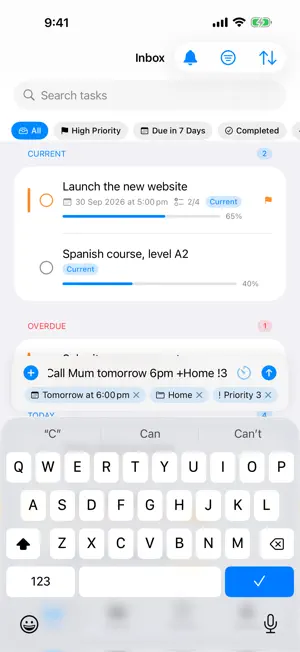
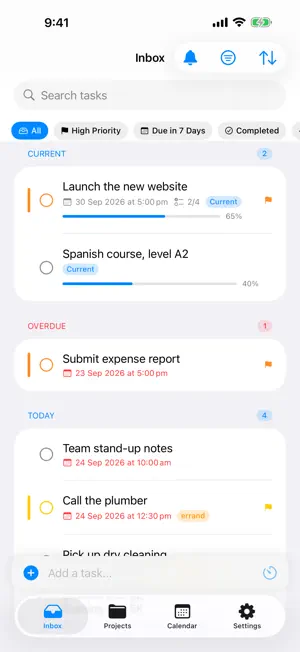
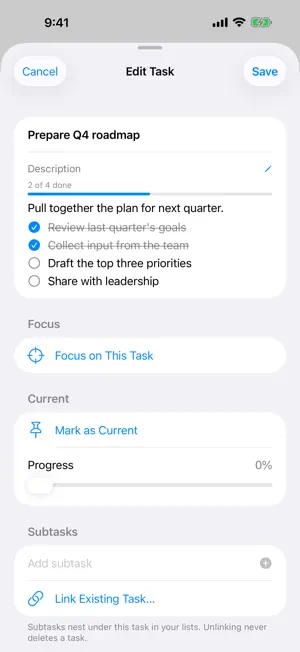
Take control of your tasks with mDone, a native task manager for iPhone, iPad and Mac, built for your self-hosted Vikunja server. If you run your own Vikunja instance and want a polished, native way to manage your tasks, mDone is made for you: a thoughtful, focused interface for your self-hosted productivity setup. KEY FEATURES Quick Add That Understands You Type "Buy milk tomorrow at 5pm +Home !2 *shopping" and mDone files it in the right project, with the due date, priority and label already set. Everything it picks up shows as a chip before you add the task, so nothing happens by surprise. Switch it on in Settings. Smart Lists Stay on top of what matters. Today, Upcoming and Overdue views organise your tasks, so you always know what to focus on next. Current Tasks Keep long-running work top of mind. Mark a task as Current and it stays pinned above Today, with a progress bar you can update and a gentle nudge when it has sat untouched for too long. Kanban Boards Open any project as a board. Drag cards between columns and reorder them, exactly as they appear in Vikunja's web app. Subtasks, Checklists and Labels Break big tasks into subtasks, link related tasks, tick off checklists written in a task's description, and add or create labels without leaving the app. Projects and Favorites Organise tasks into projects and sub-projects, sort them by date, priority or your own manual order, and keep the ones you use most one tap away. Siri, Hands-Free Say "Add a task in mDone" and Siri adds it without opening the app. Works over CarPlay, on AirPods and on Apple Watch. Home Screen and Lock Screen Widgets See your tasks at a glance: today's agenda, what is coming up, and anything overdue. Focus Timer with Live Activities Work through a task with purpose. Live Activities keep the timer on your Lock Screen and in the Dynamic Island. Repeating Tasks Daily, weekly, monthly or custom intervals. Completing a repeating task schedules its next occurrence. Calendar View See your tasks across days and weeks alongside your calendar events. Spot the gaps and plan ahead. Offline Support mDone caches your tasks so you can keep working without a connection. Changes sync back to your server when you are online again. Privacy First Zero analytics, zero tracking, zero third-party SDKs. mDone talks only to your Vikunja server, and your data stays entirely under your control. Available in English and Simplified Chinese. REQUIREMENTS - A self-hosted Vikunja server (vikunja.io) - An account on that server mDone is open source. Visit the GitHub repository to report issues, request features, or contribute.
Ratings & reviews
5.0
7 ratings
What’s new
Version 1.21.0 · Updated October 23, 2026
Assign tasks to the people you share projects with. - New Team features, off by default. Turn them on in Settings > Teams if you share Vikunja projects with other people: tasks show who they are assigned to, you can assign people when adding a task or from its details, and the advanced filter adds Assigned to me. - Completing, rescheduling or editing a task no longer removes its assignees in Vikunja.
App privacy
The developer, Marcus Williams, reported these privacy practices to Apple.
Data Not Collected
The developer does not collect any data from this app.
Alternatives to mDone
Looking for apps like mDone? Here are 6 similar apps on the App Store. The highest rated is Kuna (5.0/5), and all 6 are free to download.
-
 Kuna
5.0
Kuna
5.0
-
 TaskView: ToDo List & Tasks
-
 TaskForge - Obsidian Tasks
4.7
TaskForge - Obsidian Tasks
4.7
-
 GitSync.
4.2
GitSync.
4.2
-
 AFFiNE: Notes, Whiteboard AI
4.3
AFFiNE: Notes, Whiteboard AI
4.3
-
 Joplin
4.1
Joplin
4.1
| App | Rating | Price | Last updated | Compare |
|---|---|---|---|---|
| mDone | 5.0 / 5 (7 ratings) | Free | October 23, 2026 | |
| Kuna | 5.0 / 5 (1) | Free | Sep 28, 2025 | Compare |
| TaskView: ToDo List & Tasks | – | Free | Jul 31, 2026 | Compare |
| TaskForge - Obsidian Tasks | 4.7 / 5 (109) | Free | Oct 12, 2026 | Compare |
| GitSync. | 4.2 / 5 (30) | Free | Sep 12, 2026 | Compare |
| AFFiNE: Notes, Whiteboard AI | 4.3 / 5 (36) | Free | Jul 30, 2026 | Compare |
| Joplin | 4.1 / 5 (479) | Free | Sep 25, 2026 | Compare |
Compare mDone with the top alternatives: ratings, updates, ASO score and keyword gaps →